Plex Pass does not provide any more access to support.
I remember now trying to help with this issue, and am disappointed to discover there wasn’t a fix found. Sometimes Plex developers pop in and provide much more detailed support.
I’m a bit surprised to see that none helped you in that other post. Perhaps if we poke @BigWheel maybe we can call attention to it and find a solution.
I’ve run into this problem with MP4 files that have embedded cover art. Never did come up with a good diagnosis or resolution. Here’s the thread: PMS not using embedded Cover Arts. Not sure if MKVs are also affected. I do not have MKVs with embedded artwork.
A further complication is that Plex sometimes cannot provide cover art due to legal reasons. See this post: Once Upon a Time in the West metadata - #4 by dane22. This applies to all media, irrespective of file type (MP4, MKV, etc).
A Plex Pass makes no difference.
Options / Workarounds
Configure Plex to not look for embedded metadata.
This applies only to MP4 files. Plex does not read embedded metadata from other containers.
This affects all MP4 files in the library and applies to all embedded metadata, not just artwork. Edit the Library → Advanced → deselect Prefer local metadata.
Manually select cover art.
Edit the movie (pencil icon) and manually choose a poster.
Embedded cover art should be displayed.
Online cover art will not be displayed if restricted due to take down notices.
Remove the embedded cover art from the MP4 container, then refresh metadata.
Plex will retrieve cover art, if available, from online sources.
I keep on hoping update after update that embedded mp4 metadata will start being picked up according to the set preferences, but I’m not seeing it.
It’s sad, because I have a pretty good app to collect and add the metadata to the files. I’t s also the only practical option for personal content (e.g. home movies etc.), but PMS refuses to use it.
As a workaround, I tend to edit the metadata manually after importing to correct errors or fill in the blanks when needed, but it’s necessary work IMVHO.
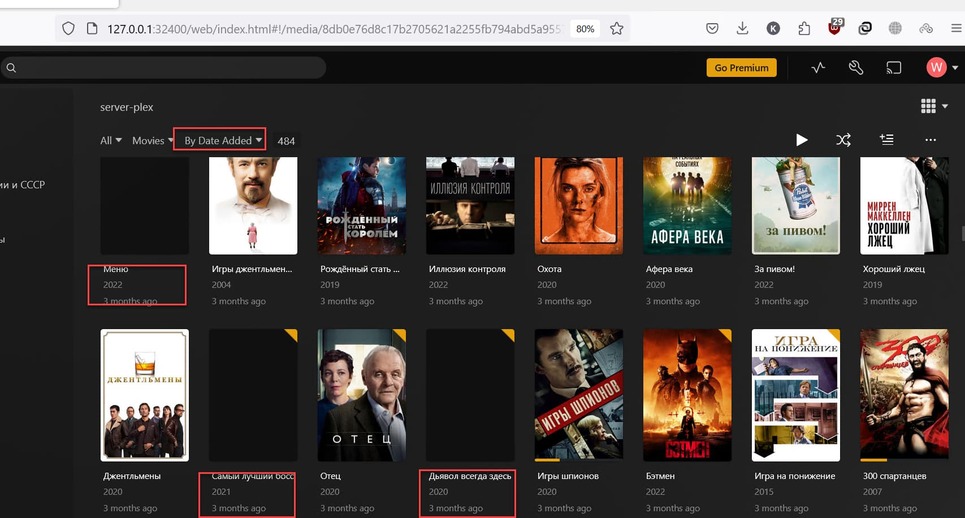
I have pretty much lost all my posters MP4 & MKV and it is getting aggravating. Noone responds to posts about it. You think someone could mention it to whoever does the updates
I’m facing this issue with MKV files at most. I guess I have no MP4 files at all.
So if Plex Pass does nothing, forum posts do nothing, what or who will do something?
This bug is reported but not accepted or what? Any feedback? logs request? Bug tracker list number? anything?!
I cannot see the video or log files. The place they are posted says “There is a typo in the link, or the owner has deleted the files or blocked access to them.”
Which agent & scanner are you using (edit library → advanced to check)?
It should be Plex Movie for both, not “Plex Movie Scanner,” “Plex Movie (Legacy),” or any other choice.
Check that Use Local Assets is enabled at the library level. The option in Setting → Agents does not apply when using the Plex Movie agents/scanner.
Place movies in their own folder, along with the cover art.
Then re-scan and refresh metadata.
Here’s an example from my system. Plex had to delete cover art for The Dirty Dozen due to a take down claim. I added two pictures to the movie folder. Plex defaults to the first (-1.jpg) picture. I can choose either as cover art.
wait a minute - what will Plex do in such case? I suppose Plex to be my librarian not me. If I have to make a separate folder for each Movie, search for posters, name it correctly and do all this stuff, it is easier to catalog Movies just with fileshare.
it’s a process for the process.
I’m not sure why posters are not showing. I’m going to ping a Plex employee and ask them to look at the log files.
Also, please turn off verbose logging. It adds too much info to the log files. You’ll need to restart Plex. It is not documented, but a Plex must be restarted when lowering log levels.
With the Plex Movie agent/scanner, Plex pulls metadata, posters, etc. from several sites, then pools it together and stores it on hosts at plex.tv. Plex Movie Server then pulls the info from plex.tv hosts. It never communicates directly with TMDB or other such sites.
I was told by folks on our metadata team that we will eventually host them but currently images from TMDB are actually still served by them so it does look like the TMDB blocking Russia is the cause.