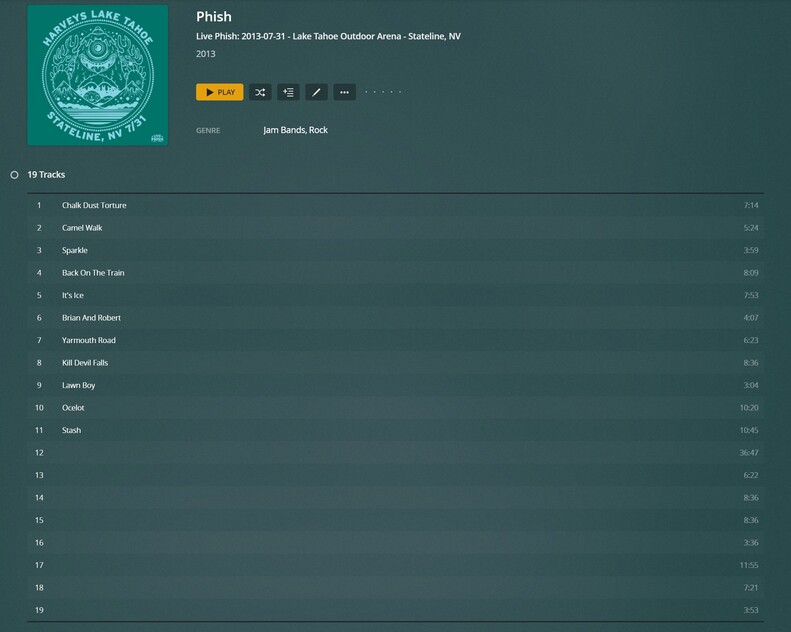
I have a sizable number of files that aren’t going to be found in any of your precious metadata agents.
I have tried all of the suggestions here and in other threads, but all it takes is one library scan or metadata refresh for everything to fall to pieces again and I’m beyond tired of it.
Someone on the Plex dev team needs to figure out how to make the software work SEAMLESSLY with iTunes/Music.app. I’m not about to abandon the Apple software or retag/rename/move around 180,000 files just because Plex can’t read a friggin ID3 tag properly.
I’ve just had another bunch of songs “disappear” into some random unrelated artist’s discography after a scan, and I’m absolutely not happy thinking about the amount of work it’s going to require to fix this YET AGAIN.
Agreed. Looking for suggestions for another Plex-type application to manage my music collection. Beyond frustrated. Tried Emby/Jellyfin and these aren’t much better.
I’m new to Plex and just noticed a bunch of my song titles disappearing. So uh, this is an on-going issue then? This kinda deflates my enthusiasm for the platform. I don’t know if I want to bother investing any further time into this if I’m just going to be playing whack-a-mole every few days to fix metadata. I guess I’m glad I just signed up for the monthly Plexpass instead of doing a whole year.
Hmm. It looks like it’s also randomly undoing other metadata edits that I spent a decent amount of time on. I realize I might be a bit more OCD than others when it comes to this stuff, but what the hell?
Same issue here. I upgraded to the latest 1.22.0.1421 and issue still happens. I tried changing the Scanner settings, editing metadata using mp3tag, locking/unlocking fields but certain titles refuse to stay inputted if anything in the library changes. I’ve been trying to troubleshoot a common thread, but found nothing. In the metadata, some of my songs have the title blank and other are fully filled in with artist and album. I haven’t been able to find a common thread to those that work and those that don’t
Same issue here. Whenever a new song is added to the library, after scanning is complete all tracks lose the title and alike fields. Now if someone has like 10 songs, fine they can update. For anyone like me who has quite a few thousand tracks in the library, oh boy!! not a fun time getting them back one by one.
@PLEX, this is going for more than 11 months, please fix this before the community switch to alternatives.
I completely emptied the library (for the 4th time since starting to use Plex Music a month ago) and added all my music again from scratch. Everything is tagged correctly using MP3Tag, with every track having a non-empty title, artist (and album artist as it seems Plex can’t cope without it) and album tags. The latest import has about half of the Artist tags missing. Refresh Metadata does nothing to fix it when run for the affected Album, Artist or Track(s). The only thing that seems to have any effect is doing the Plex Dance for each affected album. I’m not going to do that 500 times to fix all of the broken tags!
I know bug fixing isn’t sexy, but it’s an important part of selling a commercial product.
*** UPDATE ***
A lot of my metadata issues appear to be related to the iTunes “Compilation” flag, which groups albums into a single “Compilations” folder. Perhaps @Plex could extend support to include this tag, as well as making the “Various Artists” value configurable?
As others have noted, turning on “Prefer local metadata” definitely helps. I also turned on the “Include music libraries in automatic updates” setting in the Library section, along with partial scanning. Despite the warning (Linux inotify limit?), I found related info on this here: Linux, inotify, and CIFS... Oh My!. It’s possible to increase the amount of inotify watches using the guide here: https://unix.stackexchange.com/questions/13751/kernel-inotify-watch-limit-reached
With these settings both turned on I can edit the comment tag for the broken albums/tracks and the files will automatically refresh metadata just as they do in Movies/TV sections.
Go to your music library advanced section and check “Prefer local metadata” as others have stated.
THEN,
Move the folder affected by the absent titles outside of your main music library hierarchy. I chose my desktop. Scan library files and watch the folder disappear from your Plex Media Server (PMS). Now, add the folder to its’ original location. Scan the library and hopefully PMS will grant your music files with titles once more.
****Edit
If I add a new track to the folder and have PMS scan the library file, it will render all track names blank. I did the steps listed above to bring the titles back. A bit of a pain but a small step to have titles until the wonderful dev’s fix this issue.
Just adding my experience here - I have a few albums that can’t be matched in the Plex music database, but it was fine because the native ID3 metadata in the media files worked fine. Not sure what triggered the issue, but now I am randomly coming across albums that have been in my library for months that previously had song titles that no longer have song titles. Huh.
I can fix this on a case by case basis as I notice the issue by clicking REFRESH ALL METADATA for the affected album in the Plex admin account, but I mostly listen to my music in Plexamp using a Home User account. If anyone in family had this issue, they definitely wouldn’t be able to fix this. Would love to know if there is a trigger for this and how to fix it.
I too have track titles disappearing in my music library.
And it’s happening all over the place, from unknown artists/albums whose metadata I had to add manually to Michael Jackson’s Thriller, which I believe is a rather well known album, despite all the dudes doings.
I’m running version 1.21.4.4054 at the moment, on a Synology DS218play.
The library is set to “Agent: Plex Music” and to prefer local metadata.
There are 45320 tracks in there right now, mostly in FLAC format and very properly tagged.
I’m adding music regularly, so the library gets scanned often, which as I understand might be related to the problem.
Using “Refresh metadata” on an album with missing title info does fix it for that album at that moment.
Struggling with this issue too, just want to keep this thread alive. I have a lifetime pass but I’m about to give up plex for good anyway.
I opened up the playlist I maintain of my favorite new tracks and I noticed that probably 25% or more just showed a blank in the song title. Most of them are fixed by a manual refresh but it is super tedious (especially with singles). But the same techniques that fix some just simply do not work at all. The “Plex dance” (aka move offending files to a different folder that is not indexed by plex, delete from library, re-add to folder, let plex re-scan) usually works but then you lose all your play history and have to re-add anything to playlists so most of my playlists have been depleted at least a little and that is a hassle to fix.
I add new just to my music library at least a couple times per week and I probably spend at least 3-4 hours per WEEK, every week, fixing these errors, and I’m crazy meticulous about making sure tags are perfect before putting anything in a library folder. It feels like my most time-consuming household chore. We find errors so often it has become a joke/meme with my partner, “Oh just Plex things” “That’s so Plex” “Just Plex being Plex”
It has gotten to the point that I actually get angry and I don’t like feeling that way about a simple app that is supposed make my life better by making my access to music easier. I’ve re-installed emby, but it was not fully-featured enough last time I tried it out a few years ago. We’ll see if it sticks this time.
I have folder of music with all of the mp3 metadata tags filled out properly and a cover and poster.jpg. The artwork appears and associates with the correct artist but ALL of the songs have no title…
Seems like this issue has been going on for years? I guess the next option is try using the legacy Music scanner… Kind of sucks though…
Just to stick my head in. Recently moved my Plex server to a newer computer - copied the whole data directory over the network to the new computer (tried zipping it first, but after 2.2 million files, Winrar crapped out - I thought it had gotten to the end of the “counting” phase and crashed (after FIVE HOURS) when it started zipping, imagine my chagrin when I decided to just copy the directory file by file and it turns out I had over 4.5 MILLION files.) Well after the 25 hours it took to copy everything and after getting the server set up and working on the new computer - it turns out I now have over 29000 files with no titles. That’s about 24% of my total number of music tracks.
Never had this problem before and I see I can manually go and REFRESH metadata on each individual album (and ExportTools is helpful to find the albums with the N/A tracks - since going into Plex itself and sorting by title HILARIOUSLY sorts the BLANK titles where they WOULD BE if they weren’t blank, thus not keeping all the blanks together. So Plex KNOWS the title, but won’t let us see it?) but that will take hours and hours.
So now I’m running a REFRESH METADATA on my whole music library. I feel like it’s not working, but we’ll see in 5-24 hours or however long it takes.
There SHOULD be a better way Plex - a… what’s the word? FIX for this problem?
Don’t get me wrong, I’ve had a PlexPass for years and mostly love Plex, but this is quite annoying and frustrating - especially after seeing seeming indifference from Plex about this issue that has affected many of us.
HAHA. Here’s an update…
I wanted to check how it was doing, so I guess about a half-hour into the REFRESH METADATA scan of the entire music library I ran another Export. So now instead of 29000 files with no titles, I have 34092. So I made MORE tedious work for myself?
A lot of my track names are randomly missing. They were once there and now they are gone. Is there a fix for this without manually naming thousands of tracks?
I have found that refreshing the metadata (i.e. click the three dots and select Refresh Metadata) fixes these issues for me.
Usually I will then select the tracks (if there is a lot I do it via selecting the first one then clicking shift to the end or just click the circle beside the top level “# Tracks”), select edit, then click the lock icon beside the title input and save the changes.