Most of my time in plex is spent with a huge, multi-week long playlist called “working backgrounds.” It’s all TV episodes I’ve seen many times and am used to, so I leave it on shuffle while I’m working for comfort. Sort of a linear TV channel but stuff I don’t have to worry about missing.
It’s kind of a nightmare to manage that playlist, though. Two things would make it easier:
- Let me filter by show/season or sort the view of it so I can find the one bad episode I want to kick out or adjust.
- Let me set the playlist to automatically remove watched items to keep it from being stale.
Use a Smart Playlist.
Add all the shows to a collection, named e.g. ‘backgrounds’
I assume that you don’t put stars on your tv show episodes, right? So all episodes have currently zero stars on them.
Now put one star onto those eps which you don’t want to see.
Now go into your TV shows library,
set it to view mode ‘Episodes’
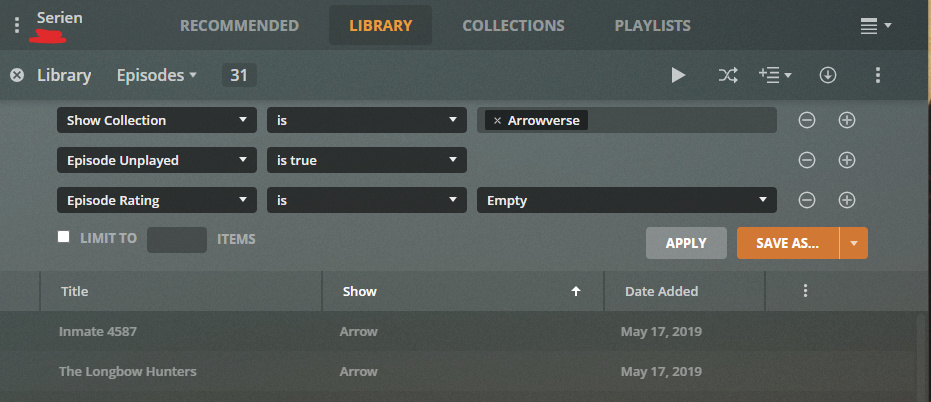
call up the Custom Filters and create a filter like the below
(instead of ‘Arrowverse’ use your own collection name ‘backgrounds’)
Save As… and give it a name
Then go on and shuffle this playlist.
You’ll have to re-set the ‘watched’ status of the contained shows to ‘Unwatched’ from time to time.
Otherwise your smart playlist will become shorter and shorter as you watch it, due to the condition Episode unplayed = True.
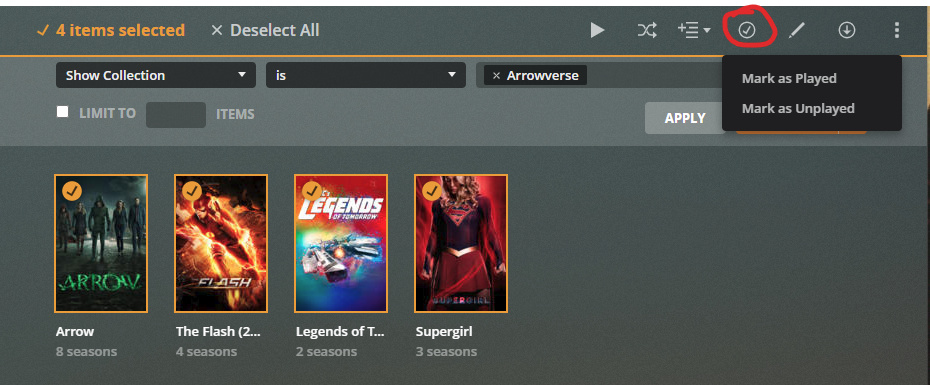
Resetting ‘watched’ state can be done quickly, again by using the Collection Custom Filter. But this time, the view mode of the library must be ‘Shows’.
Just filter the view to only shows which are a member of your ‘backgrounds’ collection.
Then hold down the ‘Shift’ key and click on the first poster.
Keep holding the shift key and click on the last poster.
Now all shows are ‘selected’ and can be marked as ‘unplayed’ at once.
I had no idea you could do this.
But I did lose some time considering that the “save as” button only appears when using app.plex.tv, not when connected directly to my server.