Only sometimes everything works and I can stream with no problem,
but usually the server says “Signed into Plex, but is not reachable from outside your network”.
I didn’t change any settings in the meanwhile (including disabling anti-virus e.g).
This issue has come out of nowhere (or at least, so it seems).
Securede connections is set to prefered.
I don’t use port forwarding (if I do use this it still doesn’t work), proxy or VPN.
My home network is set to private.
Plex is set up correctly in the firewall.
It doesn’t matter if I use a static IP or not.
It doesn’t matter if I use a UPNP or not.
I got my server on my home pc, connected wired to the router.
If I stream, I stream to my Fire TV stick which is connected via Wi-Fi on the same network.
Server Version#: 1.25.2.5319-c43dc0277
Player Version#: 4.66.1
Let’s try to go with a stable approach first to understand what’s causing your problems.
Assign a static local IP address to your server (IP reservation in your router configuration)
Disable UPnP and configure a manual port forward; make sure to adjust the Plex remote access configuration with the public port specified in the port forward.
Basic/generic check: does your router get a publicly routable IPv4 address from your ISP (e.g. not only an IPv6 address or a private network IP)?
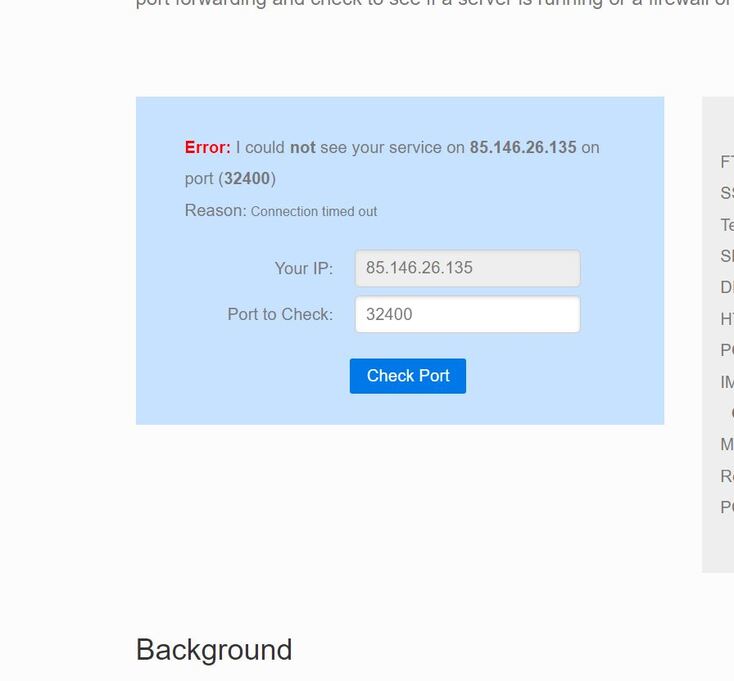
check if the router is visible/accessible using its public IP and the specified public TCP port (e.g. using a service like canyouseeme.org)
if you can see your router, this implies the issue is between the router and your Plex Media Server (including both endpoints)
if you cannot see the router, this implies the issue is between “the internet” / your ISP and your router (including both endpoints)
I tried fixing it with the plex support troubleshooting pages.
Step 1: I found “bind IP to MAC”, no “IP reservation” so i did that.
Step 2: UPNP disabled.
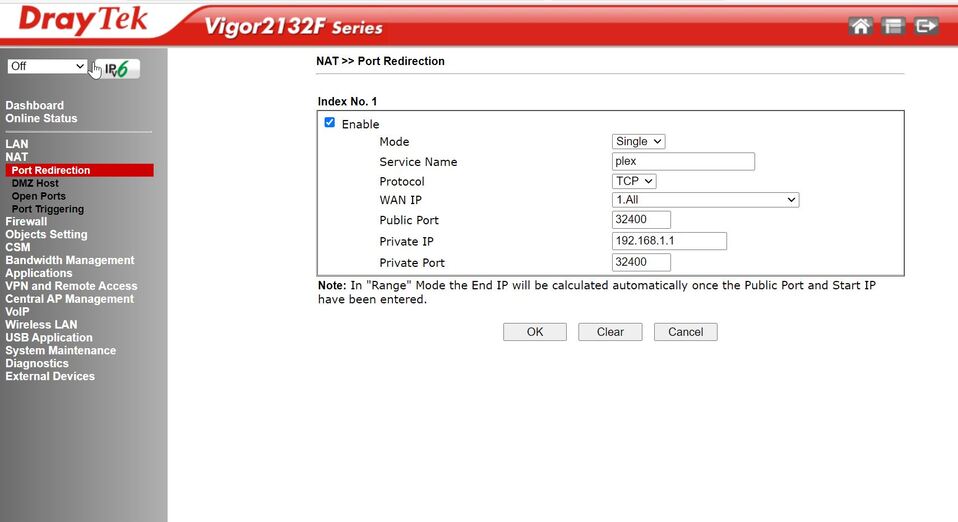
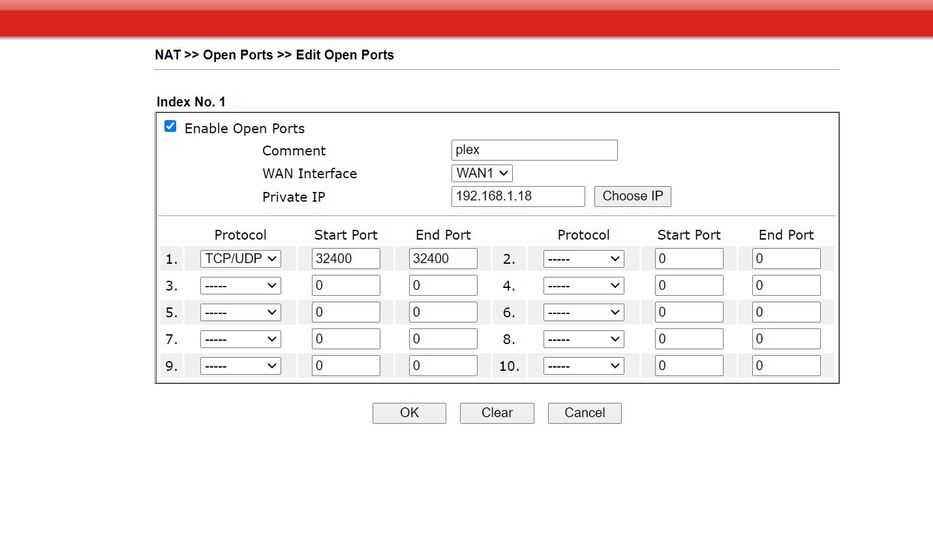
I setted up Port redirection under NAT (as this is the only option for forwarding I see).
Step 3: I have no idea how to check this
Step 4: It gives an error.
Looks like that’s the correct place for this configuration.
I’m just wondering if your PMS server’s private IP is actually 192.168.1.1 – the xxx.xxx.xxx.1 address is usually reserved for the network controller / router.
Regarding #3:
Plex is listing what it determines to be your home network’s public IP in the remote access settings. Settings > [Server Name] > Remote Access
e.g.
Private 192.168.1.1 : 32400 <- Public xxx.xxx.xxx.xxx : 32400 <- Internet
Where xxx.xxx.xxx.xxx is supposed to be your public IP address.
Usually the router will an option to display its public IP. I suppose the WAN IP dropdown from your screenshot will list those next to the selected 1. All option.
Regarding #4
Unless this is due to some typo about the private IP of your port forward (see #2)… can you try configuring a different public port to rule out your ISP is filtering that port in particular?
Edit: The remote acces page still says not reachable from outside the network, but now suddenly the App on the Fire TV has no problem finding the server.
Possibly solved, but will keep this open for now in case this is one of those times it suddenly works.