Server Version#:1.26.2
Player Version#:4.76.1
My QNAP TS-253A is connected to 4 Orico external HDD enclosures via the usb ports. I have 20 external HDDs in total attached this way to the NAS.
Everything worked fine for almost 2 years under covid. Until recently. And I dont know what changed. I have the QNAP set to auto power down and power up everyday during the wee hours of the morning. Upon powering up, the Plex Media server no longer know where the originally scanned media files are. AT the QNAP level, using Storeage & Snapshots, I can see that the device number assignments DO NOT CHANGE after every reboot or powerup.
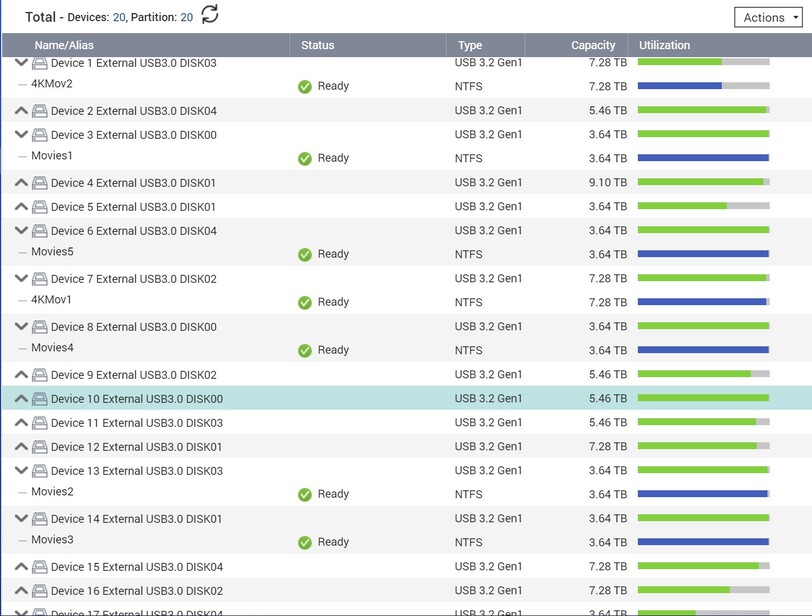
Above is how i know that as far as NAS is concerned, the ext hdds are mapped and do not change assigned device nos with every reboot…
However, in the plex media browser, the folders pointed to have moved! Furthermore, unlike before, the device designations show up as DEV3307_2 and so forth instead of the HDD names I have assigned them (and which shows up properly under Storage and Snapshots). Before, the hdd names I have assigned appear within the media browser, but now its all DEV####. And the DEV### locations change with every reboot. So the scanned libraries show “NOT AVAILABLE” due to this mysterious musical chairs that is going on.

Above is capture of what ext hdd assignments look like via the Plex Media browser when assigning content to a designated library folder. So that is supposed to consolidated all my movies across the 20 HDDs into one folder called… Movies.
Help? There doesnt seem much on google about this issue.
