Is there any way to split games? Plex keeps combining Dragon Warrior 1 through 4. Each ROM is properly named but Plex just won’t see them as separate games.
Here are the filenames with full path:
- P:\Games\ROMs\Nes\Dragon Warrior (1986).nes
- P:\Games\ROMs\Nes\Dragon Warrior 2 (1987).nes
- P:\Games\ROMs\Nes\Dragon Warrior 3 (1988).nes
- P:\Games\ROMs\Nes\Dragon Warrior 4 (1990).nes
Have you tried putting them in their own folders? ie * P:\Games\ROMs\Nes\Dragon Warrior (1986)\Dragon Warrior (1986).nes
Yes, and now I have two entries: Dragon Quest and Dragon Quest II.
Get Info on Dragon Quest II reveals:
Files
Delete Files
P:\Games\ROMs\Nes\Dragon Warrior 2 (1987)\Dragon Warrior 2 (1987).nes
Media
Title Dragon Warrior 2 (1987).nes
Part
File Dragon Warrior 2 (1987).nes
Size 256.02 KB
Get Info on Dragon Quest shows:
P:\Games\ROMs\Nes\Dragon Warrior 3 (1988)\Dragon Warrior 3 (1988).nes
Delete Files
P:\Games\ROMs\Nes\Dragon Warrior 4 (1990)\Dragon Warrior 4 (1990).nes
Media
Title DragonWarrior3.nes
Part
File Dragon Warrior 3 (1988).nes
Size 512.02 KB
Media
Title DragonWarrior4.nes
Part
File Dragon Warrior 4 (1990).nes
Size 1.00 MB
Dragon Warrior is gone completely.
If you rename them I, II, III, IV that should fix them, we think it’s the roman numerals causing the mistaken shared identity.
I’ll give it a shot. Is there any reason why there is no option to split these as you can with movies?
Merged is when plex thinks they are duplicates, two copies of the same thing. the poster will be badged with number of copies and will have an option to “play version”. Merged duplicates can be split
Multipart is when you add the part numbers Plex thinks they are the different parts continued to a different file like chapters in a book. Multi-part cannot be split in any library type, naming needs to be corrected to avoid it. though usually the year in title is enough of a difference so that is new to me.
I see no option to split them. I changed the file names and then did a full scan, same thing. Dragon Warrior is gone and Dragon Quest and Dragon Quest II are the only entries
Get Info for Dragon Quest:
Files
Delete Files
P:\Games\ROMs\Nes\Dragon Warrior III (1988)\Dragon Warrior III (1988).nes
Delete Files
P:\Games\ROMs\Nes\Dragon Warrior IV (1990)\Dragon Warrior IV (1990).nes
Media
Title DragonWarrior3.nes
Part
File Dragon Warrior III (1988).nes
Size 512.02 KB
Media
Title DragonWarrior4.nes
Part
File Dragon Warrior IV (1990).nes
Size 1.00 MB
Get Info for Dragon Quest II
Files
Delete Files
P:\Games\ROMs\Nes\Dragon Warrior II (1987)\Dragon Warrior II (1987).nes
Media
Title Dragon Warrior II (1987).nes
Part
File Dragon Warrior II (1987).nes
Size 256.02 KB
I see no option anywhere to split these, I don’t want them merged. There is no badge.
they do not seem to be “merged” as duplicates is what I was saying, they are being treated like a “multipart file” if i understand your description. splitting multipart is not an option in any library type.
I am trying to recreate the issue but for some reason is keeps coming up as Dragon Quest is that the same game named differently for another region?
You’re right, it keeps coming up as Dragon Quest. This was the Japanese name for the game, it was changed to Dragon Warrior for the USA release due to the lack of popularity of RPGs, “Warrior” gave it more of a fight name. I’m going to try renaming them to Dragon Quest, but honestly this is ridiculous.
Okay some progress. Renaming them to Dragon Quest allowed for 1, 2, and 3 to appear, but 3 still has 3 and 4. Here is the Get Info for Dragon Quest 3:
Files
Delete Files
P:\Games\ROMs\Nes\Dragon Quest III (1988)\Dragon Quest III (1988).nes
Delete Files
P:\Games\ROMs\Nes\Dragon Quest IV (1990)\Dragon Quest IV (1990).nes
Media
Title DragonWarrior3.nes
Part
File Dragon Quest III (1988).nes
Size 512.02 KB
Media
Title DragonWarrior4.nes
Part
File Dragon Quest IV (1990).nes
Size 1.00 MB
I don’t understand where it’s getting the “Title” value either. I know this is a mess, but here is the XML:
<MediaContainer size="1" allowSync="1" identifier="com.plexapp.plugins.library" librarySectionID="10" librarySectionTitle="Games" librarySectionUUID="2c2ad19c-a126-4b08-a20d-0625487df8b8" mediaTagPrefix="/system/bundle/media/flags/" mediaTagVersion="1621964790">

<Game ratingKey="220958" key="/library/metadata/220958" guid="plex://game/5fbe6923dcef38a0f85732a7" studio="Chunsoft" type="game" title="Dragon Quest III: The Seeds of Salvation" librarySectionTitle="Games" librarySectionID="10" librarySectionKey="/library/sections/10" contentRating="T" summary="Dragon Quest III is noted for greatly expanding upon the original Dragon Warrior and Dragon Warrior II. The game uses basic console role-playing game conventions, such as leveling up by gaining experience points and equipping items. Battle is turn-based like the other games in the series. Dragon Warrior III features a class system, in which each character has a certain class. While the Hero always keeps the Hero class, the other characters can choose among the following: Soldier (Warrior in the GBC version), Fighter, Pilgrim (Cleric), Wizard (Mage), Merchant (Dealer), Goof-Off (Jester), Sage, and Thief which was available only in the later versions. The choice of class greatly affects the character's stats and spells he or she can learn. Furthermore, upon reaching experience Level 20, a character has the option of changing classes at the temple of Dhama, found halfway through the game. The game starts with just the Hero in the party, who then is able to recruit a party of three at the local tavern. Unlike most Dragon Quest parties, aside from the Hero, the party is not made up of characters involved in the story. Although only four characters can be in the party at a time, extra members of the party can be kept at the tavern, allowing room for new recruits. Another innovation is an arena where the player can place bets on the outcome of monster battles. The remakes incorporated some interface changes from later games in the series, such as simplified door opening; the bag, which replaced bank item storage; the item sorting "Tidy Item" and "Tidy Bag" commands; and the "Full HP" command, which can be used outside of combat to automate the process of casting healing and status restoring spells. While the earlier Dragon Quest games were also non-linear, Dragon Quest III was the most substantial example of open-world gameplay among the early Dragon Quest games. It also allowed the player to swap characters in and out of the party at will, and another "major innovation was the introduction of day/night cycles; certain items, characters, and quests are only accessible at certain times of day."" index="1" audienceRating="4.4" year="1988" thumb="/library/metadata/220958/thumb/1622148604" art="/library/metadata/220958/art/1622148604" originallyAvailableAt="1988-02-10" addedAt="1621967762" updatedAt="1622148604" audienceRatingImage="igdb://image.rating">

<Media id="245918" title="DragonWarrior3.nes">

<Part accessible="1" exists="1" id="280469" key="/library/parts/280469/870742002/file.nes" file="P:\Games\ROMs\Nes\Dragon Quest III (1988)\Dragon Quest III (1988).nes" size="524304"/>

</Media>

<Media id="245919" title="DragonWarrior4.nes">

<Part accessible="1" exists="1" id="280468" key="/library/parts/280468/874983328/file.nes" file="P:\Games\ROMs\Nes\Dragon Quest IV (1990)\Dragon Quest IV (1990).nes" size="1048592"/>

</Media>

<Genre id="132823" filter="genre=132823" tag="Action/Adventure"/>

<Genre id="160133" filter="genre=160133" tag="Role-playing (RPG)"/>

<Platform id="160299" filter="platform=160299" tag="Nintendo Entertainment System"/>

<Publisher id="160145" filter="publisher=160145" tag="Nintendo"/>

<Publisher id="160140" filter="publisher=160140" tag="Enix Corporation"/>

<Publisher id="160239" filter="publisher=160239" tag="Nintendo of America"/>

<Publisher id="160138" filter="publisher=160138" tag="Square Enix"/>

<Extras size="0"> </Extras>

<Related> </Related>

</Game>

</MediaContainer>```yeah I am not sure where it is getting that title either.
just did this and it seemed to work.
not sure if you removed the files from folder first before renaming the scanning back in but I would try try this Plex Dance
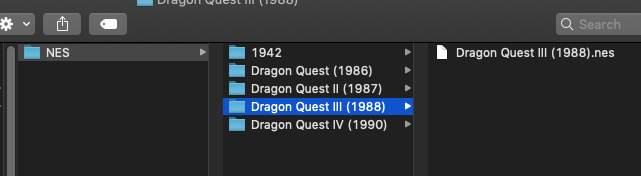

Looks as if that article is pretty old. There’s no delete files, or bundles, or anything like that. All I can find is to move the files out of the library (I moved them to my desktop), scan the directory, move the files back, then rescan. Am I missing something?
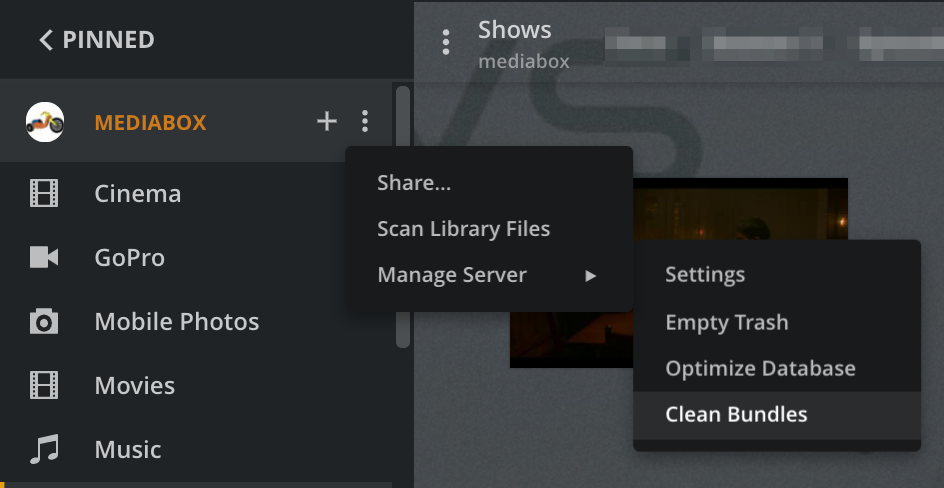
I’m sorry for the late reply, kids  That fixed it, it now sees the games as separate. Can I make a feature request that fixes this? It really shouldn’t have required all of that work, but I do thank you very much for the help.
