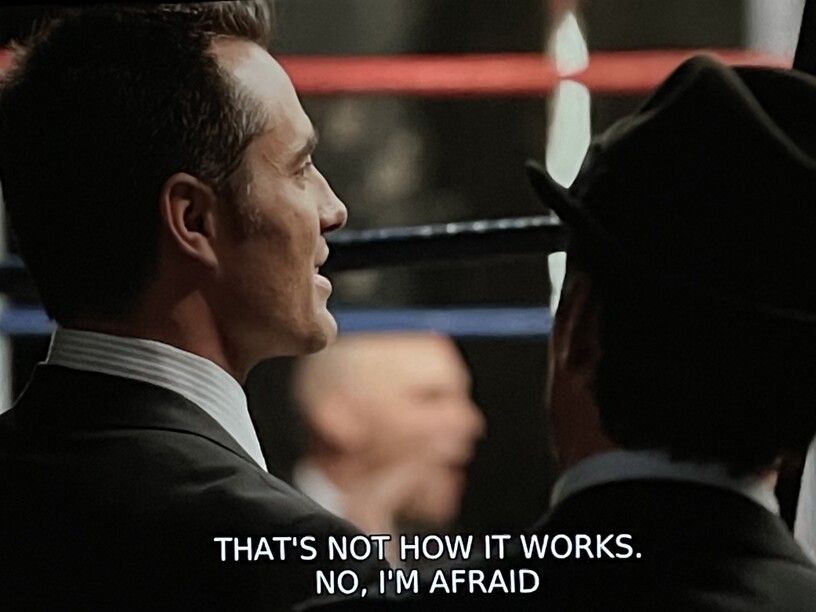
I’ve noticed this does not happen with all subtitle files - and if I use a external SRT file from OpenSubtitles for the same video, that actually works.
I’ve tried looking through all the Plex settings I could find and previous posts to figure out why this happens, but so far I have found nothing that makes it work. Has anyone experienced this issue before, or have an idea how I might fix it?
Just to be clear… when you write upside-down / inverted, you mean the sequence of the lines showing on the display is wrong?
e.g. in your screenshot it should be
No, that’s not how it works, I’m afraid.
No, I’m afraid it doesn’t work that way.
Neither of which is what the person said.
“That’s not how it works, No I’m afraid”
seems like a literal translation from something else to English (not surprising coming from opensubs) - kinda like the assembly instructions for an IKEA Bookshelf. <—they don’t make any sense.
Quick look in an editor shows the line sequences are correct. The Plex player is whichever is the latest on LGTV WebOS, though this problem has been happening for at least a year now for me (and on various shows and movies - I haven’t identified a distinguishable pattern when it does occur).
@JuiceWSA Yes translations could be an issue if it only happened for that one line. However, the sequence inversion is happening for all captions throughout the file. Also the srt file I’ve attached isn’t from OpenSubtitles (at least that I’m aware of) - and when I attempt to download new SRT ones from OpenSubtitles (which show up as SRT (External)), it actually does work.
So wondering if maybe it’s an issue with transcoding and the SRT file? Unsure as I do not have a clear picture how SRT files work.
It doesn’t look like this is the file which is on the screenshot.
The letters in the screenshot are all upper-case, while the file uses proper mixed-case.
@OttoKerner That is the file - it’s the only one of it that I have (or at least know about). I do not know why it comes out as all uppercase though.
I did also just think to try it on the web client, and sequences there look correct, though it also weirdly shows the text as fully upper-case. So maybe it is some kind of client issue.
just a guess, but if the inverted lines are actually two separate lines with identical or similar timings in the srt file, then the player could easily get confused about which one has priority.
if the file was like this: (from your screenshot)
419
00:21:31,962 --> 00:21:33,762
NO, I'M AFRAID

420
00:21:31,962 --> 00:21:33,762
THAT'S NOT HOW IT WORKS.
you will likely get a different result than this (from your srt file)
419
00:21:31,962 --> 00:21:33,762
No, I'm afraid
that's not how it works.
Probably the srt is from a poor OCR, or software that didn’t automatically combine those two lines, or combined them in the wrong order.
Any chances your video has an embedded srt file, being chosen automatically that wasn’t formatted properly?
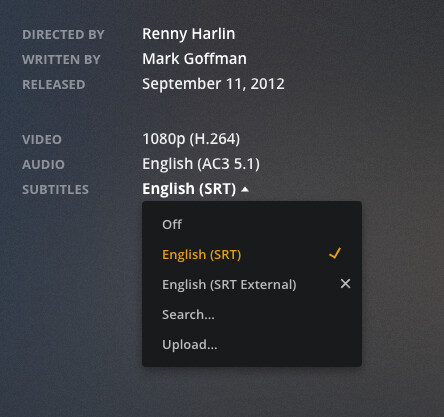
@JuiceWSA@leelynds Yes, it could be some kind of embedded element that I don’t know about yet. Here’s a screenshot of the playscreen:
And to reiterate for clarity, the “English (SRT)” is the one with the inverted line sequence and shows capital letters, and the “English (SRT External)” is the one I downloaded from OpenSubtitles, does not have an inverted sequence, and the letters are not capitalized in that one.
I also realized I have some other plex plugins installed, like Sub-Zero, which could be doing some kind of post-processing of these files. That would explain why they are different. I didn’t think about it before because I installed them a long time ago and honestly forgot they were there. But if the above confirms this can’t be an issue with the SRT file or Plex itself, then I bet I can do some more debugging by disabling the plugins and see if it helps.