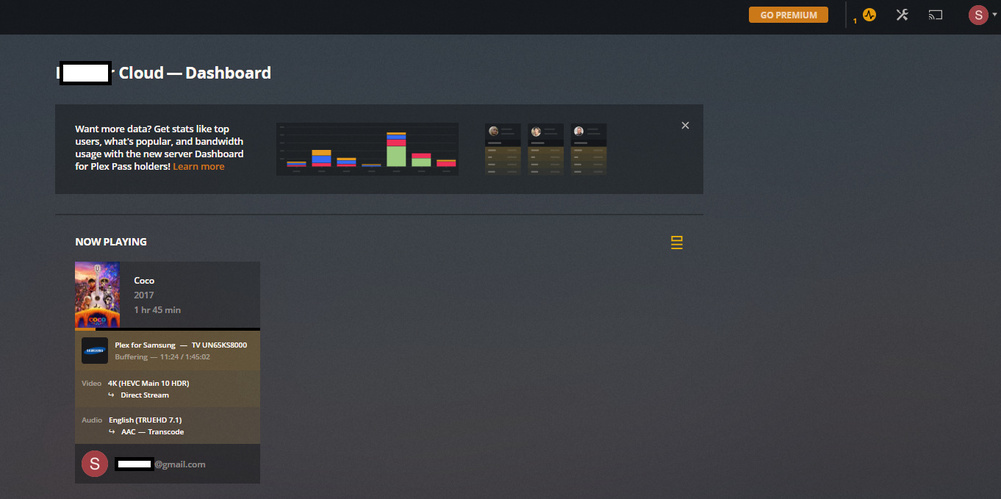
Server Version#: Version 1.14.1.5488
Player Version#: ?
Seagate personal cloud NAS drive
Samsung KS8000 tv
running the PLEX app through the TV
So I have a seagate personal cloud SSD that I put plex onto. I have it hardlined to the TV. So the problem is that its constantly “buffering” when trying to play movies and media (I mostly have 1080p files). I don’t understand why.
Is it not connecting directly to the harddrive? Is the TV running the App which is connecting to the internet and then to the PLEX server? how do I address this?
Most TVs ethernet ports are only 100MB, which you may think is still fast enough, but most of them are crappy hardware as well. For instance my Sony’s perform better and faster on WiFi. I gave up ethernet to my TV awhile ago.
ethernet connected to TV (bridged through a switch/router)
But still, I guess my question is about PLEX…is it connecting to my NAS over the internet (PLEX.TV) or is it connecting directly to the NAS over the network (wired or wifi)?
It seems my connection is the same as if I connected to PLEX at a different house.
On the LAN plex is streaming direct to your TV client. Plex never streams anything through plex.tv either way … that’s only used for authentication, connections are always peer to peer.
Check your local network, sounds like a bottleneck somewhere. Use the plex dashboard in the server web interface to see if your media is direct playing or transcoding too.
How do I verify this? It seems quite slow and buffers constantly.
On my laptop, I can play these files directly from the file browser no problem, but on the TV, connecting through the PLEX app, its slow as all hell.
It just doesn’t seem like its direct the the NAS drive…like I’m connecting through the internet back down to the NAS.
Its transcoding the audio so try and pick a stream that your TV can handle or passthrough directly. If your server is on a NAS it really needs to direct play 4K HDR material or you’ll have this problem.
I’m sorry, I don’t quite understand what you mean about picking a stream?
I’m playing files saved on my NAS that’s ethernet connected to the TV.
The TV certainly was able to handle the file when I was accessing the harddrive directly as an input source, before trying out this PLEX thing.
What do you men ‘direct play’? Yes, i’m running PLEX on a Seagate Personal Cloud NAS drive.
That’s what I’m confused about…it seems that PLEX on my TV is not directly connected to the NAS, but rather running through the app through the internet…
The audio track of the movie you are playing is a format that you tv doesn’t support. Plex is transcoding the audio track into one it does so you will hear some sound, but your Plex server (Nas/etc.) isn’t beefy enough to do the transcoding in real-time. This is the cause of your buffering.
If you select an audio track (2-channel stereo for example) that your tv supports then you likely won’t see the issue.
i’m sorry, i don’t get the analogy. everyone’s said the TV can’t handle the file and I said the tv can play the file fine directly through the NAS, but I’m getting errors through the PLEX…so it seems apples and apples with the bonus of the orange PLEX.
so going back to my original question/theory…when I run the PLEX app on my TV, is it connecting directly to the NAS over my ethernet line or is it connecting the to plex server out on the internet?
Is there any difference connecting the PLEX through my TV inside my house that’s ethernet lined to my TV vs connecting through PLEX at my neighbors house?