yes im using rasplex player but sorry, which cert is that? trying to find but this is such a long back read… mind if you can pin point me? Thanks.
The easiest solution for you is to go to the Github Rasplex site and get the updated binaries. The certificate is included.
It’s not that far back.
got it working already… Thanks.
Moved my comment to our other thread
@ChuckPa
My server has an invalid certificate causing me issues. How do I convince my local plex server to retrieve a new one? Running on Synology. I’ve restarted the server a few times including just an hour ago.
@ChuckPa so now we just have to wait for Samsung to Update the Certificate for their TVs
right ?
Could you please reset my Plex cert?
Thank You.
There are certain televisions (as detailed in the announcement I linked) which we know will never be updated again. Samsung, LG, and others, have done a full EOL on those particular televisions.
For those machines, the only way to play on them is either:
- Jump through hoops and allow them to run without auth and, in some cases, disable secure connections (which disables it for remote too— very bad)
-or- - Use a set top box / player device which is currently supported (Roku, Nvidia, AppleTV, Chrome – etc) and have normal secure connections & authentication for everythng again.
I have reset the certificate. Please restart the server.
It will download a fresh one.
Your certificate was valid. It also had an older one laying there.
I have reset it all.
Please restart the server.
If not resolved, your problem is with the player/client.
Thank You.
Most of my issues relate to remote connections on Samsung TV’s, all of which are on the NEW supported TV list. But still don’t work. Strange issues where some content is playable, some is not, erratic. All seem to be running the same version of Plex, I think it was 5.25.2. So what needs to happen in order for these remote TV’s to work again?
I would restart everything on your side, Modem/router then server.
On their side, they should also restart the TVs (so nothing is cached).
Samsung should update the certificate for their still supported TVs
I have some strange problems
Actually both servers are available but still several users complain with connection problems, however the devices are not listed on the incompatible list.
Samsung TV 2019/2020
Apple TV 4th Gen (2015)
What can be done?
Everyone has already reinstalled their apps, rebooted router, etc. nothing seems to help. Since there are more than 30 watching I don’t assume a server issue. Other streamers seem to be running for the users so I suspect the Plex apps.
Can anyone help me?
The incompatible list isn’t all-inclusive (as it states).
The Samsung and AppleTV are both current devices and should have their certificates updated.
We have seen where Apple tvOS needed a reinstall (from factory) to get its core certificate updated.
It might be the same for the Samsung ??? What do their forums say?
Agreed, if there is something else going on here, just disclose what it is, and that Plex is aware, and working on a solution.
If you think we’re holding out? The answer to that is NO, we aren’t holding back on anything.
Plex relies on the device and its credentials (certificates), in conjunction with Plex’s certificate to make a HTTPS connection to Plex.tv
If the base device has a problem, there is nothing we can do it if fails because our Application is asking the Operating System (tvOS) to make that connection for us.
We know we’ve given it valid certificate credentials from the server side.
This is your current PMS certificate (private data redacted)
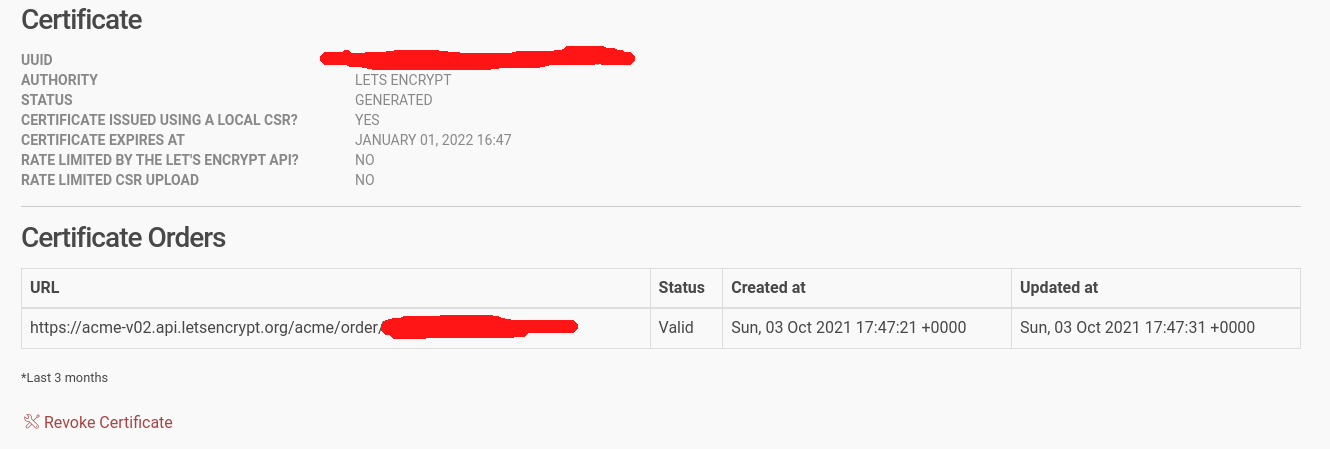
If you restarted PMS and your logs show it fetching a new certificate then your PMS is ready and using this certificate.
One AppleTV user did a factory reset of the AppleTV to get it to update
Maybe time to call AppleCare?
Thanks @ChuckPa, done! Somehow my apt source got disabled! 
Could you do the reset for me too please? Local playback and browsers (remotely) are working but our android devices still won’t playback anythibg since 30. September.
Thx a lot
Doemer
