SSL Certificate Errors

To add your certificate to Plex.

  1. Create a P12 file which contains the Cert, Key, and CA of the granting agent.
  2. It will look something like this:

openssl pkcs12 -export -out mydomain.p12 -inkey mydomain.key -in mydomain.crt -certfile “Acmecert_+O=Let’s+Encrypt,+CN=R3,+C=US.crt”

You then add the path to that mydomain.p12 and the P12’s password to Plex

Settings → Server → Network → Show Advanced.

Seeing these errors:

Jan 14, 2022 15:11:41.776 [0x7f47554bfb38] ERROR - CERT: Error acquiring new certificate: Failed to retrieve cert from plex.tv: 429,
Jan 14, 2022 15:13:42.358 [0x7f4755660b38] ERROR - CERT: Error acquiring new certificate: Failed to upload CSR: 429, <?xml version="1.0" encoding="UTF-8"?>

Any ideas on how to fix?

@wnypoker

HTTP 429 is “Too Many Requests”

Please tell me about the server ( what is it installed on ?), OS version and PMS version.

This type error happens when:

  1. Creating and deleting servers (like when using Docker) too rapidly
  2. PMS can’t save its certificate between restarts.

@ChuckPa

Could you please also reset my certificate? Thanks!

@alshain

Your certificate for the Docker container is valid

Valid	Sat, 08 Jan 2022 14:44:36 +0000	Sat, 08 Jan 2022 14:44:45 +0000

Are you having a problem with a player?

Hi @ChuckPa,

Sorry for the delay on my reply. I just wanted to let you know that after enabling remote access, my Plex server is accessible from the app and website again for users. Not sure what changed as I never had to enable this for many years, but thank you so much for helping me solve this.

Happy New Year to you and yours!

Thanks for the quick reply.

Yeah, Plex on my Android phone can’t connect via secure connections, nor can my friends.
Remote access works fine via app.plex.tv however.

I see entries like these in the logs:
Jan 18, 2022 11:00:06.201 [0x7f8a141eab38] DEBUG - CERT: incomplete TLS handshake from [::ffff:IP OF PHONE VIA MOBILE DATA]:22152: sslv3 alert certificate unknown
This shows up whenever I try to use my phone to connect to my Plex server.

Even on Wifi, my Android device can only connect to my Plex if I allow insecure connections.

sslv3 alert certificate unknown

Whose certificate ? Yours?

Good question, Plex doesn’t say. I had assumed it was talking about my servers certificate.

I was thinking that the client errored out with this message, but maybe that isn’t the case after all? Ever seen this before or do you have an idea what I could check?

What are / how old are those android device(s) ?

If it were a Plex certificate, and it were expired, it would say so.
If it were a custom certificate (which was imported) , it would also say so.

Might this be one of the “Sept 30,2021” devices?

It’s an Android Phone, Xiaomi MI 10 5G
Security Update 2021-11-01
Google Play system update: 2021-12-01

I just wanted to play around with things today to get more information for you, suddenly it’s working again. :man_shrugging:

First, the server wouldn’t connect via app.plex.tv either, then I relaxed the “Require secure connections” setting.

I had also noticed that when trying to g o to IP.*.plex.direct:32400 in my browser, Firefox would show a certificate warning on my desktop:

I played around with shutting down the server, deleting Plex Server’s cache folder, nothing seemed to work, re-enabling “require secure connections”.

Fiddling around with my phone, suddenly my phone could connect to Plex again. Firefox on my desktop PC also no longer shows the certificate issue. So all is well? Very weird!

I have an issue w/ my server cert that appears to only affect iOS device. The LetsEncrypt cert shows valid in the cert but iOS shows it as the old date. Pics attached… it’s hard to explain…
image1

image0

Any help will be very appreciated.

@jmahaffey09

Your Plex certificate is correct however it looks like your iOS device’s certificate has expired.

Valid Thu, 30 Dec 2021 08:04:19 +0000 Thu, 30 Dec 2021 08:04:31 +0000

Which iOS device and iOS version?

Understood. Thanks.
iphone 8, 13.3

@jmahaffey09

Your iphone 8 should be upgradable to iOS 15.3

Upgrade it to get the internal certificate resolved.

I certainly agree that iOS 13.3 is ancient and should be upgraded.

But … mind if I ask? Why do you think it’s an iOS certificate issue? I think I’m not seeing something you’re seeing, and I’d like to understand.

iOS has included the ISRG Root X1 cert since iOS 10. iOS 13 definitely includes the ISRG Root X1 cert.

https://support.apple.com/en-us/HT210770

Does the screenshot indicate that he’s getting the expired-on-9/29/21 R3 intermediate from Plex?

If I remember iOS certificates correctly,

is showing the iOS certificate itself has expired. (notice it is the Apple icon and not a Plex icon)

Why is the issuer name covered if it’s Plex ?

OK, I’m confused.

This looks just like this other thread. He updated to 15 and 15.0.1 without improvement.

From an iOS perspective, you could try resetting the network settings. If it really is caching the wrong intermediate certificate, that might kick it out. SettingsGeneralTransfer or Reset iPhoneReset, then select Reset Network Settings. Be prepared to re-join any WiFI networks if you do that.

I’m certain that iOS has trusted the ISRG Root X1 CA since iOS 10. Intermediates shouldn’t be cached by iOS, so as long as the current R3 intermediate is being sent by Plex, it should be trusted.

And in the second screenshot, the dates on the certificate itself look reasonable.

But the Expired date on the first screenshot is exactly, precisely, when the old Let’s Encrypt R3 intermediate expired. iOS enforces that the whole chain is valid, so I would expect iOS not to trust that.

This is the sort of error I would expect if a server was sending the old intermediate certificate chain.

@jmahaffey09, can you visit this on the iPhone? This page uses a certificate that was issued by the Let’s Encrypt R3 intermediate, just like Plex Media Server certificates.

@jmahaffey09, what did you cover in the screenshot? Is it a name like 01-02-03-04.abcdefghijklmnopqrstuvwxyz123456.plex.direct?

But that’s confusing. It doesn’t seem like that would fit in the space that was covered up.

If you’re willing to share, can you PM me your public IP address? I’d really like to see what the server is doing, just to confirm.

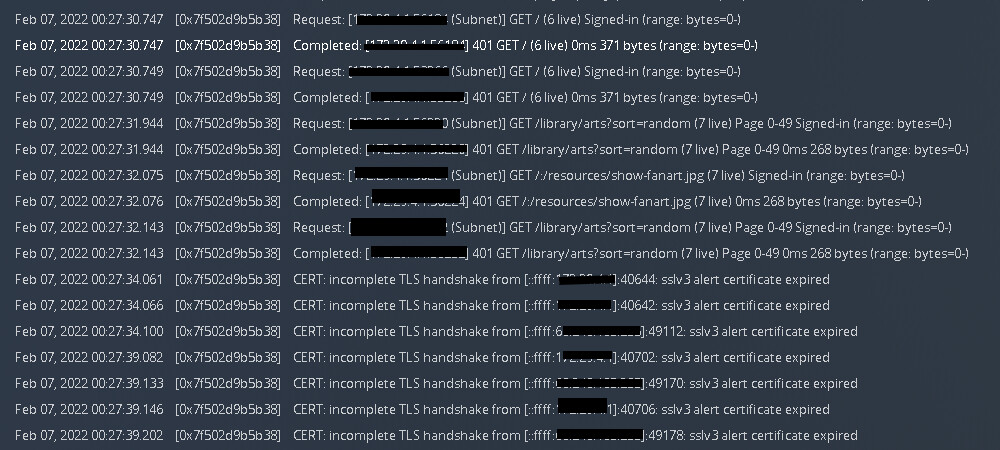
Hey guys - first time poster apologies if I’m meant to start a new thread, but same issue.

Recent server update - which I do pretty regularly, but for some reason this latest one has thrown off an old iPad that I use to connect to it. No issues for years but suddenly now a problem

Also get issues with Plex Home Theater on my NAS also losing connection to the Server that is accessing the server run on the same NAS - but let’s tackle on thing at a time

TimeFeb 07, 2022 00:21:43.695
LevelDebug
Thread0x7f502d9b5b38
MessageCERT: incomplete TLS handshake from [::ffff:<my.externalIP.address]:49208: stream truncated

Can someone check my server certificate? Not sure what details you may need from me.

Here’s the logs generated from the Plex Home Theater failed attempt