Server Version#: 4.47.3
Player Version#: 1.21.1.3803
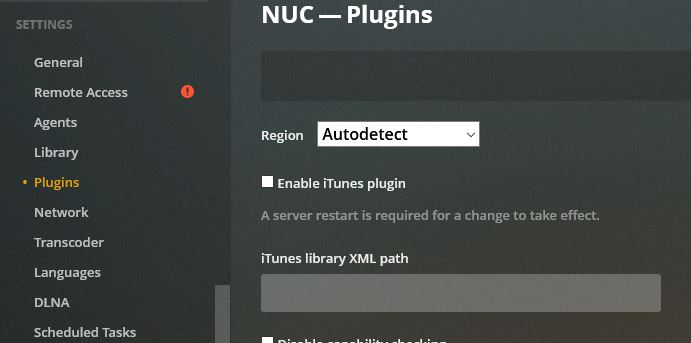
As you can see Settings > Plex Web > General > Play Theme Music is NOT checked.

How do I shut it down?
Thanks, Fred
Server Version#: 4.47.3
Player Version#: 1.21.1.3803
As you can see Settings > Plex Web > General > Play Theme Music is NOT checked.
How do I shut it down?
Thanks, Fred
That setting is not global. It only applies to the client in which you set it. So your screenshot shows the setting for Plex Web. You should find a similar setting in PMP and the Apple TV app.
How do I get to the PMP?
I don’t see any reference to it on the Settings menu.
Apple TV app does not have any such setting.
Since you tagged this thread with the ‘plex-media-player’ tag, I assumed you used that app. If not, don’t worry about it. I don’t have an Apple TV, so I can’t advise further. I just know that the setting exists on my Roku and nVidia Shield apps.
According to this thread, the Apple TV app should have the setting:
I’m confused on what is what… and can’t find out how to resolve my confusion.
For example when you first start a post it asks for and I answered:
Server Version#: 4.47.3 – I found that at Settings >Plex Web > General
Player Version#: 1.21.1.3803 – I found that at Settings > Settings > General
I think I answered those backwards. Can you confirm?
Thanks
Yeah, those are backward.

Yes, the versions you used are backwards.
Also, the Plex Media Player (PMP) is another piece of software altogether.
I’m not seeing this.
Thanks for confirming I did it wrong 
This is the setting you should be?looking for:
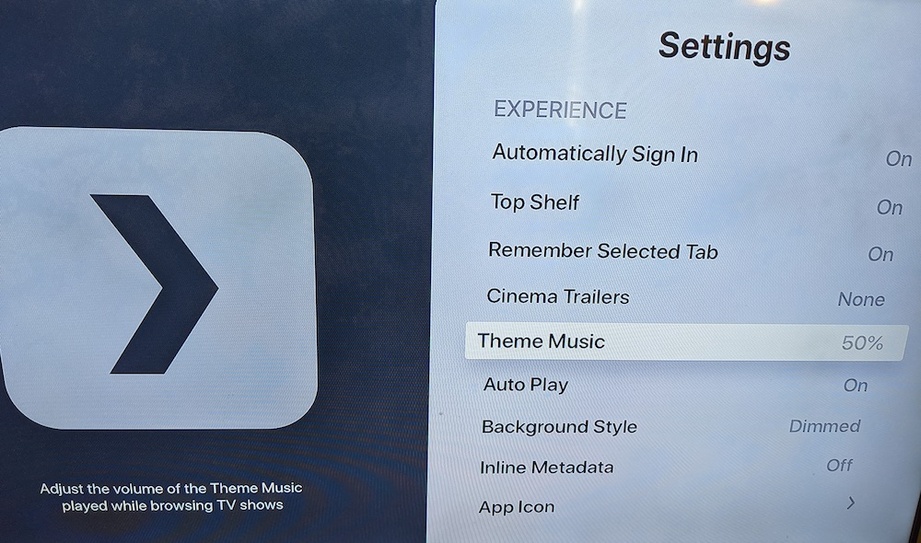
In Plex for Apple TV (tvOS)… check Settings > Theme Music
I think I am running this differently. Since I don’t see those settings.
I did not specifically set it up for Apple TV, I added the Apple TV App for Plex.
Open the Plex app on your Apple TV. In the sidebar (on the left), move all the way to the bottom and select Settings. On the settings screen, move down to the fifth item in the list, “Theme Music.” Select that and choose the first item in the list, “Off.”
Follow @pshanew instructions.
The settings are in your clients (AppleTV) not the Plex server. It has nothing to do with Plugins.
Both issues are cured. Thanks to all of you.
What confused me was that it has been fine for over a year and it showed up just after the PMS updates. I had went into the Plex App in Apps on Apple TV and it was not there. That allowed me to change what shows on the startup screen. I had never been down to the bottom on the far left side.
AutoPlay was the next issue and it is right under Theme Music. That also popped up after the last two updates.
Again thanks to all of you, Fred
This topic was automatically closed 90 days after the last reply. New replies are no longer allowed.