Server Version#: 1.18.1.1973
Player Version#: 4.8.3
This is the 1st time I am seeing such behavior.
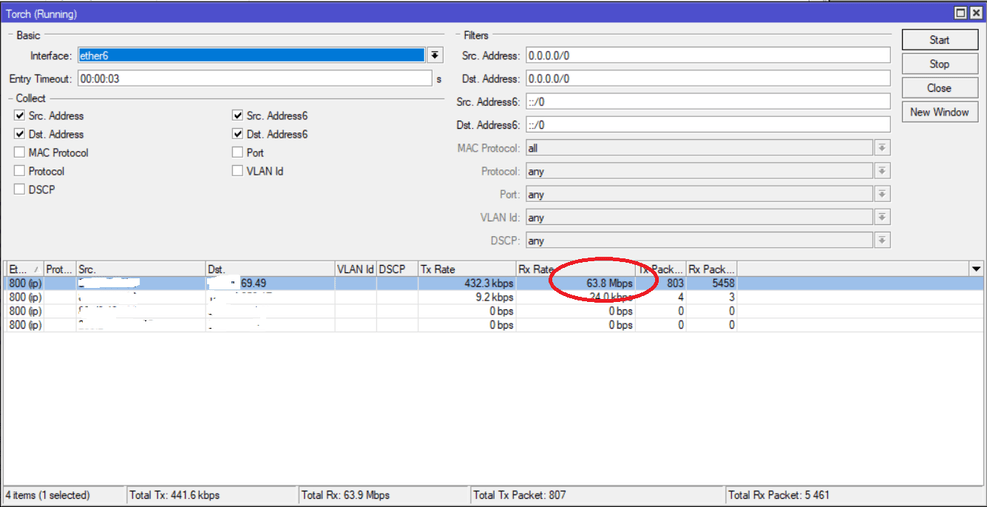
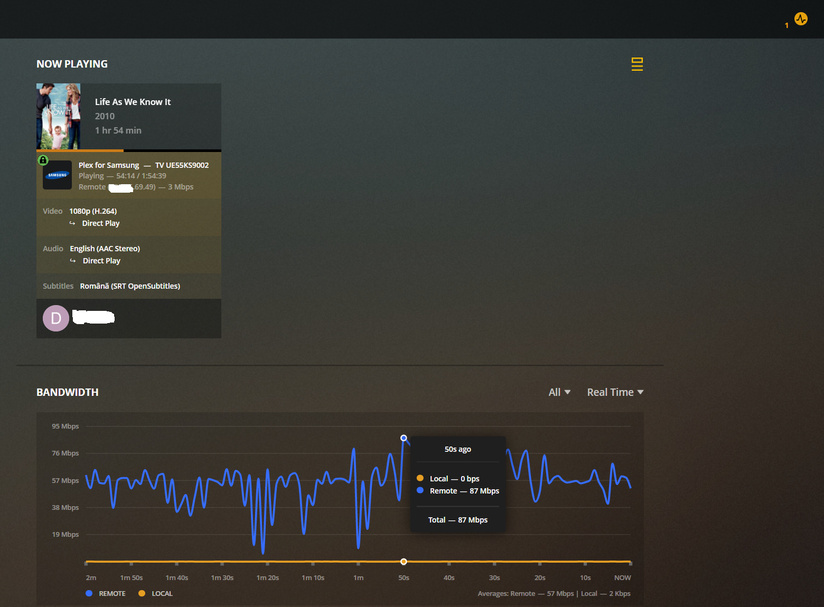
A relatively small file, 1.7 GB, played remotely is using ~50 Mbps of bandwidth with spikes to 80-90 Mbps. The bitrate of the movie is about 2000 kbps.
At first I thought the bandwidth graph in PlexWeb is acting up but the interface on the router is showing the same traffic.
The IP generating the traffic matches on router and PlexWeb.
Only one external session.
During the last one hour, this one session had a traffic of about 25 GB, only for this movie.
Anyone seen such behavior lately?
later edit: after the user finished watching the movie and no one else was playing anything on the server, I started the same movie, also remotely but could not reproduce the high bandwidth usage. PlexWeb showed Averages: Remote—2 Mbps during my play.
Even if, as I said, when I played the movie (PlexWeb Chrome), the bandwidth issue was not present.
I tried also on my Samsung TV which has an older Plex app and again, the issue was not present.
Only when played via Plex app on a newer Samsung TV as far as I can tell.
I have remuxed the file again using ffmpeg just in case.
I assume, either because the browsers did not Direct Play it, but Direct Streamed. So the server had to mitigate the issue with its larger file cache.
Or simply because web browsers also have larger network caches, since they are running on a real computer and not on a small embedded system, like the Samsung player.
Today I saw the same problem, with the same user and device, but for another movie.
While the user was playing the movie, I remuxed and uploaded back the file.
In about 10 seconds the bandwidth normalized to the expected value.
Any hint as to what exactly should I look for in my media library so I can fix this issue for any remaining problematic files?
Also, just pointing out that from my PC with Chrome and my Samsung TV, both in a remote location from the actual PMS machine, I cannot reproduce this weird bandwidth usage.
Unfortunately I don’t know a way to search for this issue.
I only know that it has to do with improper “interleaving” of the data chunks for the several video, audio and subtitle streams in the file.
Some scripts or some software apparently doesn’t do this correctly.
Can you check if all your mp4 files are flagged as ‘optimized for streaming’?
And can you tell if the affected files were flagged as such or not?
All my media is in mp4 format and optimized for streaming (Web Optimized: Yes)
No file has embedded subtitles. Only external srt, or lately opensubtitles.org for some of my soon to be ex-users if sharing said subtitles between users is not fixed.
Will try to gather more data next time this happens.