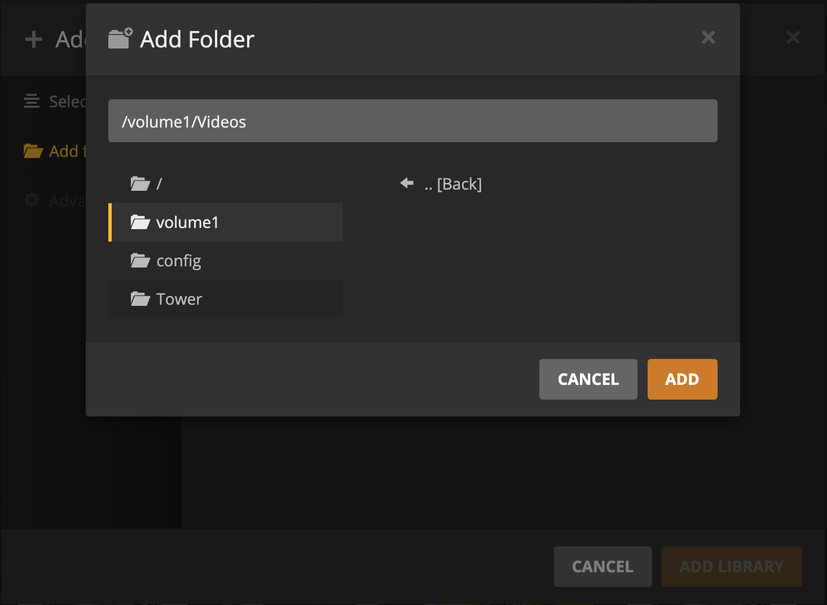
Hi, so I’m trying to setup Plex on my Synology DS220j (mainly for DVR recording, have a Unraid Tower for the heavy Plex lifting) and running into sub folder issues (I think?) when trying to add a Library. As you can see in the photo below, after I click on the Videos share I don’t see any sub folders. Am I missing a step here or is this the best the Plex app can do (first share folder only)?
Using the default, Synology provided, shared folders is always problematic for Plex.
Synology claims them for their exclusive use no matter what permissions you may assign.
Do you have other shared folders, which you created?
If not, please do make some.
You can create one and then place sub-folders under it for each type.
The only requirement is you give user Plex permission to Read/Write the share when using DVR or will allow deletion. Read-only is sufficient in all other cases.
Normally I’d agree with ya, but this is just mainly a Time Machine backup server and I’m playing around with Comskip on it. I also disabled Video Station cause I didn’t need it. But I might re-organize my media on both servers cause it makes sense that way. Which leads me to my next question.
So I setup Comskip with ffmep installed also and don’t see anyway to set it up (looked for the wiki, didn’t find it haha). Can someone point me in the right direction on how to get it going?