A new one for me.
I like english subtitles for english tv shows.
All my shows are mp4 with srt files for the subtitles in the same folder
I have the latest plex pass version and playing on a Shield 2017 pro
Since the last Plex update when playing “some” subtitles I get “Error
Playback has stopped because the connection to the Plex Media Server has been lost. …”
Clicking retry does not work.
If i cancel and goto settings /subtitles and click none then resume the show will play.
If i click the subtitles icon (which is now white when usually it is yellow if there are subtitles) option and click a version while playing the show continues, but with no subtitles.
Changing the subtitles option to “only image formats” or “Always” from “Auto” does not get it working…
This is happening on my Shield but its NOT happening on my ATV4.
So the Shield player appears to be the issue.
Can you provide the subtitle file in question?
I have a work around from another post. thanks @rankinstudio
A very fast way to fix the srt files was using this site:
http://subsyncer.com
Upload it, choose time shift, and shift by 0 milliseconds.
Worked on the initial srt file.
Wouldn’t say it’s fast when you have a ■■■■ load of srt - but will do til there is a fix
NP I would send up but I repaired the guilty files with the above method.
When I get the next one will post it.
The shift by 0 milliseconds is a way to save and create a valid SRT file.
Subtitle Edit can do the same thing in batch. Thousands in a few seconds.

Be sure to select Overwrite original files (new extension if format is changed)
Thanks NP
Great app.
What are the setting after i do the Batch convert and drag my srt into it?
Overwrite - yes
anything else?
No. You really don’t have to have any other options ON.
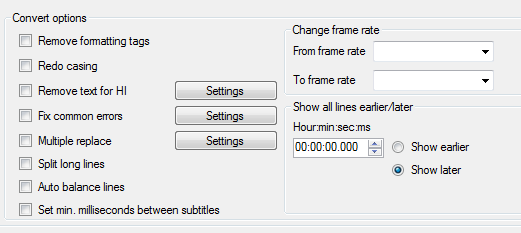
Leave as is unless you want remove SDH text or whatnot…
If you are using Subtitle Edit’s ‘batch convert’ anyway, make sure to set the ‘Encoding’ to UTF-8
This will fix many, many subtitles which previously only played in PMP.
Thank will make sure.
I still have this issue (sometimes) even after using the above software.
My question is yes this is a fix - but why did it start happening anyway??
I can only guess the people invoked in creating the sub’s are making mistakes.
That or PLEX now has a higher standard for sub’s and the small errors in the srt files are causing PMS not to display them or crash.
I find it REAL hard to use other peoples *.srt SUB’s for many reasons including those “tiny errors”. Most of the subs I see are riddled with errors such as sync problems, misspellings, grammar, punctuation, and worst of all the conversion from UTF-8 to ANSI format causing musical notes and others to display all messed up. Pain-in-the-butt to fix.
You say you still have the issue (sometimes). Do you have one of these SRT’s?
Hey NP
I have been fixing them (usually) as soon as I find one.
I will keep the next one and pass it on.
