For all of my movies, I also have subtitles (.srt) files which are not working. I know it would be a lot of work to go through .srt files and rename them I tried with just one but it still did not work. Any easy way for me to do this?
give real name of movie and subtitle
example…
Avatar 5 (2025).mp4
Avatar 5 (2025).eng.srt
For external subtitles, you need to have the ‘Local Media Assets’ agent enabled.
Settings - Server - Agents
Is that not enabled by default?
Yes, it is. But it may have been disabled for some reason.
I enabled that but my subtitles .srt still does not work.
There are actually 3 places for movies where the LMA agent needs to be enabled.
Have you checked it is indeed enabled in all 3 places?
Settings - Server - Agents - Movies - Personal Media
Settings - Server - Agents - Movies - Plex Movie
Settings - Server - Agents - Movies - The Movie Database
Is the movie in question actually ‘matched’? If it is not, the LMA agent cannot function and find the subtitle.
If you click on the movie’s preplay page on the ellipsis (...), is there a menu item ‘Fix Match’ or is it just ‘Match’?
All of those are check marked I do not understand anything you are mentioning in the other paragraph. How do I know if a movie is “matched”. What is a LMA? what is the movie preplay page on the Elipsis(?) ? Kind of technical for this old brainl
short for ‘Local Media Assets’
If you click onto the poster of a movie, you are directed to its pre-play page.
The ellipsis ... menu is indicated by the arrow in this screenshot:
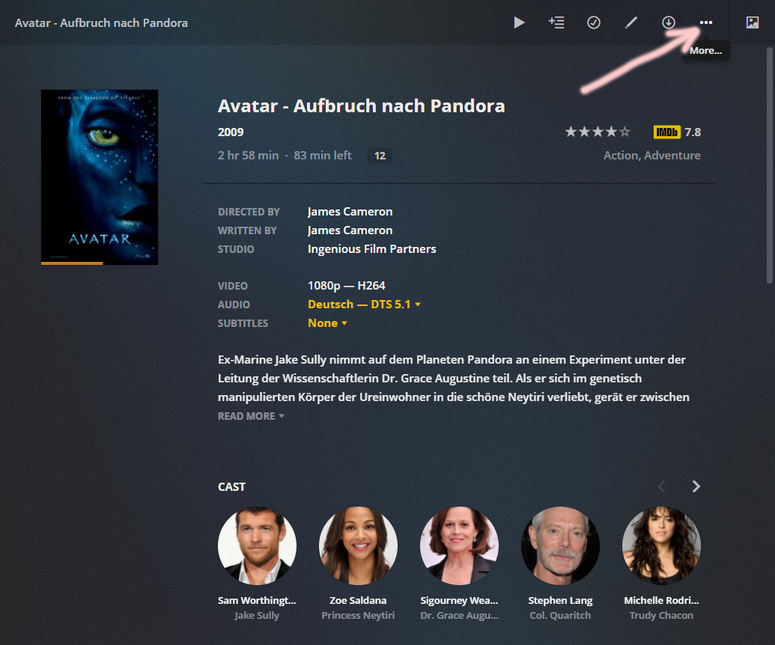
You can tell by clicking on the ellipsis menu.
If there is a menu item named ‘Fix Match’, then the movie is matched.
If there is just an item named ‘Match’, then the movie is unmatched, in which case an external subtitle may not work.
Thank you so much. Now maybe I will be able to watch my movies and understand what is being said.
Just wondering, if Plex has a glossary of terms that they use to make everythng easier for us? Their support articled are just too technical.
This topic was automatically closed 90 days after the last reply. New replies are no longer allowed.
