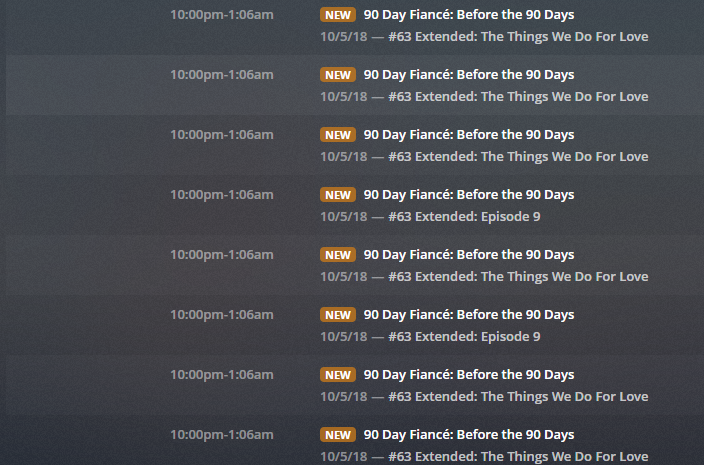
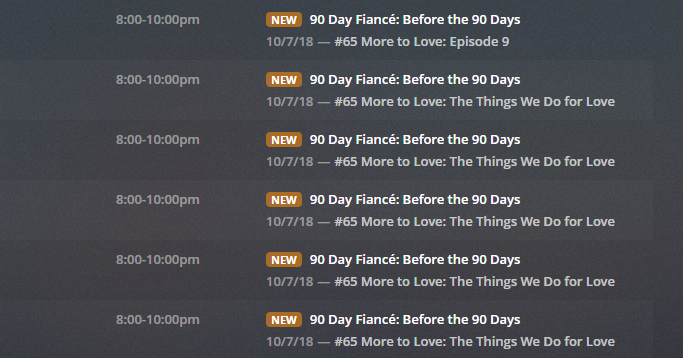
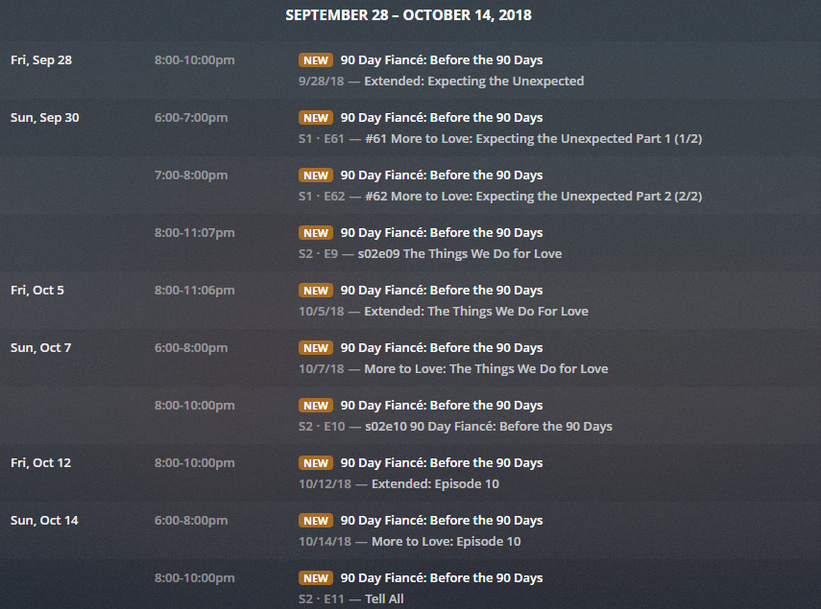
I am using @garyan2 's most excellect EPG123 to get my guide data as Plex has not incorporated multiple lineups for HDHR Premium and OTA listings. Here’s a link to my xmltv file
I would be most thankful if someone can look at this and let me know. I have no idea what is going to happen when these recordings come up but it might not be good.
I won’t be able to access the xmltv file until later tonight. Right now, looking at your images, I’m confused as to why all the episodes are considered NEW. They ARE in the future a bit, so some may be considered as generic, but I’m not sure yet.
Once I see the contents of the file, I should be able to describe what is going on or at least hypothesize to what PMS is doing. Would be nice if the Plex folks could save me the time.
I haven’t been able to duplicate what you got there. I tried v1.2.5.10 and v1.2.5.20 with no strange behavior. I have no idea what is going on with yours. Is there a way to “clean-up” your database maybe? My experience with Plex is limited to me creating v1.2.5.10-.20.
Thanks for taking time to look at this. I’m uncertain how to purge the EPG data from Plex and start over but hopefully someone from the Plex team will chime in and tell me.
Can you tell me if you were able to look at my xmltv file? Were these duplicate entries in the xmltv file?
I did look at your xmltv file and actually used it as a source in my server without issue. I then started using my own, changing versions and settings to see if I could trigger this behavior without any luck.
As far as purging the EPG data, maybe deleting your DVR’s and building again?
Thanks for clarifying. I would delete the DVR but I’ve got a ton of recordings set and I really don’t want to spend a lot of time setting them all up again. I’m hoping this is an isolated incident and that it will correct itself. I’ll investigate if there is a way to purge the EPG data without deleting the DVR.
Deleting your DVR will not delete the recordings that are scheduled. Once you setup the DVR again all of your previous recordings that are setup will be scheduled using the new DVR guide data provided.
@johnm_ColaSC
I spoke too soon. The problem is back. Looks like when I did an update last night it introduced a second recording of those same programs. For some reason it is adding these additional recordings when it brings in the epg data a second time. I can bet that if I clear the dvr again and reimport the same xmltv that was loaded last night that the problem will go away until the automatic update happens tonight.
What server version are you running? One of the things I had to do was randomize the seconds value of the program start times in order for Plex to recognize your News and Sports programs as being separate and unique. It wasn’t something I was too excited about doing, but it was the only way I could find.
When I was doing my testing above, I was still using the same version of Plex that I used for development of the work-around above, which is version 1.13.5.5332. I see there is a new version available. I guess it is possible that Plex is now remembering all past scheduled programs (with their randomized start time) as well as scheduling the current programs (with their randomized start time) and considering them different programs. I have no idea why the “old” program is not forgotten and the “new” program doesn’t just take its place.
Also, I still had everything set up with the scheduled recordings and just did an update with a new xmltv file and I still don’t have any duplicates. It would probably be good if the Plex team gave an assist here.
I’m running Version 1.13.8.5395 which is the current beta. I usually install the betas as they are released as it’s super easy to do with Docker. This behavior did exist on the previous beta version as well. I can’t say for certain how long this has been going on as I just noticed it last week.
@garyan2 If you have time, would you mind downloading my latest xmltv file and see if you notice any changes for the ‘Survivor’ program airing on 10/10/2018 compared to the previous file I posted? Trying to eliminate everything that could be possibly introducing this ‘issue’.
Your xmltv file is just fine. I imported it into my PMS over top of what I already had there from this morning and still don’t have any duplicates. I’ll see what I can do as far as setting up a beta server.
EDIT: maybe the server difference is between Windows and ???
Thanks for checking this. I am indeed running PMS on Linux (Debian).
@johnm_ColaSC As predicted, I am getting the duplicates again. It seems every time Plex does a daily EPG update I end up with more recordings set for these certain recordings. Something isn’t right somewhere. Can you tell me what I might try?
Also, what is the status of Plex actually handling multiple EPG sources for folks like me who are using both OTA and HDHR Premium Channels? Don’t you guys have an (un)official partnership with Silicon Dust HD Homerun products?
I would suggest looking in the logs for any messages during a guide refresh to see if any errors are displayed. Sorry but I have used a XMLTV guide on any systems I run. If the same file works on a Windows system then the only thought I have would be possibly something with the Linux environment that is not allowing the guide data to be updated, possibly permissions but if you can add and delete data don’t see how permissions could be the problem. I have heard of no plans to allow multiple EPG sources from Plex. While Ninja’s can communicate directly with Devs, Plex doesn’t share everything they have in development. I have posted a message on our internal system and will update if I get a response. In the meantime if you can look through the logs or post the logs here that would be the only suggestion I have at this time.
Thanks for the suggestions. So you guys are the Plex support though right? I’m unclear on how exactly the product I’m paying for (lifetime subscription) is supported when problems arise.
The forums are the support system for Plex. Your Plex Pass gives you additional features in Plex that a user without a Plex Pass does not have access to. Such as:
Access to beta releases, Free Mobile Plex apps which non Plex Pass users must pay for, Access to Plex Pass only features such as DVR/Live TV, Ability to create a Plex Home with users for different family members perhaps, as well as some other features mentioned in the What is Plex Pass Support Article.
I’m no genius, but you would think that the devs could do a check to see if it is the SAME program at the SAME time on the SAME channel regardless of what the EPG might say (though I’m pretty sure there’s nothing wrong with mine) and only set this to record once. I have to go through this dance of deleting the DVR and setting it back up to clear this mess. I guess I’ll just leave it alone and see if Plex is smart enough not to record all these at the same time.