Welp, it’s official, I am a dumb ass. I tried to watch Plex on my Smart TV after not having used it for a while and was told my credentials had expired. No place to log in with my username and password that works perfectly on my desktop for my music and TV. I did have a choice to log in with Amazon, but that seemed strange to me. I let the problem go for a night and then circled back to it thinking I was being productive. When I tried to hit the sign in button I got a code and link. The next day I navigated that and it gave me a phone number to call. I wish I had never made that call. I reached someone who told me I had to upgrade my lifetime pass for a $1.99 or it would no longer work. Like a fool I went along with it. I ended up getting charged $100 for something called SodaGift through Amazon and never getting access to Plex on my Smart TV. I thought I was being reasonably smart by using a backup debit card with maybe $120 in the account. They also asked me to download something called QuickSupport on my phone so they could help me get registered. That allowed them to overrule the fraud alert my bank was sending me before I knew what hit me. What a disaster. The bank, instead of cancelling the pending transaction, apparently has to let it go through before starting an “investigation.” What a dope I am. I deleted the software from my phone and tried deleting and reinstalling the Plex app on my TV, but I received no joy. I got completely used. You know the bank isn’t going to do bleep. If I had used a credit card I’d have a fighting chance. Anyway, buyer beware out there. I have to believe I’m not the only moron.
Hit the Sign In button where? On your TV?
Yes on my TV where it says sign in. You would think I could then enter my username and password, but it just gives me a code, a link and eventually a number to call.
I don’t know which type of TV you have but the original Plex client doesn’t prompt you to call a phone number.
Are you sure that this was shown on your TV screen and not on some website you may have found with a Google search?
Yes, it is very difficult to input a user name/email address and a (hopefully) long password on a tv-type device.
Therefore you are directed to the plex.tv website, where you can log in using your computer’s keyboard. Then you go to https://plex.tv/link
Notice the domain name plex.tv
If you encounter any other domain name, it is most likely a fake/fraudulent website.
Honestly Otto, I don’t know what to tell you. I deleted the app and downloaded it again and these are my only options. It works fine on my desktop, but I don’t watch TV there. Hopefully the first three screen shots upon attempting to watch Plex on my Samsung Smart TV will at least prove that I’m not crazy. Thanks very much.


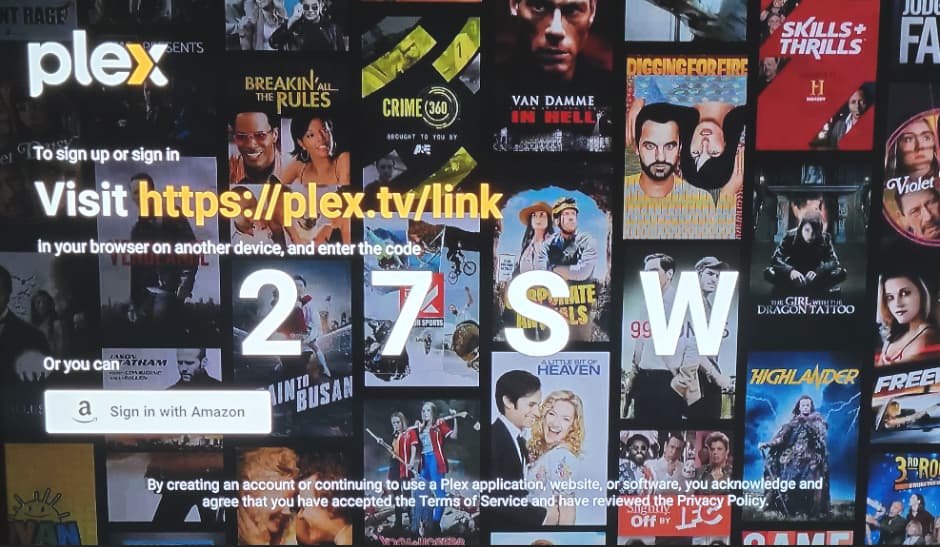
This sort of tactic by scammers are banking on the fact that the general public mistypes the url address that’s been given and they in turn swoop in by creating phishing sites that hinder the legitimate website. This tactic is high on the list now that streaming sites/apps have integrated activation via codes.
Roku had an outbreak of this happening several years ago where many first time users were prompted to legitimately add a payment card to their Roku account on a fresh setup. This may have been a great idea for Roku to lead users to add their financials to the platform, however this backfired when lots of first time Roku owners were unaware that this was an optional step and could skip it entirely. What scammers wound up doing was purchasing any domains similar to Roku and setting up fake Roku support to assist in getting rid of that prompt. It allowed scammers to siphon information such as personal and credit card info off their victims.
To be honest, this trend hasn’t let up. Plex has NEVER had a dedicated number to call nor has direct support. Other than the Billing dept, the Plex Forum is literally the only place to get assistance. This linking mechanism is identical to many other services such as Amazon, Apple, etc.
Unfortunately when there is a url shown on the tv screen, many users will often mistype or misspell the url altogether, allowing scammers to prey on whoever sees keywords such as “support” or “assistance” of getting the apps or services to work.
I think what would be beneficial to Plex is for Plex to further enforce this by having QR codes that individuals can scan with their phones so you are directly sent to the official Plex page rather than attempting to type it in yourself.
Amazon does a great job at this, as well as incorporating their added validation of One-Time Passwords (OTPs).
I could be wrong, but I THINK  SOME? Plex platforms may already include a QR code, but if they don’t, they should.
There’s a different scam for Amazon.
If you google Amazon customer service number, some of those google searches aren’t legit
You call one of the sites set up by a scammer who proceeds in telling you that your account has been hacked and the hacker has placed a virus on your computer.
They tell you that they need to fix this for you or all your accounts will be compromised. Anything on your computer, not just Amazon. Credit cards, banking, email ect…
People panic, and then they coerce you into letting them remote connect to your computer to fix this
Then they either steal all your passwords for your accounts or lock your machine and demand ransom
I know it sounds like you have to be a moron to fall for this but you don’t.
Just by chance, I caught someone in mid-conversation with one of these scumbags and was able to stop them
They still had to change their Amazon password and cancel the credit card connected to the account but it could have been much worse.
The best thing you can do is find the phone number you called and where you found it so it can be reported and investigated.
The URL you visited should be in your browser history and the number should be in your phone
Yes, and you go to https://plex.tv/link, login to your plex account and put in the Numbers.
What phone number did you call and why?
Thank you for picturing what you did. The photos are what I would expect, though.
May I ask did you sit down to a PC and type in that https://plex.tv/link address or go there on a TV browser? If you were on a PC, did you have save your browser history?
If you’re sure you typed it correctly, what DNS are you using on your LAN?
I once saw bad networking and DNS direct Plex to the completely wrong IP address when it tried to resolve plex.tv.
You should post the phone number you called so that if anybody else searches for it in the future this warning thread will come up in the google results.
OK, update…I reluctantly came back to my PC, but used a different browser (I generally used Firefox, but used Chrome for this attempt). It worked as it should have the first time. The only
difference was I used my cell phone to access the link the first time. What I can’t figure out is before I used their hijack software (QuickSupport) of choice, after I entered the code from the TV on my mobile, I was still referred to a phone number, which I believe was 1-877-390-2047 (now disconnected, naturally). As previously stated I was asked to upgrade my Lifetime Pass for $1.99 or my TV app would allegedly not work. I know you keep thinking I typed in the wrong URL, but I didn’t. Everything matched to a T until it told me to call a number for verification. It was only after I called that number that I stupidly gave them access to my mobile by downloading QuickSupport. All I wanted was to watch Plex on my Smart TV. Now I can thanks to your suggestion, but at the cost of $100. I disputed the charge with my bank, but it’s an extreme long shot they will rule in my favor. They didn’t even want to hear a recount of what actually took place. Waste of time. I’m guessing my only hope is that the company that masquerades as a support arm of Plex, SodaGift.com, will have other complaints filed against it. I’m not holding my breath. Anyway, thanks for getting me back on track if nothing else. P.S. I am not savvy enough to tell you what DNS I’m using. I have a home PC that doubles as my server, a Comcast modem, Wi-Fi and a Smart TV. That’s all I know, I’m sorry. Thanks again for trying to help me.
How does this website fit into the picture? How did you get to this?
YIKES!
I’m not bashing you for wanting to use ONE device to be a multipurpose machine, there’s absolutely no fault in that… HOWEVER, an individual needs to know or at least learn the most BASIC and ESSENTIAL forms of security, blocking any unneeded ports, adding a firewall or even enabling firewall protections on the PC itself. You can’t just start installing apps and think you’re safe. Whether you’re working with Linux, Mac, or Windows, ya need to check, double check, and triple check your security resources so your machines AND your hard work and your valuable media isn’t compromised.
I’d consider wiping your machine and starting your machine from scratch after this fiasco.
Sounds like your computer is compromised by malware.
