Synology - Can't detect files on NAS and defaults to PC

Hello,

Brand new to NAS and recently got a Synology to store my media files on instead of my PC. Currently am moving all the files over but decided to install Plex while that was happening. I installed the latest package 1.25.4.5468-989df2310 and got it running.

First thing wasn’t able to select any drive from the NAS, checked permissions and it was granted read/write. Still only showed the folders available on PC. Was kind of stumped here since this is supposed to be an alternative to the PC and I don’t want it to default to that folder structure.

Tried killing media server on PC and now when running it off Synology it times out. I saw another post about making the Synology the primary (did not see any option to do this) just to remove servers. This is still a problem since I can’t actually have the Synology detect the files on it.

Any help would be appreciated! Thanks!

you might want to give this a read.

Thank you I think this answers some of the questions the main being I did quickconnect and now it always defaults to that. How do I remove that? Do I need to go into Plex and disable the server?

Control Panel - External Access - Quick Connect – Disable it.

This changes the URL printed by Package Center as the URL.

Most of us just make a bookmark using the LAN IP for our browser toolbar

Did all the steps for set-up had a few different experiences:

  1. didn’t give me the full installation just allowed me to pick which folders I wanted to see on the side in plex
  2. Still can’t detect folders on NAS when I try to add a folder it still defaults to the PC even though I am running it from the NAS.

What does this mean?

PMS only detects those folder paths you give it. By default it shows you the local volumes

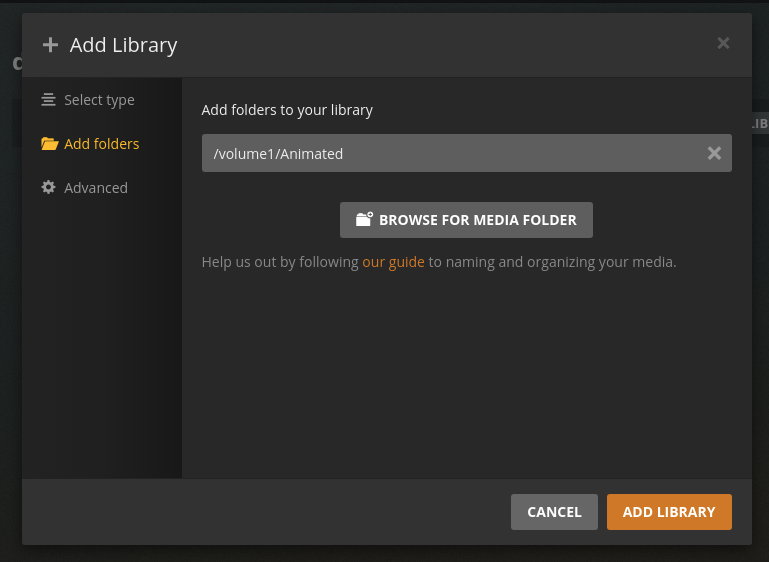
When you add a section, you initially see the volumes

Select the volume, then scroll down.

Here, I click “Animated” (animated movies shared folder)
The GUI shows the resultant path.

It does not give me any options for the NAS it defaults to the PC folder structure

@nchungyee

Then you’re connect to your PC server.

The NAS will always show you its native file structure as I show above.

Well I run Plex from the NAS so how do I have it default to the NAS or stop showing the PC Server?

This topic was automatically closed 90 days after the last reply. New replies are no longer allowed.