Synology DS1019+ Full Out Locking Up due to Plex

Server Version#: 1.41.0.8992
Player Version#: iPhone Version 8.39

I am going to need a little help on what I can provide to help this out.

What’s happening:
I have a Synology DS1019+ running DSM 7.2.1-69057 Update 5
I upgraded Plex Server today to 1.41.0.8992

When I am within my house, on my iPhone using my WiFi and I go to stream a specific file (one that I watched on my LG tv and Nvidia Shield just fine), it full out locks up my synology. At first, Plex will try to play the file and spin a bit. Then it will tell me my server is not available.
But if I jump onto my PC and try to login the synology, my PC tells me its not reachable. If I press the power button the NAS, it goes into shutdown and flashes, but after an hour, it is still running and it can’t shut itself down. I have to hold the power button down and force it to turn off.

I can replicate this, as I’ve done it three times (but clearly I don’t like taking these hard shutdowns on my HDDs).

What log files could I potentially try to grab, knowing that the entire NAS is locking up and probably poo’pooing.

This didn’t happen before until I pushed “PlexMediaServer-1.41.0.8992-8463ad060-x86_64_DSM7” update to my NAS today. My NAS hasn’t flagged a needed update in a few months now.

When it locks up…

As soon as you get into the synology desktop.
Stop Plex
Using Filestation –

Navigate to PlexMediaServer/AppData/Plex Media Server
Right-click LogsCompress to Logs.zip

Download and then please attach so we can see what happened.

@drez143

Thanks for that. The logs should be about 4-5 MB when Zipped by Syno

You trimming them down kept the right pieces (Plex Media Server.*.log)

you have a network fault which is driving the machine crazy

Sep 12, 2024 20:36:00.552 [140540728810296] DEBUG - [Notify] Now watching "/volume1/Media/Movies/The Big Short (2015)"
Sep 12, 2024 20:36:00.630 [140540701358904] DEBUG - NetworkInterface: received Netlink message len=1224, type=RTM_NEWLINK, flags=0x0
Sep 12, 2024 20:36:00.630 [140540701358904] DEBUG - NetworkInterface: Netlink information message family=0, type=1, index=8, flags=0x1002, change=0xffffffff
Sep 12, 2024 20:36:00.630 [140540701358904] DEBUG - Network change.
Sep 12, 2024 20:36:00.630 [140540701358904] DEBUG - NetworkInterface: Notified of network changed (force=0)
Sep 12, 2024 20:36:00.631 [140540701358904] DEBUG - Network change notification but nothing changed.
Sep 12, 2024 20:36:00.631 [140540701358904] DEBUG - NetworkInterface: received Netlink message len=1224, type=RTM_NEWLINK, flags=0x0
Sep 12, 2024 20:36:00.631 [140540701358904] DEBUG - NetworkInterface: Netlink information message family=0, type=1, index=9, flags=0x1002, change=0xffffffff
Sep 12, 2024 20:36:00.631 [140540701358904] DEBUG - Network change.
Sep 12, 2024 20:36:00.631 [140540701358904] DEBUG - NetworkInterface: Notified of network changed (force=0)
Sep 12, 2024 20:36:00.651 [140540701358904] DEBUG - Network change notification but nothing changed.
Sep 12, 2024 20:36:00.651 [140540701358904] DEBUG - NetworkInterface: received Netlink message len=1224, type=RTM_NEWLINK, flags=0x0
Sep 12, 2024 20:36:00.651 [140540701358904] DEBUG - NetworkInterface: Netlink information message family=0, type=1, index=9, flags=0x1002, change=0x0
Sep 12, 2024 20:36:00.651 [140540701358904] DEBUG - Network change.
Sep 12, 2024 20:36:00.651 [140540701358904] DEBUG - NetworkInterface: Notified of network changed (force=0)
Sep 12, 2024 20:36:00.652 [140540701358904] DEBUG - Network change notification but nothing changed.
Sep 12, 2024 20:36:00.652 [140540701358904] DEBUG - NetworkInterface: received Netlink message len=1444, type=RTM_NEWLINK, flags=0x0
Sep 12, 2024 20:36:00.652 [140540701358904] DEBUG - NetworkInterface: Netlink information message family=0, type=1, index=9, flags=0x1002, change=0x0
Sep 12, 2024 20:36:00.652 [140540701358904] DEBUG - Network change.
Sep 12, 2024 20:36:00.652 [140540701358904] DEBUG - NetworkInterface: Notified of network changed (force=0)
Sep 12, 2024 20:36:00.652 [140540701358904] DEBUG - Network change notification but nothing changed.
Sep 12, 2024 20:36:00.652 [140540701358904] DEBUG - NetworkInterface: received Netlink message len=1444, type=RTM_NEWLINK, flags=0x0
Sep 12, 2024 20:36:00.652 [140540701358904] DEBUG - NetworkInterface: Netlink information message family=0, type=1, index=9, flags=0x1002, change=0x100
Sep 12, 2024 20:36:00.652 [140540701358904] DEBUG - Network change.
Sep 12, 2024 20:36:00.652 [140540701358904] DEBUG - NetworkInterface: Notified of network changed (force=0)
Sep 12, 2024 20:36:00.652 [140540701358904] DEBUG - Network change notification but nothing changed.
Sep 12, 2024 20:36:00.652 [140540701358904] DEBUG - NetworkInterface: received Netlink message len=1424, type=RTM_NEWLINK, flags=0x0
Sep 12, 2024 20:36:00.652 [140540701358904] DEBUG - NetworkInterface: Netlink information message family=0, type=1, index=7, flags=0x1003, change=0x0
Sep 12, 2024 20:36:00.652 [140540701358904] DEBUG - Network change.
Sep 12, 2024 20:36:00.652 [140540701358904] DEBUG - NetworkInterface: Notified of network changed (force=0)
Sep 12, 2024 20:36:00.653 [140540701358904] DEBUG - Network change notification but nothing changed.
Sep 12, 2024 20:36:00.653 [140540701358904] DEBUG - NetworkInterface: received Netlink message len=296, type=RTM_NEWLINK, flags=0x0
Sep 12, 2024 20:36:00.653 [140540701358904] DEBUG - NetworkInterface: Netlink information message family=7, type=1, index=9, flags=0x1002, change=0x0
Sep 12, 2024 20:36:00.653 [140540701358904] DEBUG - Network change.
Sep 12, 2024 20:36:00.653 [140540701358904] DEBUG - NetworkInterface: Notified of network changed (force=0)
Sep 12, 2024 20:36:00.653 [140540701358904] DEBUG - Network change notification but nothing changed.
Sep 12, 2024 20:36:00.654 [140540701358904] DEBUG - NetworkInterface: received Netlink message len=1444, type=RTM_NEWLINK, flags=0x0
Sep 12, 2024 20:36:00.654 [140540701358904] DEBUG - NetworkInterface: Netlink information message family=0, type=1, index=9, flags=0x1003, change=0x1
Sep 12, 2024 20:36:00.654 [140540701358904] DEBUG - Network change.
Sep 12, 2024 20:36:00.654 [140540701358904] DEBUG - NetworkInterface: Notified of network changed (force=0)
Sep 12, 2024 20:36:00.662 [140540701358904] DEBUG - Network change notification but nothing changed.
Sep 12, 2024 20:36:00.662 [140540701358904] DEBUG - NetworkInterface: received Netlink message len=296, type=RTM_NEWLINK, flags=0x0
Sep 12, 2024 20:36:00.662 [140540701358904] DEBUG - NetworkInterface: Netlink information message family=7, type=1, index=9, flags=0x1003, change=0x0
Sep 12, 2024 20:36:00.662 [140540701358904] DEBUG - Network change.
Sep 12, 2024 20:36:00.662 [140540701358904] DEBUG - NetworkInterface: Notified of network changed (force=0)
Sep 12, 2024 20:36:00.662 [140540701358904] DEBUG - Network change notification but nothing changed.
Sep 12, 2024 20:36:00.726 [140540728810296] DEBUG - [Notify] Now watching "/volume1/Media/Movies/The Wolf of Wall Street (2013)"
Sep 12, 2024 20:36:00.741 [140540728810296] DEBUG - [Notify] Now watching "/volume1/Media/Movies/Uncharted (2022)"
Sep 12, 2024 20:36:01.013 [140540728810296] DEBUG - [Notify] Now watching "/volume1/Media/Movies/Valley Girl (1983)"
Sep 12, 2024 20:36:01.033 [140540728810296] DEBUG - [Notify] Now watching "/volume1/Media/Movies/8MM (1999)"

This will happen when:

  1. Wired connection loose or cable going bad or connector damaged
  2. Connected via wifi and it’s sitting at the end of WiFi range
  3. The NAS is configured with DHCP and the DHCP server (modem/router) is flipping out.

You need to find which is the cause.

FWIW: Wired with static IP for the server is usually best.

Thanks for checking this out and flagging it.

Something jumps out to me though, looking through what you highlighted:
None of the movies flagged in the “Now watching” were played, or even selected within Plex. This issue is happening when I go to play “Longlegs” on my phone over WiFi. I even tried Longlegs again on my Nvidia Shield and it played with no issues.

I haven’t selected or played 8MM/Valley Girl/Uncharted/Wolf of Wall Street/Big Short in years. Would it be normal for them to be flagged as Now Watching within tenths of a second (and no reference to Longlegs)?

I have a rather robust home network system using all Ubiquiti equipment (Gateway/Switch/Access Points).

1. Wired connection loose or cable going bad or connector damaged

The NAS is connected to the network via two patch cables running in Aggregating. I can try replacing the cables, but this is only occurring when trying to play this specific file over WiFi, so I am thinking it can’t be this as the issue is not popping up elsewhere.

2. Connected via wifi and it’s sitting at the end of WiFi range

I sat right underneath the access point during one of these failures, and then randomly elsewhere in my house for the other two attempts. My phone might be connected to a farther out access point though, so I will have to play around with this. I also tried on WiFi 7 and WiFi 6.

3. The NAS is configured with DHCP and the DHCP server (modem/router) is flipping out.

Could the issue then be what is highlighted below? I think this setting is on by default with UniFi

Specifically, right before the NAS crashes, why would Plex be attempting to play so many files in such rapid succession:
“Sep 12, 2024 20:36:00.726 [140540728810296] DEBUG - [Notify] Now watching “/volume1/Media/Movies/The Wolf of Wall Street (2013)”
Sep 12, 2024 20:36:00.741 [140540728810296] DEBUG - [Notify] Now watching “/volume1/Media/Movies/Uncharted (2022)”
Sep 12, 2024 20:36:01.013 [140540728810296] DEBUG - [Notify] Now watching “/volume1/Media/Movies/Valley Girl (1983)”
Sep 12, 2024 20:36:01.033 [140540728810296] DEBUG - [Notify] Now watching “/volume1/Media/Movies/8MM (1999)””

May I please see the Plex server DEBUG logs from immediately after the NAS reboots?

There is something very fishy happening.

Those [Notify] log entries are informational. It’s Plex telling you that it will now watch for changes in those folders and automatically add new media / update as changes are detected (see: Settings - [server] - Library - [Show Advanced])

Rather than scanning all the folders like Windows does, Linux has a method of setting “Notfy me” events whenever a folder changes.

That means: Whenever the folder changes in any way, Linux sends a “Hey!” to PMS. PMS comes and then looks at what’s changed and acts accordingly.

Does this then look like a video transcode issue when trying to play this on a iPhone?

It might be the ApolloLake (Synology)

Would you try it one more time and them IMMEDIATELY break out ?

What I’m hoping to catch are the iPhone logs to see what it’s requesting.

I suspect it might be doing something stupid because your server logs are absolutely correct and error free.

https://support.plex.tv/articles/201636593-ios-logs/

What does this exactly mean? “…IMMEDIATELY break out ?”

How do I do that? Is that grabbing the logs from the iOS device, as you linked?

My apologies.

  1. Hit Play
  2. At soon as the screen switches to begin the playback
  3. STOP (Before the Syno locks up / attempts a transcode)
  4. Grab the logs there please

Your CPU is like mine - C2538

It’s OK with audio but cannot transcode ANY VIDEO
If you attempt to transcode HEVC – it will feel like it’s “Locked up”
( software transcode on a machine which has fewer than 700 Passmarks )

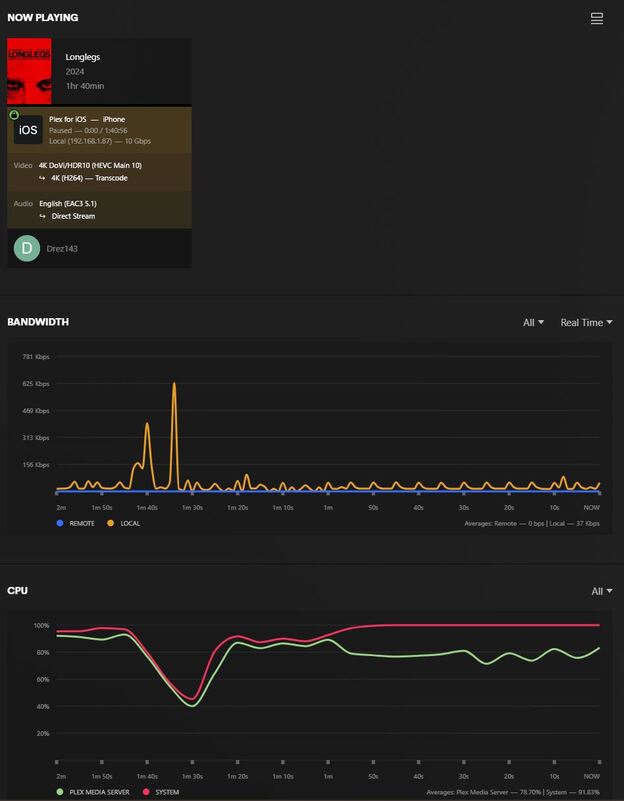
Pressing play, and simply pausing it on my phone, does not appear to cause the NAS to lock up.

But it is driving the NAS’s CPU to 100% utilization, even though the file is paused (and I even turned off the screen on my phone).

So is this just an issue for a lackluster NAS CPU?

The pictures below, show the only thing my NAS is doing is running Plex, which only my phone has the video paused.


I wanted you to STOP playback (terminate) not PAUSE the playback.
That causes PMS to behave differently internally.

This is very strange.

I can find NOTHING in your logs, other than a momentary burp (0.580 seconds), as it starts playback (you clicking the button)

Sep 20, 2024 09:07:30.649 [140523399093048] DEBUG - Audio Stream: 185024, Subtitle Stream: -1
Sep 20, 2024 09:07:30.688 [140523856587576] DEBUG - Completed: [192.168.1.87:55314] 200 GET /hubs/metadata/27068/related?includeAugmentations=1&includeExternalMetadata=1&includeMeta=1 (13 live) #4e99d TLS GZIP 507ms 18678 bytes (pipelined: 17)
Sep 20, 2024 09:07:30.895 [140523394698040] DEBUG - Request: [192.168.1.87:55314 (Subnet)] GET /library/augmentation/27068/relatedAlbums?includeExternalMedia=1&includeMeta=1 (13 live) #4e9b4 TLS Page 0-24 GZIP Signed-in Token (Drez143) (iPhone)
Sep 20, 2024 09:07:30.895 [140523701197624] DEBUG - Request: [192.168.1.87:55319 (Subnet)] GET /library/sections/1/all?actor=41210&id%21=27068&includeExternalMedia=1&includeMeta=1 (13 live) #4e9a6 TLS Page 0-24 GZIP Signed-in Token (Drez143) (iPhone)
Sep 20, 2024 09:07:30.897 [140523584224056] DEBUG - Request: [192.168.1.87:55320 (Subnet)] GET /library/metadata/27068/similar?includeExternalMedia=1&includeMeta=1 (13 live) #4e944 TLS Page 0-24 GZIP Signed-in Token (Drez143) (iPhone)
Sep 20, 2024 09:07:30.899 [140523724589880] DEBUG - Request: [192.168.1.87:55321 (Subnet)] GET /library/augmentation/27068/relatedTracks?includeExternalMedia=1&includeMeta=1 (13 live) #4e9a5 TLS Page 0-24 GZIP Signed-in Token (Drez143) (iPhone)
Sep 20, 2024 09:07:30.906 [140523701197624] ERROR - [Req#4e9a6] Unknown metadata type: folder
Sep 20, 2024 09:07:30.913 [140523701197624] DEBUG - [Req#4e9a6] Setting container serialization range to [0, 24] (total=-1)
Sep 20, 2024 09:07:30.942 [140523394698040] DEBUG - [Req#4e9b4] It took 70.000000 ms to retrieve 1 items.
Sep 20, 2024 09:07:30.961 [140523584224056] DEBUG - [Req#4e944] It took 90.000000 ms to retrieve 1 items.
Sep 20, 2024 09:07:30.967 [140523394698040] DEBUG - [Req#4e9b4] It took 60.000000 ms to retrieve 85 items.
Sep 20, 2024 09:07:31.039 [140523724589880] WARN - [Req#4e9a5] SLOW QUERY: It took 320.000000 ms to retrieve 1 items.
Sep 20, 2024 09:07:31.047 [140523701197624] WARN - [Req#4e9a6] SLOW QUERY: It took 260.000000 ms to retrieve 25 items.
Sep 20, 2024 09:07:31.067 [140523724589880] DEBUG - [Req#4e9a5] It took 60.000000 ms to retrieve 85 items.
Sep 20, 2024 09:07:31.138 [140523854478136] DEBUG - Completed: [192.168.1.87:55319] 200 GET /library/sections/1/all?actor=41210&id%21=27068&includeExternalMedia=1&includeMeta=1 (13 live) #4e9a6 TLS GZIP Page 0-24 243ms 14259 bytes (pipelined: 5)
Sep 20, 2024 09:07:31.

There’s nothing other than PMS running, native package, on the Syno?

Thanks for looking into all of this.

The only other stuff I have running on the Syno is qbittorrent and tautulli. All minimal resource users.

I guess I will just chalk this up as trying to tax the NAS too much, to the point it goes bonkers.

Now, I am still on 7.2.1, but I see that 7.2.2 (which has not natively been pushed to my NAS yet) kills the processing of HEVC and AVC media files.

It looks like the most recent versions of Plex do something about this? But I imagine this all means, that the NAS won’t even try to transcode this to my phone?

Would it be worth me pushing 7.2.2 to my NAS, or should I keep it at 7.2.1 at this point?

I would not push to 7.2.2 yet . Synology has put additional constraints on DSM which would only hamper your machine

I would suggest this –

  1. Uninstall Plex – Uninstall Only (Keep option)
  2. FileStation → Navigate to PlexMediaServer
  3. RENAME AppDataAppData.save
  4. Install the same SPK of PMS you have – HOWEVER
  5. Install using Plex Claim Token option
  6. Get Plex Claim token
  7. From the tab which opens, COPY the token (it’s only valid 5 minutes)
  8. Return to the install tab and PASTE the token into the box
  9. Click NEXT - Next - Done

It will now install and claim the new server for you

When you open Plex/web, you’ll see your server listed twice.

Once will be active… That’s the one to use
As you go through the Setup Wizard, change its Friendly Name to something obvious (for now)

Continue to setup one section as you normally would and see how well it works.

This topic was automatically closed 90 days after the last reply. New replies are no longer allowed.