Hi all, my DS815+ running a reasonably up to date DSM6 has died today, just won’t power up at all.
I may try a new PSU from amazon but suspect it’s more fundamental.
As a new NAS will be DSM7 and my old install is DSM6, is there anyway I can still migrate across or a I going to have to bite the bullet and set up a brand new plex server? I know there are process you are supposed to fix before updating to DSM7
Would I be able to find at least my library settings in a file on the HDD so I can replicate the set up manually?
Apols, I cant give any more info on server version etc as the NAS won’t boot.
Thanks
1815+ Power Issues
There are known problems with 1815+ models. Search online for “DS1815+ power issues”, “DS1815+ C2000” and similar terms. You’ll see many posts, YouTube videos, etc.
Moving to a DS1821+
Contact Synology support regarding moving your drives to the new NAS. It might be possible to simply move the drives, but verify with Synology first.
See How do I migrate data between Synology NAS (DSM 6.0 and later)?.
Plex Media Server
On DSM 6, the /Plex shared folder holds the database, preferences.xml (settings), thumbnails, etc. All the stuff that defines your server. If/when you move to the 1821+, you’ll want to preserve it.
Things changed quite a bit with DSM 7. However, migrating Plex from DSM 6 to DSM 7 is straightforward. See FAQ 27 - Migrating an existing PMS from DSM 6 to DSM 7.
Once you know more about moving to the 1821+ (does it run DSM 6, can you just move the drives, etc.), write back and we can then figure out the necessary steps for Plex.
Thanks for the links. Really helpful. The straight HDD migration looks good and by the looks of it, when you first set up then I can choose to install a previous version of DSM, so I’m downloaded the latest DSM6.
I’ve ordered the DS1821+ from amazon for delivery tomorrow.
Reading up on the DS1815+ power issues, it may be a simple new battery that is needed to get it to boot. Hopefully that works so I can download the DSM config, but no biggie if not.
Even if the battery works the 1815 had a more fundamental issue. I woke up this morning and it was rebooting every 6mins or so. Then when I was checking it out, I did a hard power down. It was after that it wouldn’t reboot. Reading up, it sounds like the hard power down is the cause of the battery issue.
Will see how we get on tomorrow if Amazon deliver it early enough. If not, then I won’t get to play with it till later next week.
Move from 15 to 21 should be as easy as moving the disc and turn on the power.
I have done this 3 times and it is fairly painless (3rd time was from 15 to 22).
Your 1815 is dead, its the Intel Atom “bug” that kills its. It’s inevitable.
I can concur with Migration.
Move the drives from one chassis to the other ( I kept in the same order )
Power it up
Let it reinstall DSM for you (DSM is on a separate parition) for that machine.
(Partition 1 = DSM , 2 = Swap, 3 = Your Volume)
Okay, so coin batteries arrived early doors, but as expected the old NAS remained dead.
Fortunately I had an old DS214Play, so popped one of the drives in there that wasn’t backed up and copied that to a USB. The other 6 used drives are all backed up on external usb already. Just thought I best to that before I caused carnage.
The new DS1821+ arrived in the afternoon. Less than 30mins and all back up and running.
- Popped the old drives in in the same order
- Booted and found the new IP address using the Synology Assistant (downloaded) from their site.
- Went to the new IP address and it was in ‘migrateable’ mode.
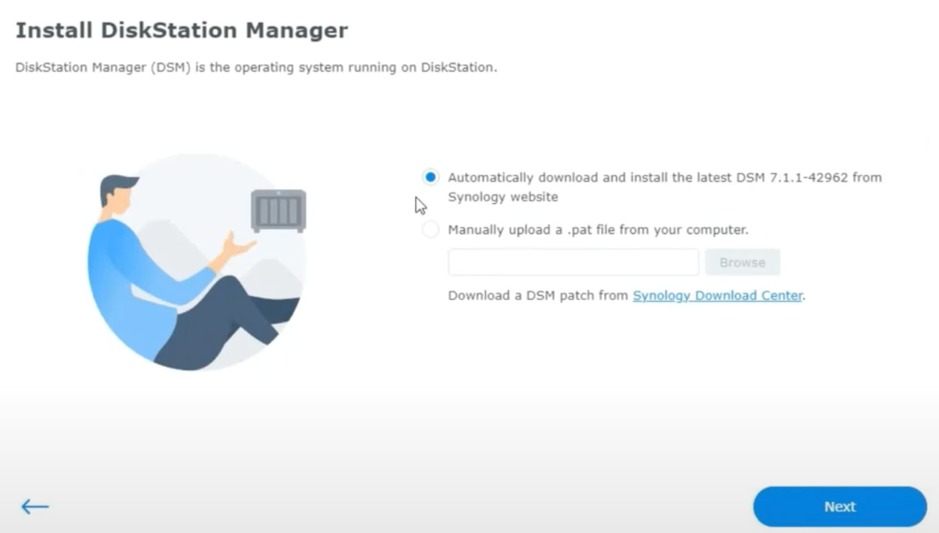
- Click to the Install DSM and chose manual install and browsed to the latest DSM6 that I had downloaded… but it failed and said it was corrupted.
- Revert to installing the latest method, but that failed saying I had no internet which was odd.
- Anyhow, quick google and the DSM6 I had downloaded was the latest ‘patch’ file at 85Mb, so found the full file ar 200Mb and it now installed.
- Logged in and the Raid was in degraded mode (probably due to me putting one of the Raid drives in the DS415Play, so just kicked off the repair.
- Plex loaded fine.
- Went to my router and updated the port forwarding address
- Checked plex on my iPhone (with Wifi off, so 5G) and film played fine.
So all in all, everything seems to be back working… just £1k lighter for it. The 1815+ was 9 years old, so can’t complain too much and it had been fixed twice under warranty.
Thanks for the help guys.
Will bite the bullet some time and follow the guide to do the plex update so I can upgrade to DSM7. Are these still the correct instructions? DSM 7 - Plex Media Server - Release Info & Migration instructions - #6 by ChuckPa