Hello,
I have request to Synology to allow transcode : Demande de renseignements sur les fonctionnalités | Synology Inc.
Hello,
I have request to Synology to allow transcode : Demande de renseignements sur les fonctionnalités | Synology Inc.
Finally, some prominent YTers are picking up our story:


Would you all mind taking a minute and sharing your thoughts here?

I know the kernel mods needed to restore the functionality.
Those mods were pressented elsewhere in this forum.
All it would take is SOMEONE to make a SPK file to support that kernel update (which is trivial). 
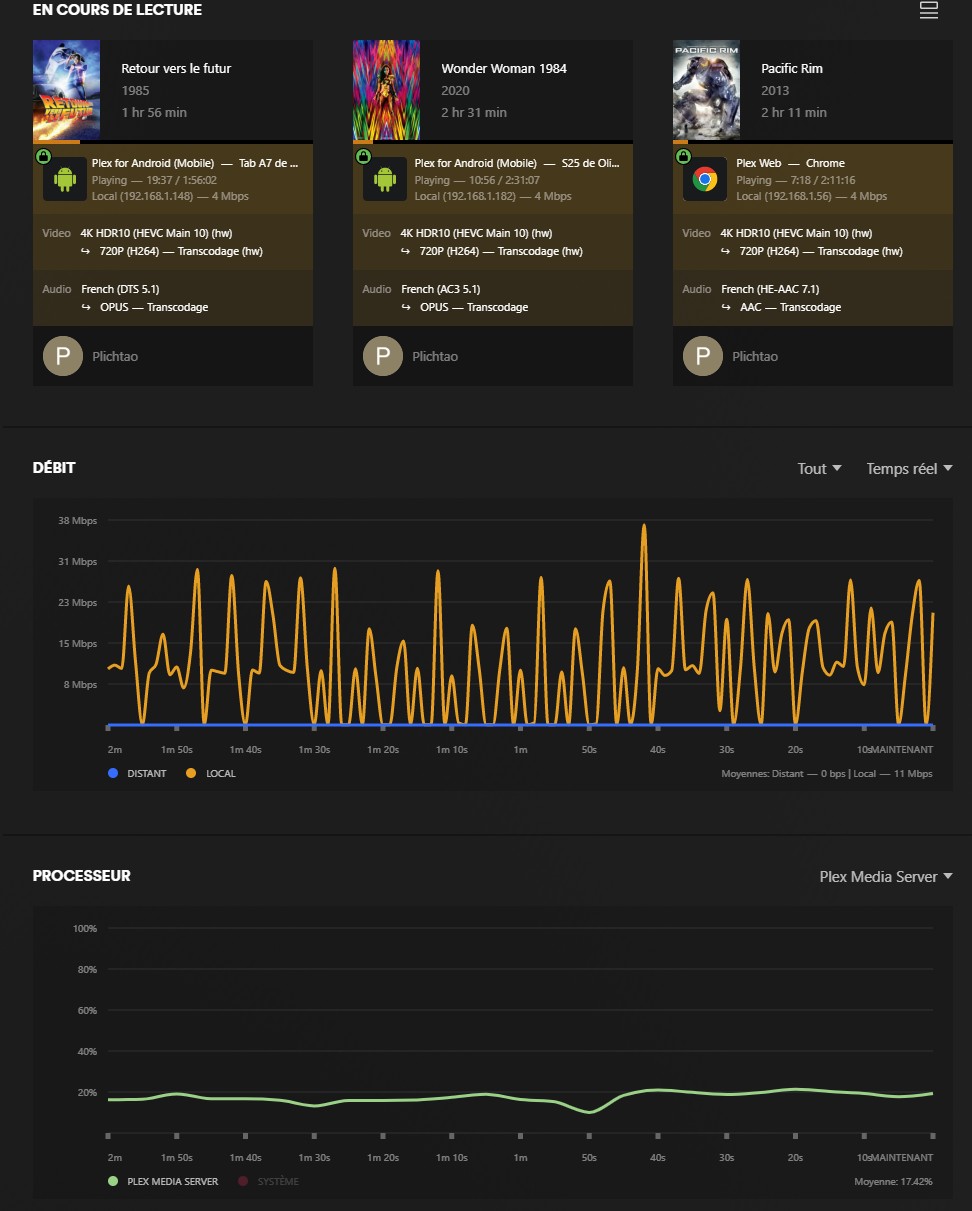
I just tested it and unfortunately it doesn’t work on my DS425+ for videos with 4K resolution: the hardware transcoding starts (I can read “(hw)” but after a few seconds “(hw)” disappears and the CPU activity climbs to 100%. I redid the unloading / loading sequence of the .ko files 3 times (after a reboot each time), I tested different files, same result. On the other hand, it works with 720p and 1080p videos (I tested 5 or 6 without problem). I think there is not much missing for all resolutions to be correctly supported.
I have tried it on 2 425+, and 4k hw transcode works flawlessly on both.
Check the HEVC setting in Plex Server transcoder settings.
Great! It seems to work much better this way! There are two settings for HEVC encoding: for the first, I have the choice between: “never” (but it doesn’t work here), “HEVC videos only” (it does!), or “always.” Do you also recommend checking “Enable HEVC optimization (experimental)”?
I tested it on a single video; I don’t have much time this morning; I’ll test it again tonight. Thanks for your help!
‘HVEC Sources Only’ is generally the best option for Transcoding, especially as intel Quicksync really shines at AVC transcoding, so you wouldn’t want to transcode AVC media to HVEC (‘Always’ setting), it would just result in higher CPU usage.
I don’t think the Optimization setting affects on the fly transcoding. But is for if you manually optimise your media for different scenarios within Plex. (Creating Optimized Versions -Support)
Another video:

So, this is the same working method that we have been talking about?
Yep same fix, it’s just been compiled into a script.
I spent a lot of time testing my DS425+ with the appropriate drivers for hardware transcoding. I ran tests with 9 video files of varying resolution and bitrate on various clients: a Samsung Galaxy S25 smartphone (5G connection), a Samsung Galaxy Tab A7 tablet, an Amazon Firestick TV 4K Max connected to an old TV, and two fairly old laptops (one based on a Core i5-6300HQ, the other on an AMD A6-9220). All the machines involved in this test have the latest version of Plex. For each of these clients, I forced hardware transcoding by selecting a lower resolution and bitrate than the original file. Here are my comments:
A few months ago, I had a Synology DS1520+, which I replaced with a DS425+ (the worst idea of my life…) and it served as my Plex server for years, without ever encountering a hardware transcoding problem on 4K videos, whether locally or remotely. So, given these mixed results, I told myself that the versions of Plex (client and servers) had evolved in the last few months since the sale of my DS1520+. So I used my personal PC to make a Plex server under Windows: a core i9-13900K from which I removed the GeForce graphics card to be sure to use Intel Quicksync. I used the same files, under the same conditions. And there, no problem: all 4K files are transcoded in hardware regardless of the client! I’m aware that there’s a gap of several generations between the DS425+'s J4125 and the Core i9-13900k, but I’m sure the DS1520+'s J4125+ performed very well in hardware transcoding 4K videos.
Has anyone observed the same issue using the correct drivers on a DS225+ or DS425+?
From the way you describe, it seems we need to depend on the client, (the device that plays the video) being powerful enough to play 4K video?
For me so far I haven’t found an issue with 4k on multiple devices (phones, multiple laptops, TV’s) I don’t have a firestick or similar to try unfortunately.
HW Transcoding has always triggered.
@EZTutty, @jingloon, @ChuckPa, after spending a lot of time testing the new drivers for the DS425+ with different clients, and comparing it with the behavior of my i9 13900k as a Plex server, here’s what I get:
As you can see, hardware transcoding doesn’t trigger for UHD files with a resolution of 3840x2160 on all my devices except my Samsung Galaxy S25 smartphone, i.e., two Samsung TVs (OLED 2024 and QLED 2019), two older laptops, and a Samsung Galaxy A7 tablet. However, I have a movie with a resolution of 3840x1606 that doesn’t cause any problems on all these devices.
After examining the Plex logs and searching a bit on the internet, I found a clue: tone mapping. I disabled it in the transcoder options, and now hardware transcoding works for all my devices, at any resolution.
In summary: tone mapping enabled, Linux 5.10.55+, and a resolution of 3840x2160 are the conditions for hardware transcoding to not work. From memory, I had no issues on my old DS1520+ (which runs on Linux 4.4.302+). @ChuckPa, does this specific issue ring a bell? Because without tone mapping, the colors appear very bland.
@EZTutty , are you running Plex in a container, or with the Plex app for Synology NAS? Did you have tone mapping enabled? If so, can you share the transcoder settings?
Without tone mapping, it works well but colors are not ok :
Yes. It means the kernel build is not correct for HW transcoding access in all modes.
I see now that you are transcoding from hevc to h264.
I haven’t been getting these issues as all my clients support hevc playback.
When i disable HEVC Encoding i do see the same issue with Tone Mapping not allowing HW Transcode.
at the point HW Transcode fails dmesg shows
[994490.949451] i915 0000:00:02.0: [drm] Resetting rcs0 for preemption time out
[994490.957434] i915 0000:00:02.0: [drm] Plex Transcoder[15675] context reset due to GPU hang
[994490.970172] i915 0000:00:02.0: [drm] GPU HANG: ecode 9:1:e757fefe, in Plex Transcoder [15675]
With my Amazon Fire stick TV 4k Max (which supports hevc playback) the problem remains, even if activate HEVC Encoding. The only way for me to get this works on every devices with every file is to desactivate tone mapping …
Some Asustor NAS works perfectly with hardware transcoding with Plex, and ADM is based on Linux 5. So perhaps there’s a way to make things work perfectly on our DS425+ ? Perhaps there is an additional component, in addition to the 9 custom files already added, which would take care of tone mapping?
I believe most of you have heard about Synology’s reversal of HDD restrictions.
Hope they can do it for the HW transcoding.
sidetrack: saw this on Reddit. Not sure if it’s safe for DSM7.3
We discussed this solution here: https://www.synoforum.com/threads/225-or-425-owners-plex-hw-transcoding.15094/page-4
It also works on DSM 7.3, as well as on 7.2.2.
The only limitation concerns tone mapping on 2160p videos, which unfortunately causes a crash when attempting hardware transcoding (so you must disable tone mapping). Otherwise, for 1080p, 720p, 480p, etc. videos, there is no problem.
Another day, another video of hardware transcoding:

Actually, to make the video even better, NASCompare should ask:
Why Beestation allows it and not the 25+ series? Despite the same cpu processor?
I would say this is a choice on Synology’s part to promote its Beestation+. But by making this choice, they have alienated a good portion of users who bought a DS225+ or DS425+.