Okay I see the variable in docker container settings. Fixed it. Like I said this has been fine for over a year. Wonder what changed to cause it to default to “UTC”.
System Timezone: America/Los_Angeles (UTC-0700)
Okay I see the variable in docker container settings. Fixed it. Like I said this has been fine for over a year. Wonder what changed to cause it to default to “UTC”.
System Timezone: America/Los_Angeles (UTC-0700)
We made TZ more strict in the last update.
Tautulli is connecting fine to Plex and I can see if someone is playing something but the history hasn’t updated in over a week. I tried refreshing the history and that didn’t work either.
Logs here
tautulli (1).log (244.3 KB)
FAQ’s: https://github.com/Tautulli/Tautulli-Wiki/wiki/Frequently-Asked-Questions#history-q3 since you will be pointed there by one of the Tautulli devs/support person.
-Shark2k
Thank you. I will check some of those things. I know that the sessions had completed. I updated Tautulli about a week ago and so if some of those settings changed, then that may be it.
Thanks for pointing me to the correct area of the FAQ.
So, here is what I found
If you have satisfied all the above requirements, but nothing is still being logged, then the sessions might be stuck inside the database. Go to Settings > General > Show Advanced button at the top > Flush Temporary Sessions > Flush to flush the database, and history logging should be working again. When I try to Flush, I get a red block message that says "Flush sessions failed"
Have you tried restarting? Have you updated Tautulli?
Should be:
v2.1.32
master
6d35bd7947bad9e50772ab49bcc6c9c34979eeaa
Have you checked your database for corruption? Click the “Status” link beside the database file.

If the database is not okay, read the FAQ:
I have rebooted and I am on the latest version (it was that update when this started happening). The status check of the databse showed these errors:
{“message”: “Database not ok”, “result”: “error”, “integrity_check”: "** in database main **\nOn tree page 34354 cell 0: 2nd reference to page 24257\nOn tree page 34354 cell 1: 5 of 6 pages missing from overflow list starting at 24236\nOn tree page 34354 cell 2: 5 of 6 pages missing from overflow list starting at 24251\nPage 24237 is never used\nPage 24239 is never used\nPage 24240 is never used\nPage 24242 is never used\nPage 24243 is never used\nPage 24249 is never used\nPage 24250 is never used\nPage 24253 is never used\nPage 24255 is never used\nPage 24256 is never used\nPage 24258 is never used"}
I did the “easy way” and restored an earlier backup (the earliest I had was from 3 days ago and I used it). But I get the same messages.
So, will the “hard way” work? I am fairly capable but I don’t want to go through the steps if it just won’t work either way.
I went ahead to do the “hard way”. When I got to step 9
9. Select the .sql file you saved from step 4, and save the new file as tautulli.db . Do not overwrite your original file!
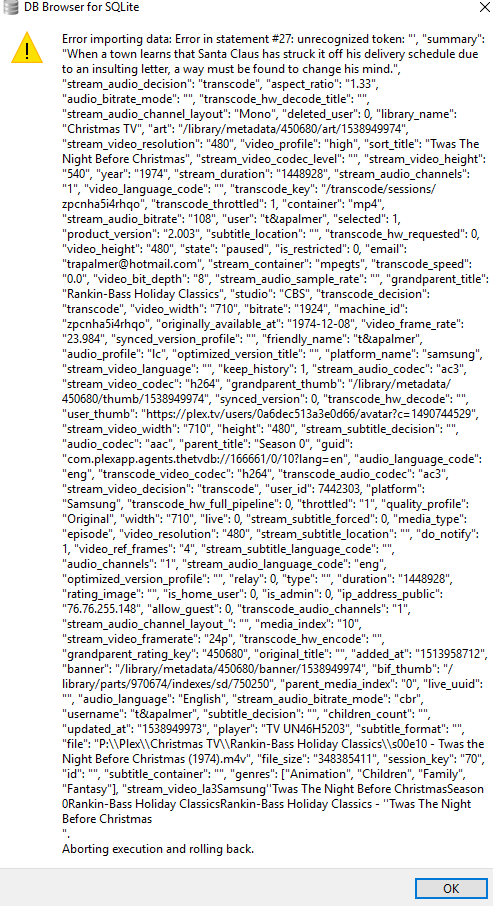
I got the attached error and could not continue.
Looks like your database is really bad. One of the rows in your database is really corrupted.
Repeat the steps, but on step 5 do not check “Keep column names in INSERT INTO” and “Multiple rows per INSERT statement”.

You’re going to need to open up the .sql files (with notepad or another text editor) and divide the file into smaller .sql files. Each line in the file starting with INSERT INTO in the .sql file is one row in the database. I don’t know how large your database is, so maybe try a few hundred or few thousand rows at a time. Import each of the smaller .sql files one by one. If you run into an error, then you know that the corrupted line is within that smaller file, so split it up again into even smaller files. Keep doing this until you find the corrupted row. Then you can just skip inserting that row and only lose one entry in your history.
Thank you. I did it just a little different. I went through step 5 and changed the settings as you said. Then, I opened the file in WordPad and searched for the description of the media as it was shown in the error message above (“Santa Claus has struck it off his delivery schedule”). That took me to the corrrect record; which happened to be the very last record before rebuilding the indexes. You can see below that it definitely was corrupted.

Then I followed the rest of the steps and deleted that record and it is now recording history again!
Thanks again!!
The issue I had above reminded me of another question I have that sounds very neophyte-ish but I can’t figure it out (and couldn’t find it in the FAQ, probably because it is so stupid).
When I start my computer, Plex starts and I can launch Tautulli with no issue. But, if I shutdown Tautulli (like I had to do multiple times while troubleshooting my issue with History), the only way for me to restart Tautulli is to reboot the PC again. I know there has to be an easier way. I tried launching the Tautulli.py but it stops when I close the command window. I looked where I thought the startup folder was but I don’t have anything there.
So, what do I do to launch without rebooting???
@rbeatse - Using Windows?
Don’t use the *.py file to start Tautulli.
Double clicking a .py file defaults to using python.exe, which opens a python shell window.
Create a shortcut anywhere (Desktop), and use pythonw.exe. It’s a python instance specifically for windows that will run without a terminal if you specify a file to run (at least, it does for me, I don’t remember if I ever changed a shortcut setting to make it do so)
Example, my shortcut target is as below. (your drive and install locations likely differ, of course)
D:\PlexCache\Python\pythonw.exe "D:\PlexCache\tautulli\PlexPy.py"
Most default would be like
C:\Program Files(x86)\Python\pythonw.exe "C:\tautulli\PlexPy.py"
EDIT - And after typing all above, I see it IS in the FAQ under Windows.
The interactive instruction
That worked! Thank you!
hey i just installed this on my unraid server but im stuck with authentication error i.e.
“We were unable to complete this request.
You may now close this window.”
abyone know how to fix this.
Sorry i don’t get it.
How can we fix this.
Unfortunately there is nothing to do but wait for Plex to fix this, as the problem is on their end.
Resolved.
Here is a current work around for the Plex OAuth issue until Plex fixes it:
&context[device][product]=Plex Web to the end of the URL.thanks that works, now only thing left for me to fix is that log issue it somehow can’t access my plex media server logs, im getting “no such file or directory exists” error.