not sure im doing this correctly, but check out the screenshot. refresh, and still the same.
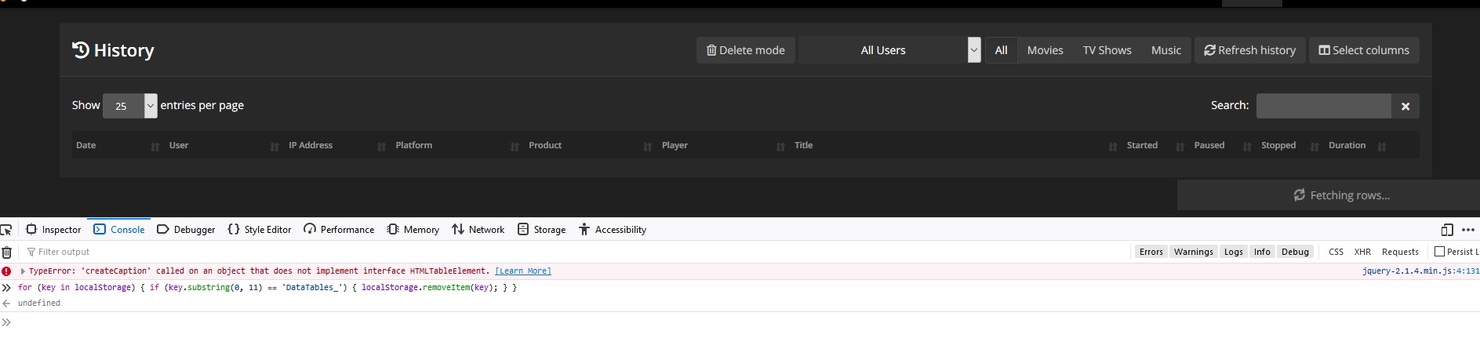
It’s still being cached by your browser. Try CTRL+F5 for a hard refresh.
tried that, and ive just gone to another PC, thats never ever visted my Tautulli site before, and it does the same thing, so cant be a browser cache issue
Then I’m out of ideas.
i need the release before for the qnap, any idea where i can download it.
Check Tautulli in QNAP Club repository:
Click in older versions and select the version you want. First copy the config files to have a backup.
Regards
Hello all,
I have installed Tautulli on a CentOS vm. No issues in getting it installed and running. I am noticing that the web server is bound to 0.0.0.0:8181. If I try to hit the actual IP of the vm, in this case 192.168.1.242:8181 it times out. Do I need to change the config so that the web server is actually bound to the real IP rather than localhost?
Thanks,
Steve
I get this error message lately and Tautulli does not run anymore. What can I do?
Websocket :: Unable to open connection: ‘ascii’ codec can’t decode byte 0xce in position 76: ordinal not in range(128).
0.0.0.0 means bind to all interfaces so it should work. Your issues is somewhere else outside of Tautulli.
No logs = No help.
1 Like
With Logs now: tautulli.log (4,0 MB)
I do not download log files. Please read the wiki page I linked above on the proper way to provide logs.
Hi @SwiftPanda16,
This isn’t the exact issue mentioned above, but it is an issue I noticed for the first time tonight.
The audio stream is incorrectly displayed from what it actually is (it’s for Mrs. DoubtFire and it was started at 2019-09-07 19:23:47 in the logs). The stream for the audio is DTS-HD MA 5.1 but it is showing as AC3 5.1. I’m including Gists with the Tautulli logs, the activity XML and the stream info (wasn’t sure how you wanted those last 2 because it doesn’t say in the Wiki, but based on your comment above, I’m hoping a Gist for each of those would work).
I’m also including a screenshot so you can see what Tautulli is actually displaying:
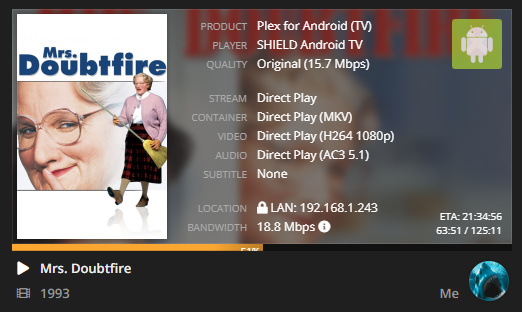
Update: Image showing 2 remote streams, one with 5.1 showing blank audio information and the other with stereo showing the audio information.

I have also added additional links with the files to include the Family Guy episode (in log at 2019-09-07 21:15:29)
Tautulli Log Gist:
https://gist.github.com/shark2k/a2dafc07f550be89c15ed40001cb4333
Tautulli Log Update [with blank display]:
https://gist.github.com/shark2k/7a19af13e21d51d7aa27ca5ae9db6100
Activity XML Gist:
https://gist.github.com/shark2k/155ff85effb49426c2e614d9549d2ff2
Activity XML Update [with blank display]:
https://gist.github.com/shark2k/da80741c4718911b3ec2bd4dce274668
Stream Info Gist:
https://gist.github.com/shark2k/c11fe66657052db85904dfa34770adf3
Stream Info Update [with blank display]:
https://gist.github.com/shark2k/ada241d9185d536901f8a9cb344e144d
UPDATE 2
Hopefully this is the XML info you want, taken from the Plex view XML link:
Mrs. Doubtfire:
https://gist.github.com/shark2k/4cebc1616d64fb893b18971260bdac21
Family Guys s10e03:
https://gist.github.com/shark2k/e24d87b8823eca1b804aaa2c8a34eaf8
END UPDATE 2
Hopefully that should be all you require based on the links you supplied in your response to @JamminR
I am wondering if this is the same issue as the blank audio stream but presenting itself differently because I’m local vs remote which is the only times I believe so far have seen the blank audio stream. However, when I see that again and I’ll get the same info as provided above.
-Shark2k
Has anyone deployed Tautulli on a CentOS virtual machine? I have a weird issue where I cannot hit the web server, even from the physical host. Not sure what I am doing wrong.
Thanks, can you also edit to add a gist of the XML info for the movies and episode.
Are you referring to directly from Plex?
I made a gist for the XML from Tautulli when doing the triple click on the Activity header and included that in the post, so just want to clarify what specifically you are asking for so I get you the correct information.
UPDATE: Just added the XML info from Plex, so hopefully that’s what you want, otherwise let me know and I’ll add it.
-Shark2k
One other thing…should Tautulli say the web server is running? My last msg says the following:
Starting Tautulli web server on http://0.0.0.0:8181/
Just wondering if it might be stuck and thats why it will not resolve when I hit it.
That is the last line of the startup sequence. Tautulli has started completely and is running.
@steveFP - You likely have a firewall blocking port 8181 even from localhost.
Use web search open CentOS firewall port 8181 and there will be many articles. Some old (iptables), some new (firewalld).
Try the one that fits your current firewall app.
@shark2k - Thanks for providing info - after 30+ movie hours and 15+ tv hours last weekend for my shared users, it’s been quiet ever since. I think most my shared friends/family were enjoying the (American) holiday weekend and watching content. I can’t seem to catch any live now.
I’ll provide same info if I can catch it live.
2 Likes
Thank you for the tip. It worked!
