Whenever you see this hopefully it’ll be a quick fix.
No rush and not a high priority just want to bring it to your attention.
Also, let me know if you need anything specific aside from what I included (I followed what the guide said plus a few more).
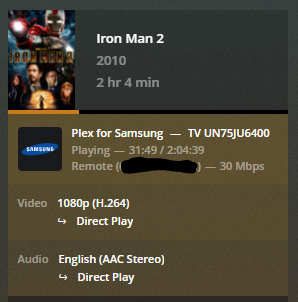
So to issue. I am seeing a display issue where the audio codec is incorrect on the Tautulli dashboard. In this example, my friend is streaming Iron Man 2 which has an AAC Stereo track but Tautulli is showing it as DCA Stereo. Now, I will add that I believe my friend started off with the 5.1 DTS surround track and then changed to the AAC Stereo, however I believe I might have seen this in the past with starting with a non DTS stereo track (can’t be 100% certain on that). Anyway, Iron Man 2 was started on 7/9 at 18:26:18.
I’m including a screenshot from the Plex Dashboard and Tautulli of the stream at the same point in time, plus the info from triple clicking on the Activity header and also triple clicking on the word Stream in the Now Playing card, plus the log as is requested.
Again, not urgent or a big issue, so whenever you see this let me know if there is anything else that I can get you that would help if all that I provided is not enough.
It’s not something that happens super frequently (at leas that I notice).
I see it every so often and I don’t believe I have ever seen it from something that I was streaming local, I believe it’s all been from remote users.
Like I said, not a big deal, would really just be nice to have the codec information correct but if it’s not something that is easy to track down, I completely understand.
hi, just have a Problem with showing up Users… It dont shows my users, i have already verified server again and checked the Identity but it still dont show up, any ideas what i can check also?
2020-07-12 11:59:09 - ERROR   :: MainThread : Unable to update from git: Aborting
2020-07-12 11:59:09 - INFO    :: MainThread : Tautulli is restarting...
2020-07-12 11:59:09 - INFO    :: MainThread : Restarting Tautulli with ['/usr/bin/python', '/opt/Tautulli/Tautulli.py', '--config', '/opt/Tautulli/config.ini', '--datadir', '/opt/Tautulli', '--quiet', '--daemon', '--nolaunch']
2020-07-12 11:59:09 - INFO    :: MainThread : Starting Tautulli v2.5.3
2020-07-12 11:59:09 - INFO    :: MainThread : Linux 4.9.0-***-***-***-amd64 (#1 SMP Debian 4.9.144-***-***-***.1 (2019-02-19) - Debian GNU/Linux 9 stretch)
2020-07-12 11:59:09 - INFO    :: MainThread : Europe/Berlin (UTC+0200)
2020-07-12 11:59:09 - INFO    :: MainThread : Python 2.7.13 (default, Sep 26 2018, 18:42:22) [GCC 6.3.0 20170516]
2020-07-12 11:59:09 - INFO    :: MainThread : Program Dir: /opt/Tautulli
2020-07-12 11:59:09 - INFO    :: MainThread : Config File: /opt/Tautulli/config.ini
2020-07-12 11:59:09 - INFO    :: MainThread : Database File: /opt/Tautulli/tautulli.db
2020-07-12 11:59:09 - INFO    :: MainThread : Checking if the database upgrades are required...
2020-07-12 11:59:09 - INFO    :: MainThread : Checking if configuration upgrades are required...
2020-07-12 11:59:09 - DEBUG   :: MainThread : Trying to execute: "git rev-parse HEAD" with shell in /opt/Tautulli
2020-07-12 11:59:09 - DEBUG   :: MainThread : Git output: 35a0242037d8393816c7254ed0618acc2efb884a
2020-07-12 11:59:09 - DEBUG   :: MainThread : Trying to execute: "git rev-parse --abbrev-ref --symbolic-full-name @{u}" with shell in /opt/Tautulli
2020-07-12 11:59:09 - DEBUG   :: MainThread : Git output: origin/master
2020-07-12 11:59:09 - INFO    :: MainThread : Retrieving latest version information from GitHub
2020-07-12 11:59:09 - DEBUG   :: MainThread : Requesting URL via GET method: https://api.github.com/repos/Tautulli/Tautulli/commits/master
2020-07-12 11:59:09 - DEBUG   :: MainThread : Latest version is 1698622d63f406d50da4429e2b5d1b5d55893358
2020-07-12 11:59:09 - INFO    :: MainThread : Comparing currently installed version with latest GitHub version
2020-07-12 11:59:09 - DEBUG   :: MainThread : Requesting URL via GET method: https://api.github.com/repos/Tautulli/Tautulli/compare/1698622d63f406d50da4429e2b5d1b5d55893358...35a0242037d8393816c7254ed0618acc2efb884a
2020-07-12 11:59:10 - DEBUG   :: MainThread : In total, 325 commits behind
2020-07-12 11:59:10 - INFO    :: MainThread : New version is available. You are 325 commits behind
2020-07-12 11:59:10 - DEBUG   :: MainThread : Requesting URL via GET method: https://api.github.com/repos/Tautulli/Tautulli/releases
2020-07-12 11:59:10 - INFO    :: MainThread : Tautulli PlexTV :: Requesting resources for server...
2020-07-12 11:59:10 - INFO    :: MainThread : Tautulli Config :: Writing configuration to file
2020-07-12 11:59:10 - INFO    :: MainThread : Tautulli PlexTV :: Using user-defined URL.
2020-07-12 11:59:10 - INFO    :: MainThread : Tautulli Config :: Writing configuration to file
2020-07-12 11:59:10 - INFO    :: MainThread : Tautulli Users :: Requesting users list refresh...
2020-07-12 11:59:11 - INFO    :: MainThread : Tautulli Users :: Users list refreshed.
2020-07-12 11:59:11 - INFO    :: MainThread : Tautulli Libraries :: Requesting libraries list refresh...
2020-07-12 11:59:12 - INFO    :: MainThread : Tautulli Config :: Writing configuration to file
2020-07-12 11:59:12 - INFO    :: MainThread : Tautulli Libraries :: Libraries list refreshed.
2020-07-12 11:59:12 - INFO    :: MainThread : Tautulli NotificationHandler :: Starting background notification handler (2 threads).
2020-07-12 11:59:12 - DEBUG   :: MainThread : Tautulli Monitor :: Checking for active streams.
2020-07-12 11:59:12 - INFO    :: Thread-3 : Tautulli WebSocket :: Opening websocket.
2020-07-12 11:59:12 - INFO    :: Thread-3 : Tautulli WebSocket :: Ready
2020-07-12 11:59:12 - INFO    :: Thread-3 : Scheduled background task: Check GitHub for updates
2020-07-12 11:59:12 - INFO    :: Thread-3 : Scheduled background task: Backup Tautulli database
2020-07-12 11:59:12 - INFO    :: Thread-3 : Scheduled background task: Backup Tautulli config
2020-07-12 11:59:12 - INFO    :: Thread-3 : Scheduled background task: Refresh Plex server URLs
2020-07-12 11:59:12 - INFO    :: Thread-3 : Scheduled background task: Refresh users list
2020-07-12 11:59:12 - INFO    :: Thread-3 : Scheduled background task: Refresh libraries list
2020-07-12 11:59:12 - INFO    :: MainThread : Tautulli WebStart :: Initializing Tautulli web server...
2020-07-12 11:59:12 - INFO    :: MainThread : Tautulli WebStart :: Starting Tautulli web server on http://0.0.0.0:8181/
2020-07-12 11:59:12 - INFO    :: MainThread : Tautulli is ready!
2020-07-12 11:59:13 - INFO    :: CP Server Thread-7 : Tautulli Config :: Writing configuration to file
2020-07-12 12:00:39 - INFO    :: CP Server Thread-9 : Tautulli Config :: Writing configuration to file
2020-07-12 12:00:59 - INFO    :: CP Server Thread-9 : Manual users list refresh requested.
2020-07-12 12:00:59 - INFO    :: CP Server Thread-9 : Tautulli Users :: Requesting users list refresh...
2020-07-12 12:01:00 - INFO    :: CP Server Thread-9 : Tautulli Users :: Users list refreshed.
2020-07-12 12:01:04 - INFO    :: CP Server Thread-10 : Tautulli Config :: Writing configuration to file
2020-07-12 12:13:15 - INFO    :: CP Server Thread-5 : Tautulli Config :: Writing configuration to file
Aside from deleting the Tautulli folder in /Application and removing the .plist in LaunchAgents, what else I need to do to completely remove Tautulli in Mac?
I update my Docker container images with a script and remake them. Something killed Tautulli Docker for me. All my other containers are working properly and are treated the same way.
$ docker logs tautulli
Running Tautulli using user _apt (uid=100) and group users (gid=100)
This account is currently not available.
I tried another user and got the same error. These Users work fine in my other containers. Where should I start poking around? I think I’m using the official Tautulli docker, should I be using the one from Linuxserver.io?
This has worked for a very long time and I changed nothing to break it.
EDIT: FYI This may have broken a while ago, I noticed my Tautulli scripts weren’t working but I’m not sure when the container stopped working.
Thanks! I can do that. If I link Plex logs though, how do I set it up so tautulli user has permission? I just add my new tautulli user to that group? Previously my containers all just used the same built-in user so they can all access the same volumes, is that a security issue or something? Asking because I can change up my practices if so, I’ve been learning Linux as I go. Thanks again for the help.
You can create one user per app or create one “docker” user for all your apps. It depends if you want to separate them out or not. Just don’t use the built-in system users.
I use conky for the dashboard on my linux desktop and in the conky configuration, i use the tautulli API to retrieve the activity and then pipe it through jq to pull out the direct play, stream and transcode counts along with the lan and wan bandwidth.