The application "Plex Media Server" can't be opened

the title is the message I get when I click on the icon on my desktop. here is a picture of that icon:

here is the name of the .zip I got the server form. I think it includes the version.

PlexMediaServer-1.18.0.1944-f2cae8d6b-x86_64

here is my computer info:

I am on a restricted user, but I have permission to use the application.

After trying to open try going to preferences /security and Privacy / general/ allow apps downloaded

Not the same problem, but I will check anyway. I’ve only ever experienced that problem with a security logo in the window.

I have the app downloaded. there is not a notification in security and privacy to allow it.

there is no option to allow an application. it has not triggered a warning with apples system

Hutonahill ! Any luck getting that to run?
Let’s assume you went to https://www.plex.tv/media-server-downloads/ and you grabbed the file latest stable PMS for Mac.


1.18.0.1944-f2cae8d6b
October 11, 2019

SHA-1 Checksum
44822be261764138329453049044801b8fa3e31d


Let’s have you verify the file PlexMediaServer-1.18.0.1944-f2cae8d6b-x86_64.zip that you downloaded. I’ll guess that file is in your Downloads directory.

openssl dgst -sha1 PlexMediaServer-1.18.0.1944-f2cae8d6b-x86_64.zip

The SHA1 checksum it spits out must match the one listed above. Does it?
If it does, please right click on the zip file in Finder, and choose
Open with … then choose Archive Utility
Do that so you uncompress it with Apple’s built in Archive Utility, not some 3rd party app.
Let us know how you get along.

@nibbles
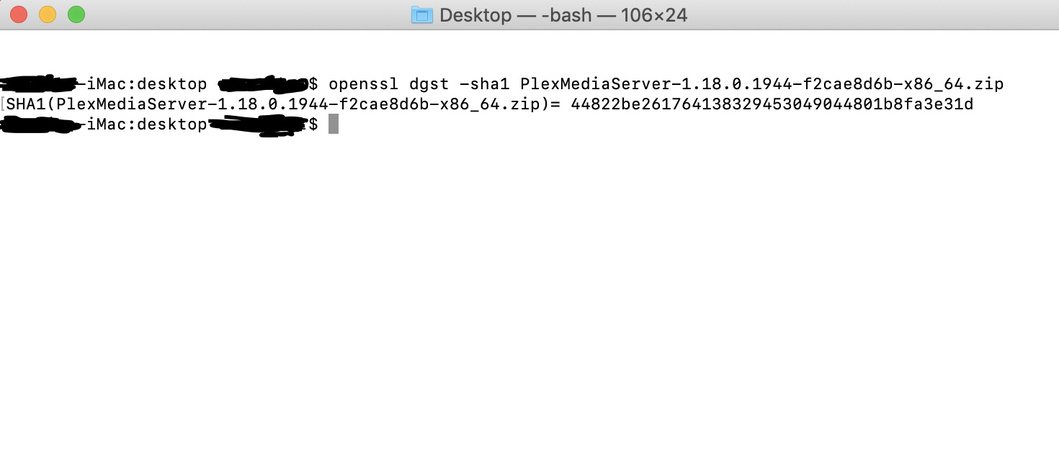
yes, it’s the right .zip. I don’t know what the next bit means, but here is a screenshot of my terminal window:

I followed your instructions with the utility archive tool. I got the same results.

there is no prompt to allow the application to operate in any way.

dragging the application to an applications folder doesn’t help.

They cut my power for a few days in California. As far as your issue goes, it’s possible your limited user rights are a factor. See if you can get some help from your admin to install the program for all users. It’s just a program for watching videos and playing music.

In did. There is no difference.

Does the admin user get the same error trying to open the Plex Media Server app?

yes. there is no noticeable diffrance.

Hello again. I was able to recreate your issue. It happens when a perfectly good application has its executable permissions stripped from it by Antivirus, Anti-Malware, Security, or File Sharing software.

We could prove that by listing the permissions.
Here are what correct files look like:

nibbles$ ls -l /Applications/Plex\ Media\ Server.app/Contents/MacOS

Executables

And below is what incorrect files look like on your computer, where all the files are missing the x for executable:

Perms

If your files lack the executable bit as I have deduced, then we could fix that by setting them correctly.

nibbles$ chmod a+x /Applications/Plex\ Media\ Server.app/Contents/MacOS/*

If you need the admin to fix the permissions, then their command would be:

nibbles$ sudo chmod a+x /Applications/Plex\ Media\ Server.app/Contents/MacOS/*

You can run the ls -l command from above to verify that you’ve set them correctly.

It might be good to understand why they got changed. What do you have installed from that list, anything? ESET? Malwarebytes?

okay good luck!

thanks, I will have to try that.

the only file protections we have on our Mac is what came on it with OSX

we do have google drive installed on our computer though…

@nibbles i ran the first command (nibbles$ ls -l /Applications/Plex\ Media\ Server.app/Contents/MacOS) as an admin and i got what looks like the correct files:

. i believe this means that we have distant problems. BTW i tried running the application as the administrator and got the exact same results.

Going out on a limb here, can you show your Firewall option settings. Found in Security & Privacy System Preferences Pane

as of right now, fire wall is off.

That’s good news the firewall is off and the permissions are correct.
In general the error message you get is a good indication of what’s happening.
When I alter the permissions on MediaInfo.app:

$ pwd
/Applications/MediaInfo.app/Contents/MacOS
$ chmod a-x ./MediaInfo 
$ ls -l
/Applications/MediaInfo.app/Contents/MacOS
total 24704
-rw-r--r--@ 1 nibbles  staff  12647232 Sep 10 13:23 MediaInfo

and then I click MediaInfo in my Dock to start it, I see your type of error:
Example

Even with the error, I can get a positive result when I try to run the app from the command line. Or the command line could yield more debug information. Let’s try it with MediaInfo. I’ve shown it won’t open with altered perms, and gives the same error as yours. On the command line, however, it will start:

nibbles$ /Applications/MediaInfo.app/Contents/MacOS/MediaInfo

When I issue that command, the application starts normally but is being run from the terminal. The terminal tab that’s open will be busy until I quit MediaInfo. So that is an example of how an app can still be run from the command line in certain cases.


Let’s have you issue a similar command with PMS and tell us what happens, and whether you get more information on the command line:

/Applications/Plex\ Media\ Server.app/Contents/MacOS/Plex\ Media\ Server

should be the command unless I made a typo. Good luck!

This topic was automatically closed 90 days after the last reply. New replies are no longer allowed.