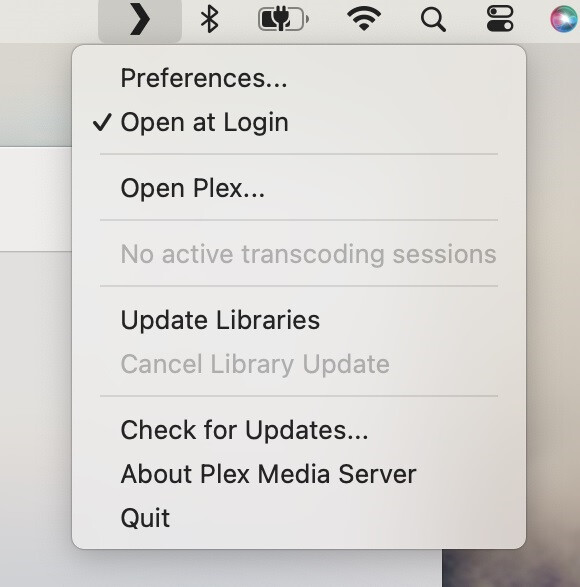
So this is a new setup on a Mac for Plex Media Server. I see you already have a Plex Media Server setup on Windows PC.
Where is this “Not authorized” being displayed ?
Does it come back when clicking on the Plex toolbar icon ?Do you have more than mac user account on the Mac Studio ? I
This popup should show up when clicking on the plex icon/chevron in the toolbar
I understand that the Plex Media Server.app did get moved to the /Applications folder. You did see that Plex icon/chevron in the toolbar at the top, so that indicates that it get launched and was running. Was the plex icon already there before you executed the download file?
I managed to reproduce the loop issue where after running Plex Media Server, the Plex Web still did not show the server and suggested getting the server installed. But this only arose when I had the Plex Media Server running under a different plex.tv account than the one I was using for the Plex Web app.
Do you have more than one plex.tv account ? And have you changed accounts ?
If you get me the Plex Media Server logs, I can establish what plex.tv account it was running under or if it is still unclaimed. And if it was already claimed for a plex.tv account, then we can compare this with the account you were signing in with on the app.plex.tv/desktop app
To get the server logs, using the Finder’s Go menu, select Go To Folder… then enter the following in the dialog box that pops up:
~/Library/Logs/
Navigate within that folder until you see the Plex Media Server subfolder
Copy that subfolder out and compress the copy and attach the zip file here
Once you have done that, you can try the following to start afresh
Resetting and starting again
To reset everything and try from the start again - and making sure the same plex.tv account is used for the server and the Plex Web app, do the following
In plex web, top right hand corner, sign out and close the browser
See if the Plex Media Server icon/chevron is showing up in the toolbar. If it is, click on it and if you manage to get the pop up, click on Quit to shutdown Plex Media Server.
If you get an error when you click on the Plex Media Server icon/chevron, then please get a screenshot of that error and then open the Mac OS Activity Monitor and locate the Plex Media Server process and the other related Plex processes
Activity Monitor should show on the right hand the Mac OS username the process is running in. Try to end / kill the Plex Media Server process and the Plex Tuner Service and Plex Plugin processes
After you ensure there are no Plex processes running showing in Activity Monitor, go through the steps to uninstall Plex Media Server
When launching Plex Web or Plex Desktop App, make sure you sign in to your plex.tv account first
Then go through the process of downloading Plex Media Server Media Server Downloads | Plex Media Server for Windows, Mac, Linux, FreeBSD and More and running the installer - but I suggest starting with the public release rather than the beta - so i suggest you download v.1.32.8.7639-fb6452ebf and install that. You can switch to the beta later
When you see Plex Media Server showing up as running in Activity Monitor, you can try to use the Plex Media Server icon pop up to Open Plex - note during initial initialization you would get an error and would need wait a few minutes
If you get any problems still, please get me fresh server logs and screenshots