I’m trying to watch some new movies I uploaded on my Plex Server, but the last movies I added to the library are marked as UNAVAILABLE even though they’re there. I can watch it on the computer by double clicking them, but can’t watch it with Plex.
The message that appear is the following:
“Please check that the file exists and the necessary drive is mounted.”
The last time I experienced that, something had somehow renamed my mount points on 2 drives and it while the UI showed it the same way, the actual path had a “1” appended to the name so I had to configure Plex to look in the new path.
Did you check if it’s just the new movies or anything on the same drive?
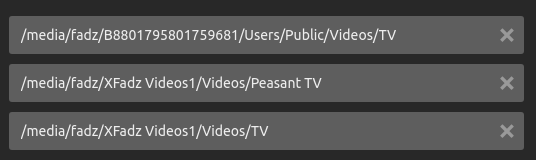
The 2 drives that got a 1 appended to their names
I feel I must explain the folder naming there since I haven’t renamed them yet… Before running my own Plex server I ripped some 4K movies and TV shows onto an old computer that I accessed via the network on Xbox or my Surface Book. Others in the house couldn’t play the 4K movies on their devices and one made a joke that I wasn’t thinking about the peasants. So I converted the 4K files to 1080p and separated those into Peasant Movies and Peasant TV folders. The 4K stuff remains in “Movies” and “TV”. When I later installed Plex server to serve these via the app, these are the names that existed and I haven’t changed them yet.
Other than suggesting that you double and TRIPLE check that your source folder for your library points to the correct location (and check that Plex has read permissions?), I just wanted to note…
I love your story, FabulousFadz. That is a hilarious reasoning behind the “Peasant TV” label, and I approve.
From the movie poster, right hand bottom you will find a Vertical Ellipsis ⋮ within a menu exists. Navigate to Info, check if there are two entries. If so, delete the Unavailable entry.
I don’t know how it slipped my mind since right now I’m dealing with the aftermath of a failed drive… some items are showing up as deleted when I have another copy on a different drive and I’ve been doing that whenever I come across that.