Now, I’m not sure if it is going to list just one server or two for you, because I do not know if your friend actually removed your share access to the old server, or just shut it down and still has it register with his Plex account. The point is on this screen you need to make sure to select your friend’s new server. If you only have access to one server now, this screen will not appear.
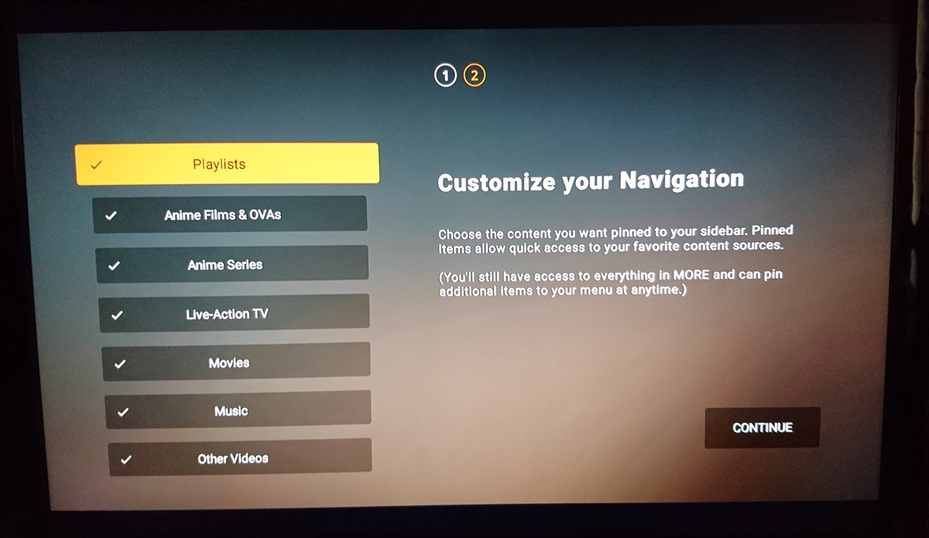
After that it’s going to ask you what libraries you want to pin (and it will have all of them checked initially, as well as a few online media sources), so you want to select and uncheck all the things you don’t want on the home screen. Then it will take you to your new Home screen with all the libraries from the new server pinned and you should be done.
No, “Manage Home Screen” is how you rearrange things on the Home screen. We’re trying to clear the pinned libraries on the Sidebar. The Sidebar is not the Home Screen itself.
Okay I am there, but I noticed something, after Recently Added Videos, the server switches to Movies & TV (first- Continue Watching Movies & TV, second- Most Popular Movies & TV…). But that is not the old server’s name?
Those are libraries from Plex’s Ad-supported content. They aren’t libraries on your friend’s server. As I mentioned before, this list will include content from online media sources. So the “News” “Podcasts” and “Web Shows” entries are all from somewhere besides your friend’s server, too. Just uncheck them if you don’t want them.
Okay, I got that, not worry about that now. But do not understand why it is in disguise as Movies & TV (first- Continue Watching Movies & TV, second- Most Popular Movies & TV…), in stead of PLEX’s Movies, TV & Internet & Etc.
So, once I complete this and test the same movie & others, then everything should be good.
I just never read where you addressed the customization of the home page was the problem- even though I suggested that could be the problem, maybe, I just missed it, with all the problem things I working right now- hard working roommates put things off all time- like I did before twice. I had to remove that first, to do what you telling me to do.
The list you are looking at is not of servers, it’s just of library names. Since Plex’s online media sources are not considered on a separate “server” (although they essentially are), they add them to this list on setup so you can select them if you want. I agree it is confusing they do not make it more clear they are not part of the libraries on the single server (your friend’s server) you are supposedly browsing now.
Okay, I could find how to continue and just clicked Finish Editing, since I did not really want to edit it any ways. But it listed only that right server (like your point, outside of PLEX’s server).
Okay, so now we should be back at the home screen and the libraries on the sidebar will only be ones from your friend’s server or Plex stuff you did not remove.
I guess there is nothing you and help me to do, because still receiving “An error occurred while attempting to play this video. Please try restarting both the PLEX Media Server and this app.” If I understand you right, I do have get my friend to restart his new and remote server?
No, and we had already multiple times tried to start it, but since restarting the app. it set bad to 0-Secs. & 0-Mins. It is movie at least I badly want to see, ‘Farming’. Maybe, you have not seen ‘LUCE’, both are thinking movies and dramas with at least good casts, I highly recommend LUCE.
Okay, I was wondering if you were trying to resume something from before you had been watching on the old server. The watch history and On Deck on your app is likely referencing shows and movies from the old libraries on the old server.
If you go into a Library, and view the Collection, and look at all the titles for like, Movies, and then choose one and try playing it, it should be playing now as all these listings should be coming off the new server.
Keep in mind there are multiple bugs on the Fire TV app right now, so I don’t know if what you are trying to play might be a file that would be effected by one of those bugs (most are regarding HEVC or 4K video).
If you can use your Plex account on the website, and access your friend’s server and play movies there, I do not think it is really something your friend rebooting the server will fix. It sounds like his server is working fine.
If you go to the “More+” on the FireTV app now, is the name of the server at the top showing your friend’s new server name, or is it still the old one?