Most of my music bitrate is 320kbps.
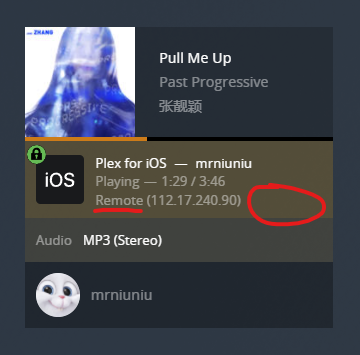
When I use the plex app playing music on my iphone, I check the dashboard on the plex-web, it showed the bitrate was 128kbps.
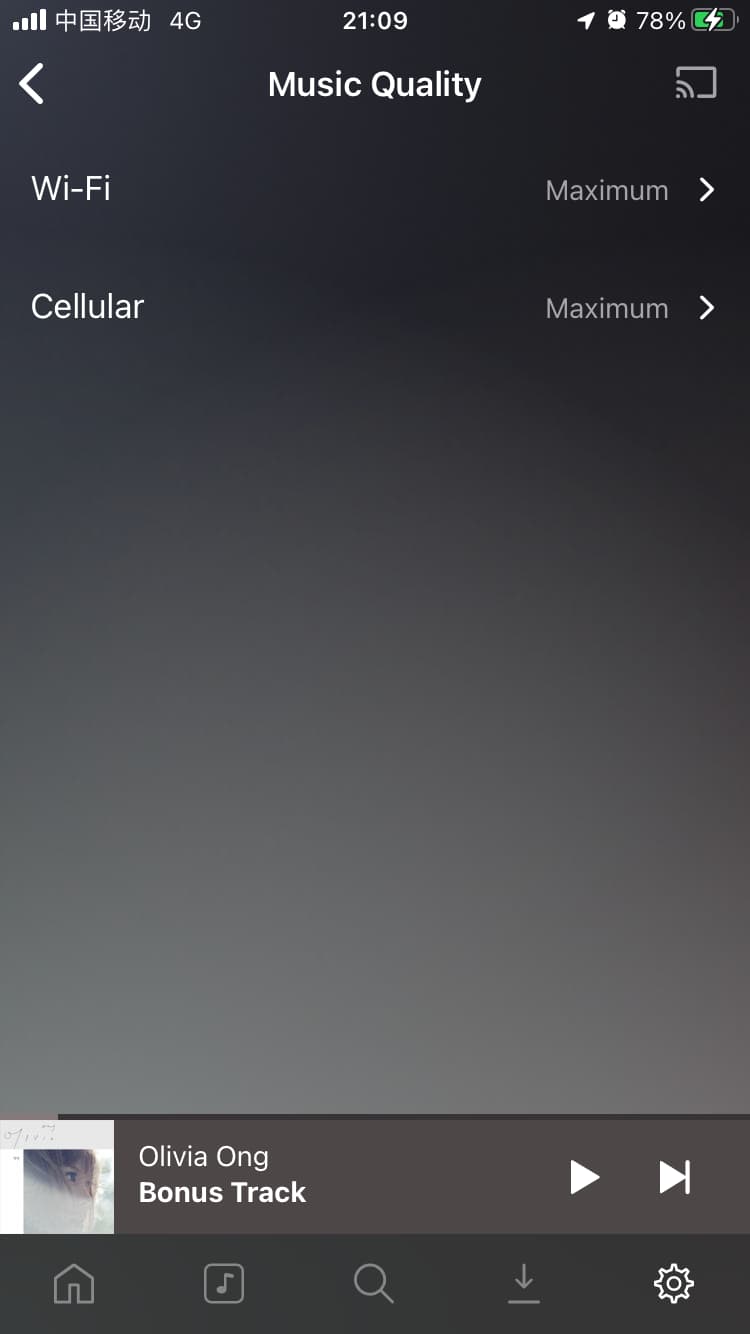
But I‘m sure that I set the quality was 320kbps from the app settings.
And I change the quality to “original” or “192kbps” or “128kbps”, refresh the web, it always displayed “128kbps”.
So I’m confused. Whether it’s display error or playback the quality is 128kbps exactly ?
I’m trying to play the FLAC, also the same as the result.
As show in the picture above, I use two ways to test the “kbps”.
Left: use the plex web play. web display is 330kbps.
log at below: Plex Web play log.txt (3.4 KB)
Right: use plex app in IOS. web display is 128kbps.
log at below: com.plexapp.plex 2021-12-24–00-55-18-476.log (6.6 KB)
Please forgive me for not understanding your meaning very well and my poor English.
I selected several sentences from the debug that can clearly prove this problem.
From the plex web debug:
Dec 24, 2021 22:08:05.623 [6040] Debug — [Transcode] MDE: 一生一次心一动 (《斛珠夫人》电视剧情感主题曲): Direct Play is disabled
Dec 24, 2021 22:08:05.623 [6040] Debug — [Transcode] MDE: Cannot direct stream audio stream due to codec mp3 when profile only allows opus
Dec 24, 2021 22:08:05.624 [6040] Debug — [Transcode] MDE: 一生一次心一动 (《斛珠夫人》电视剧情感主题曲): selected media 0 / 24457
Dec 24, 2021 22:08:05.624 [6040] Debug — [Transcode] Streaming Resource: Calculated bandwidth of 538kbps exceeds bandwidth limit. Changing decision parameters provided by client to fit bandwidth limit of 128kbps
Dec 24, 2021 22:08:05.624 [6040] Debug — [Transcode] Streaming Resource: Determining preferred transcode encoders through transcode only decision.
Dec 24, 2021 22:08:05.626 [6040] Debug — [Transcode] Streaming Resource: Reducing playback quality for 121kbps stream bitrate
Dec 24, 2021 22:08:05.626 [6040] Debug — [Transcode] MDE: Selected protocol http; container: ogg
Dec 24, 2021 22:08:05.626 [6040] Debug — [Transcode] MDE: analyzing media item 24457
Dec 24, 2021 22:08:05.626 [6040] Debug — [Transcode] MDE: 一生一次心一动 (《斛珠夫人》电视剧情感主题曲): Direct Play is disabled
Dec 24, 2021 22:08:05.626 [6040] Debug — [Transcode] 一生一次心一动 (《斛珠夫人》电视剧情感主题曲) - audio.bitrate limitation applies: 320 > 181
Dec 24, 2021 22:08:05.627 [6040] Debug — [Transcode] 一生一次心一动 (《斛珠夫人》电视剧情感主题曲) - audio.bitrate limitation applies: 320 > 181
Dec 24, 2021 22:08:05.627 [6040] Debug — [Transcode] MDE: Cannot direct stream audio stream due to profile or setting limitations
Dec 24, 2021 22:08:05.627 [6040] Debug — [Transcode] MDE: 一生一次心一动 (《斛珠夫人》电视剧情感主题曲): selected media 0 / 24457
Dec 24, 2021 22:08:05.629 [6040] Debug — [Transcode] Streaming Resource: Adding session 0C78C640:97FF7AED-E087-440E-A38E-0D2AA4FA9112-47516 which is using 128kbps of WAN bandwidth.  Used is now 128kbps
Dec 24, 2021 22:08:05.629 [6040] Debug — [Transcode] Streaming Resource: Added session 0C78C640:97FF7AED-E087-440E-A38E-0D2AA4FA9112-47516
Dec 24, 2021 22:08:05.629 [6040] Debug — [Transcode] Streaming Resource: Reached Decision id=20494 codes=(General=1001,Direct play not available; Conversion OK. Direct Play=3000,App cannot direct play this item. Direct play is disabled. Transcode=1001,Direct play not available; Conversion OK.) media=(id=24457 part=(id=25641 decision=transcode protocol=http streams=(Audio=(id=46335 decision=transcode bitrate=121 encoder=libopus channels=2 rate=48000))))
Please notice that “Direct Play is disabled”、“audio.bitrate limitation applies: 320 > 181”、“which is using 128kbps of WAN bandwidth. Used is now 128kbps”.
As can be seen from the screenshot I provided earlier, my setting is 320kbps. And I allow direct playback.
From iphone debug:
2021/12/24 22:08:06.445 (132 MB) (288976) ➖ PMKTrebleAudioPlayer.mm:84 | TREBLE: Media: Passing on an item with bitrate 320 and codec 'mp3'.
2021/12/24 22:08:06.445 (132 MB) (288976) ➖ PMKTrebleAudioPlayer.mm:84 | TREBLE: Media: Couldn't find item with supported codec and bitrate under 128, transcoding.
Why “couldn’t find item with supported codec” ? It’s just only “mp3”, is the most basic music format.
So, this is my last attempt to test. If I can’t provide you with useful information, there’s nothing I can do.
That’s the server log. It is saying that the client is telling your server to transcode the music. The decision was made by the iOS app, which is why I needed to see the iOS Logs to check why it told your server.
Your new logs are still not useful. I’m not sure how you are getting the logs, but this one only has < 1s of information. Luckily this new server log shows me what is going on.
Keep in mind that the music quality setting does not work like the video quality settings. For music, that setting is a threshold for when music is transcoded. Any music that has a bitrate higher than the threshold will get transcoded. When music is transcoded, it is always to 128 kbps. From the server log portion you posted above, the app is telling the server
Calculated bandwidth of 538kbps exceeds bandwidth limit. Changing decision parameters provided by client to fit bandwidth limit of 128kbps
So the file you are playing has a bitrate of 538 kbps, which is higher than your setting of 320 kbps. This means the file needs to be transcoded. As I said above, when transcoding, it will always use 128 kbps.
First of all, I want to clarify that the bit rate of the music I play is not 538kbps.
Generally, the bit rate of MP3 cannot be 538kbps, but “320”, “192”, “128”.
You can see my screenshot with detailed media information.
I manually cleared all logs under the “\ appdata \ local \ plex media server \ logs” folder.
So that the system can rebulid new logs.
Then I play the song “pull me up” on my mobile phone.
On the one hand, I downloaded the logs from the troubleshooting on the plex web page. On the other hand, I also downloaded the logs from the plex app settings → help interface on the mobile phone.
(ps:I deleted some previous files from the mobile phone logs according to the time.)
When I use wifi network to test, the problem will disappear.
Whether LAN or non LAN, just use wifi network, this problem does not exist.
Even I played it again use cellular network, there is nothing displayed on the dashbroad.(Red circle)
I guess that the songs are already cached on the phone.