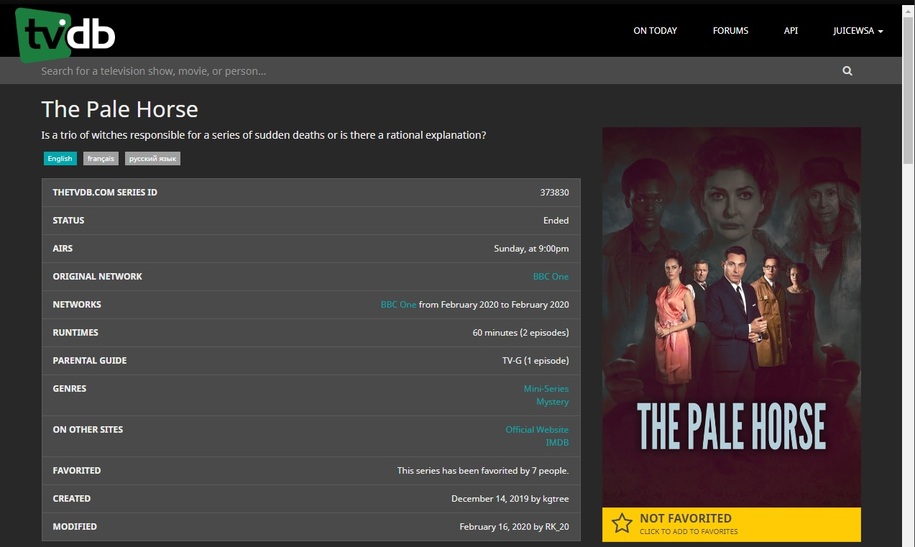
My naming convention is the same as yours, with the only difference being I specify the year in the TV Show title ie.
/tv/The Pale Horse (2020)/Season 01/The Pale Horse (2020) - S01E01.mkv
The naming convention as far as I can tell is fine, as all shows released in 2019 or earlier match fine, and even the 2020 shows match with 100 accuracy when I select “match”
… and as we’ve found through rigorous, painful testing - by filthy, smelly Plex Veteran Volunteer Data-Moles (lol)… that action will bork a match faster than you can say Jack Robinson:
Server Version#: The Latest - otherwise take a hike.
Player Version#: The Latest - tell us if we ask.
If providing server logs TURN OFF VERBOSE - TURN ON DEBUG - and wait until asked. No Snippets. Period.
TV Shows AND Movies - Pile 'em on.
Here’s the first one - This is a False Alarm:
https://forums.plex.tv/t/fix-match-using-tmdb-or-imdb-id-number/540072/12?u=juicewsa
A proper file name - worked as expected:
A Movie Library\
Monty Python's Flying Circus - Terry Gilliam's Personal Best (20…
The trick to this matching thing - use the exact name they use - like Filebot does. If a (YEAR) field is in the official name, use it. Otherwise, don’t.
Problem solved. I haven’t had a mismatch, or a ‘no match’ in weeks.
I’m in a slump.
I keep adding stuff and it keeps working. Oh, no.
lol
BTW:
MP4 Files?
When changing names - if it doesn’t work - Plex Dance it:
The purpose of this is to remove all cached metadata and xml data for an item that Plex usually keeps. This helps when you want to “start from scratch” for particular item
move all files for the media item out of the directory your Library is looking at, so Plex will not “see” it anymore
scan the library library (to detect changes)
empty trash
clean bundles (in the menu next to server name, when accessed under ‘More’. Or alternatively under Settings - [server name] - Manage - Troubleshooting.…
unfortunately, the advise to always put the (year) in the series, has been causing issues since tvdb changed the api.
this currently seems to be the best advice.
but I keep the (year) in my series titles anyway, and if I have to fix match, then I fix match.
As it should be - you are the Control (Stubborn) Group.
lol
plex shall bend to my will! /arrrrr
1 Like
Unfortunately, as we’re finding out, if you don’t use a pristine name for the natural match, you may not have a show in the fix match list to select.
That’ll scorch your 'maters.
I know how to change the search string and/or remove the year or special characters.
If that does not work, then I am a patient man.
JuiceWSA:
The trick to this matching thing - use the exact name they use - like Filebot does. If a (YEAR) field is in the official name, use it. Otherwise, don’t.
Problem solved. I haven’t had a mismatch, or a ‘no match’ in weeks.
I’m not having an issue with matching, when I press “Match” it instantly finds a result with a score of 100. So my naming convention can’t be an issue?
The issue is Plex doesn’t match 2020 shows when adding them to the Library via the Library Scan process.
If my naming convention was an issue, Plex wouldn’t find a 100 result when selecting “Match”
Dunno - let’s see it, so I can test it.
I posted my naming convention earlier.
It’s the same as yours, but has the year in the TV Show name.
Right, sorry.
Well, as we have discovered if you put a (YEAR) Field in a Show that doesn’t require it - it fails 100% of the time.
Now, you tell me: What’s the name of this show?
What’s the name of this one?:
I get what you are saying- you’re not really answering my question though.
Your response would apply if I wasn’t getting any result when selecting “Match”. But I am. I’m getting a 100 response with The Pale Horse (2020).
So my question is:
If I am getting a 100 match on a file, why isn’t Plex applying this match when running a library scan?
We’re just gathering the data for this thread:
Server Version#: The Latest - otherwise take a hike.
Player Version#: The Latest - tell us if we ask.
If providing server logs TURN OFF VERBOSE - TURN ON DEBUG - and wait until asked. No Snippets. Period.
TV Shows AND Movies - Pile 'em on.
Here’s the first one - This is a False Alarm:
https://forums.plex.tv/t/fix-match-using-tmdb-or-imdb-id-number/540072/12?u=juicewsa
A proper file name - worked as expected:
A Movie Library\
Monty Python's Flying Circus - Terry Gilliam's Personal Best (20…
Our discoveries are fed to Plex through our ‘Liaison’. What Plex does or doesn’t do with that info is beyond my control and ‘why’ something doesn’t work doesn’t concern me as much as finding what does work.
I set Filebot to use the EXACT NAME TVDB uses.
If my file name gets a natural match 100% of the time - worrying about what happens in a Fix Match would be insane. All I want to do is Use Plex. I know how. And now, so do you.
The reason I don’t accept your diagnosis is that Plex will auto match TV Shows with Year in the title, as long as they aren’t from 2020.
For example, I just added The King of Queens (1998) and it matched during the library scan.
TheTVDB references this show as “The King of Queens”. No year in the title.
Yet Plex matched it during the Library scan.
ChuckPa
February 29, 2020, 4:57am
35
If I may augment here again?
Supplying the year isn’t required, and is sometimes detrimental, if it’s the first time the series name has been used.
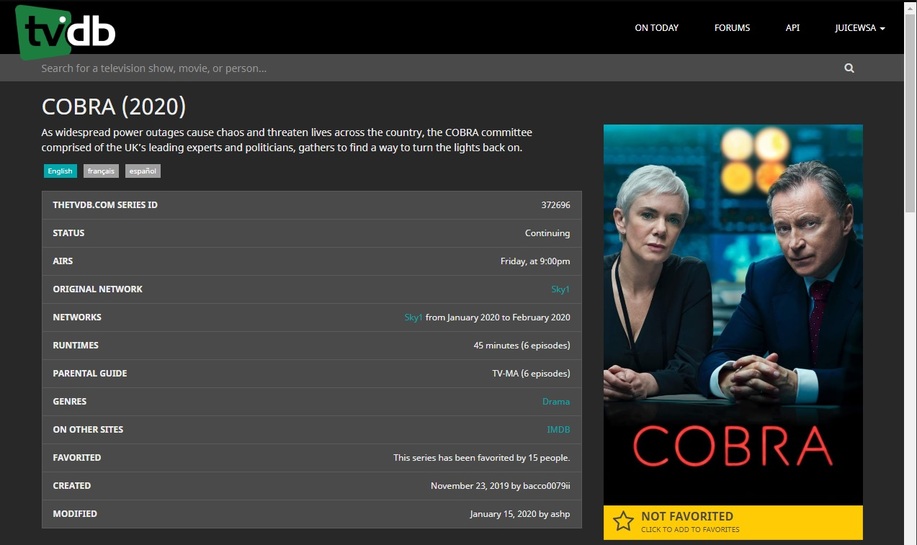
In the case of “Cobra” , I did not list the year.
Making "Cobra/Season 01"
Making "Cobra/Season 02"
Making "Cobra/Season 03"
Making "Cobra/Season 04"
Done
[chuck@lizum ~.502]$ ls -la /vie/qa/tv/Cobra
total 64
drwxr-xr-x   6 chuck chuck  4096 Feb 28 23:52 ./
drwxr-xr-x 917 chuck chuck 45056 Feb 28 23:52 ../
drwxr-xr-x   2 chuck chuck  4096 Feb 28 23:52 Season 01/
drwxr-xr-x   2 chuck chuck  4096 Feb 28 23:52 Season 02/
drwxr-xr-x   2 chuck chuck  4096 Feb 28 23:52 Season 03/
drwxr-xr-x   2 chuck chuck  4096 Feb 28 23:52 Season 04/
[chuck@lizum ~.503]$ ls -la /vie/qa/tv/Cobra/*01
total 88
drwxr-xr-x 2 chuck chuck 4096 Feb 28 23:52 ./
drwxr-xr-x 6 chuck chuck 4096 Feb 28 23:52 ../
-rw-r--r-- 1 chuck chuck  258 Feb 28 23:52 Cobra - S01E01.mkv
-rw-r--r-- 1 chuck chuck  258 Feb 28 23:52 Cobra - S01E02.mkv
-rw-r--r-- 1 chuck chuck  258 Feb 28 23:52 Cobra - S01E03.mkv
-rw-r--r-- 1 chuck chuck  258 Feb 28 23:52 Cobra - S01E04.mkv
-rw-r--r-- 1 chuck chuck  258 Feb 28 23:52 Cobra - S01E05.mkv
-rw-r--r-- 1 chuck chuck  258 Feb 28 23:52 Cobra - S01E06.mkv
-rw-r--r-- 1 chuck chuck  258 Feb 28 23:52 Cobra - S01E07.mkv
-rw-r--r-- 1 chuck chuck  258 Feb 28 23:52 Cobra - S01E08.mkv
-rw-r--r-- 1 chuck chuck  258 Feb 28 23:52 Cobra - S01E09.mkv
-rw-r--r-- 1 chuck chuck  258 Feb 28 23:52 Cobra - S01E10.mkv
-rw-r--r-- 1 chuck chuck  258 Feb 28 23:52 Cobra - S01E11.mkv
-rw-r--r-- 1 chuck chuck  258 Feb 28 23:52 Cobra - S01E12.mkv
-rw-r--r-- 1 chuck chuck  258 Feb 28 23:52 Cobra - S01E13.mkv
-rw-r--r-- 1 chuck chuck  258 Feb 28 23:52 Cobra - S01E14.mkv
-rw-r--r-- 1 chuck chuck  258 Feb 28 23:52 Cobra - S01E15.mkv
-rw-r--r-- 1 chuck chuck  258 Feb 28 23:52 Cobra - S01E16.mkv
-rw-r--r-- 1 chuck chuck  258 Feb 28 23:52 Cobra - S01E17.mkv
-rw-r--r-- 1 chuck chuck  258 Feb 28 23:52 Cobra - S01E18.mkv
-rw-r--r-- 1 chuck chuck  258 Feb 28 23:52 Cobra - S01E19.mkv
-rw-r--r-- 1 chuck chuck  258 Feb 28 23:52 Cobra - S01E20.mkv
[chuck@lizum ~.504]$
It took less than 1 minute for autodetect to kick in and scan it.
Notice this is the 1993 name. This is correct behavior.
ChuckPa
February 29, 2020, 4:59am
36
I now create “Cobra (2020)” and it jumps right in.
[chuck@lizum ~.505]$ ls -la /vie/qa/tv/Cobra*/*01
/vie/qa/tv/Cobra (2020)/Season 01:
total 88
drwxr-xr-x 2 chuck chuck 4096 Feb 28 23:58 ./
drwxr-xr-x 6 chuck chuck 4096 Feb 28 23:58 ../
-rw-r--r-- 1 chuck chuck  272 Feb 28 23:58 Cobra (2020) - S01E01.mkv
-rw-r--r-- 1 chuck chuck  272 Feb 28 23:58 Cobra (2020) - S01E02.mkv
-rw-r--r-- 1 chuck chuck  272 Feb 28 23:58 Cobra (2020) - S01E03.mkv
-rw-r--r-- 1 chuck chuck  272 Feb 28 23:58 Cobra (2020) - S01E04.mkv
-rw-r--r-- 1 chuck chuck  272 Feb 28 23:58 Cobra (2020) - S01E05.mkv
-rw-r--r-- 1 chuck chuck  272 Feb 28 23:58 Cobra (2020) - S01E06.mkv
-rw-r--r-- 1 chuck chuck  272 Feb 28 23:58 Cobra (2020) - S01E07.mkv
-rw-r--r-- 1 chuck chuck  272 Feb 28 23:58 Cobra (2020) - S01E08.mkv
-rw-r--r-- 1 chuck chuck  272 Feb 28 23:58 Cobra (2020) - S01E09.mkv
-rw-r--r-- 1 chuck chuck  272 Feb 28 23:58 Cobra (2020) - S01E10.mkv
-rw-r--r-- 1 chuck chuck  272 Feb 28 23:58 Cobra (2020) - S01E11.mkv
-rw-r--r-- 1 chuck chuck  272 Feb 28 23:58 Cobra (2020) - S01E12.mkv
-rw-r--r-- 1 chuck chuck  272 Feb 28 23:58 Cobra (2020) - S01E13.mkv
-rw-r--r-- 1 chuck chuck  272 Feb 28 23:58 Cobra (2020) - S01E14.mkv
-rw-r--r-- 1 chuck chuck  272 Feb 28 23:58 Cobra (2020) - S01E15.mkv
-rw-r--r-- 1 chuck chuck  272 Feb 28 23:58 Cobra (2020) - S01E16.mkv
-rw-r--r-- 1 chuck chuck  272 Feb 28 23:58 Cobra (2020) - S01E17.mkv
-rw-r--r-- 1 chuck chuck  272 Feb 28 23:58 Cobra (2020) - S01E18.mkv
-rw-r--r-- 1 chuck chuck  272 Feb 28 23:58 Cobra (2020) - S01E19.mkv
-rw-r--r-- 1 chuck chuck  272 Feb 28 23:58 Cobra (2020) - S01E20.mkv
The above example you showed highlights why the year in the title is crucial. Otherwise shows will match incorrectly.
The only time I have a match issue (where Plex won’t auto match during library scan) is when the year in the title is (2020).
Your example (I presume) involved you changing the title of the name in the “Match” functionality- which works every time for me also.
The issue I am experiencing is when you add a show with (2020) in the directory title, run a library scan (don’t press Match) - and Plex won’t auto match it as a part of the library scan process.
But a show released in 2019, with (2019) in the directory name, will auto match during library scan.
ChuckPa
February 29, 2020, 5:01am
38
The only time TheTVDB puts the year in the title is when the series name is a remake / reuse.
1 Like
ChuckPa
February 29, 2020, 5:02am
39
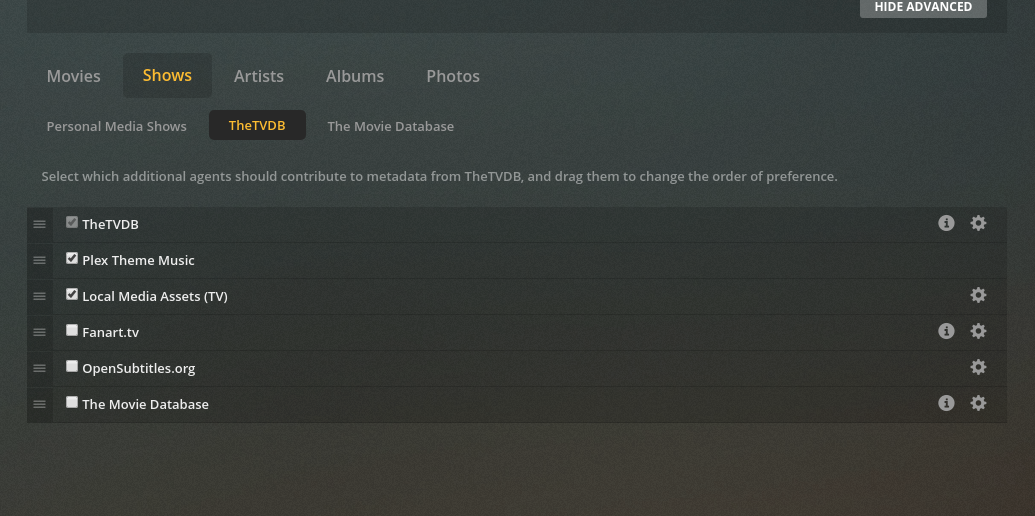
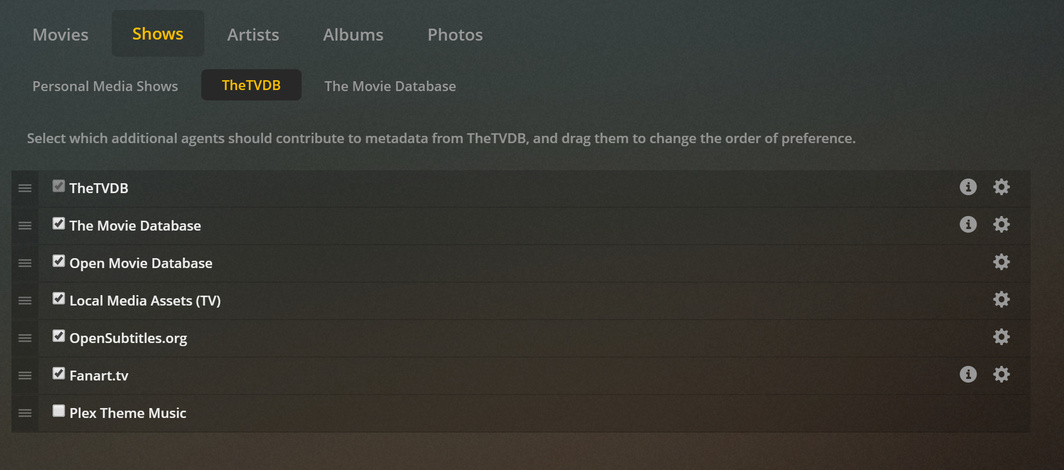
What is your Agent stacking order?