The issue with “just name things correctly” is that TVDB changes their naming conventions all the time.
What I don’t understand, is how having the year 2020 in brackets throws off a match completely, but having 2019 doesn’t.
I think one of the issues is there’s no fuzzy logic in the Match functionality. Get a single character wrong (ie. a - instead of : ) you get no match and have to manually intervene.
I came here just to ask the same thing. Series title with the year removes all ambiguity – the Plex manual matcher even asks you to input the year to better match the show.
As other people have mentioned, trying to closely couple the naming convention based on the way that the TVDB API is functioning today is not really sensible. They break and change things all the time. Instead, a sensible naming convention that can be future proofed in case TVDB messes up again or Plex shifts away from them makes more sense. Year in the title isn’t some outlandish idea, and it used to work perfectly up until very recently anyways.
EDIT: @Antigravity_83 brings up an excellent reason for why we shouldn’t be basing our naming convention off matching TVDB’s decision of the day. Any show that I have added in 2020 with a colon in the name has been an absolute mess. Colons are forbidden characters in Windows, so we are forced to modify those characters. Either removing the colon or replacing it with a dash will not match with TVDB, in fact, it will result in zero matches. They should not be the standard for a sane naming convention, and these are issues in the matching that I never had to deal with before. To be honest, I never had issues until they switched to the new API.
To me, Plex should be better at handling these cases as they are not related to the naming per se, but more so issues with how the matching works with the mess that is TVDB
Sorry for the double post, but I wanted to highlight another reason why we should not be just acquiescing to using TVDB convention for the year in the title. As you can see from the below screenshot, they will just add year to shows that are added to the database later, so it’s not even necessarily the case that the first airing show has the year. Considering how much stuff gets nuked and readded and renamed on their end, I think it makes even more sense to add year in the title always.
@ChuckPa You mentioned something about how if more and more people “fix” matches, Plex will be able to bypass this limitation. I wanted to get some clarity on that. Does that mean for that specific show, next time someone else tries to match with year in the title, it will match automatically? Or does it mean it will learn the pattern for all 2020 shows, though we are almost halfway through the year and this is happening? Or, fingers crossed, do you by any chance, mean that once enough people do it using the new API, then going forward (2021 and further as well), Plex will not trip over itself if it finds year in the title, regardless of whatever TVDB is doing on that particular day?
A show can originally have no year in the title, then next minute - it will.
Surely some sort of fuzzy logic can be introduced so we don’t need an EXACT match to TVDB. Like I said, the other issue related to this is whether you have a - or : in the right spot. That’s nuts.
I use Filebot - it goes to the database and gets the name they use - then names my files that name. It matches with almost perfect performance - and, for me, it’s over.
Ya’ll can battle Plex and TVDB as long and as hard as you want to.
I currently have a formula that’s almost too easy.
So Filebot is now a required third party application for Plex to match content correctly?
Regardless, I use Sonarr which also uses TVDB for TV Show naming. It still messes up : and - in TV/Movie names as Plex doesn’t detect those symbols in file names.
So a manual fix is required for every show that has those symbols in it.
I’m currently enjoying perfect naming with Filebot and Plex matching perfectly most of the time. I don’t care how poorly it’s working for anyone else. I’m naming correctly - you aren’t. I’m using the exact name TVDB/TMDB is using - you aren’t.
Deal with it.
The problem is yours.
Not Plex’s.
Not Mine.
If refusal to follow the instructions leads to misbehavior.
That’s on you.
Don’t make it a ‘Me Problem’.
Can you reference this in the wiki? I can’t find any reference that says not to use semi-colon or dash symbols.
Even if I leave symbols out, Plex won’t auto match anything that requires a symbol. I have to add the : when doing a manual search.
I could argue you’re doing the same thing. Because you aren’t having issues, that means noone else does/should.
I follow the wiki to a tee- and still have to manual match some shows released in 2020, and shows that have a semi-colon or dash in them.
Unless you can prove otherwise, there’s nothing in the wiki the states you cannot use : or - symbols. In fact, the wiki states the opposite- to name your files as per TVDB does.
So if TVDB has a semi-colon or dash in the name, do I follow the wiki? Or not?
By default, Plex matches against TheTVDB.com, so you should name and organize your content based on the information on that site.
Ninjas/Employees/Veterans - KNOW you don’t replace symbols with other symbols - you simply leave out the symbols. Filebot knows that. Why doesn’t Sonarr? I am under the impression that Sonarr, like most everything else designed to make our lives easier - will simply do what you tell it to do. What are you telling it to do?
Anyway, you guys can riot or chain yourselves to the doors of Plex HQ in protest while you Fix Match.
I know how to work FileBot.
That’s all I need to know.
I think you are missing the point here. This thread helped identify a regression in Plex behavior. Plex had no issue tripping over itself when year was presented earlier, and it does not have an issue even now for older shows. This regression was introduced when shifting to the TVDB v3 API. Certainly, as you mentioned, we can work around this regression. Sonarr has options, and we can also manually make those modifications. None of us are arguing that is not possible. The tools you use may not be impacted by the regression, but I’m not entirely sure why you are arguing that we should just accept the regression?
If this was new behavior we were asking for, maybe that would make sense – though I would still argue that rather than just saying to just deal with it, you should maybe argue the merits/demerits of the convention rather than just patronizing us on how to deal with it. Adding year in the title is actually a sane convention (as proven by TVBD’s response that it is not actually following any rationale when it comes to using years). We are just asking Plex to look into patching the regression in their parser or seeing how to manage it in the new API request.
By the way, in the thread where I sourced that screenshot, those shows had their titles changed. They may be changed back tomorrow. Depending on when you first matched the show, you may actually NOT be following your own advice and matching TVDB exactly. You’d have to constantly be renaming your show in cases like the below. And yes, I understand that once it is “matched” that it remains matched, but that is actually our point. We can keep the year in the title and manually match it for good as well, but that defeats the purpose – a proper naming convention should naturally match today and tomorrow. I run scripts on my folders, and to get around the massive inconsistencies found in TVDB, I just add year into the folder name.
Let me put it to you in this way. If tomorrow, for the shows highlighted in that thread you had to rematch (maybe because you moved to a fresh install), your earlier naming convention would fail and match incorrectly. My naming convention would match instantly and correctly because year works perfectly for shows prior to 2020 and removes any ambiguity on the match no matter what TVDB is showing that day. Seems useful if that can be extended for shows past 2020 as well. I think, based on these facts, accepting the new Plex behavior is accepting a step backwards, don’t you think?
Ok so firstly, you shouldn’t need “experience” for Plex to function correctly. Any limitations to the Match functionality should be specified in the wiki.
As of now, there is no mention that you cannot add a symbol to a file name (in most cases a colon).
Regardless I’ve used Plex for 5+ years and this is the first time I’ve experienced these issues.
Sonarr does the same as Filebot. It names TV Shows as they appear in TVDB. So if a TV Show or Movie (Radarr) has a colon in the name, it includes this in the name.
Interestingly Plex ignores this colon when it tries to do a match, but it still fails to match.
It’s the same issue with (2020) causing failures to match.
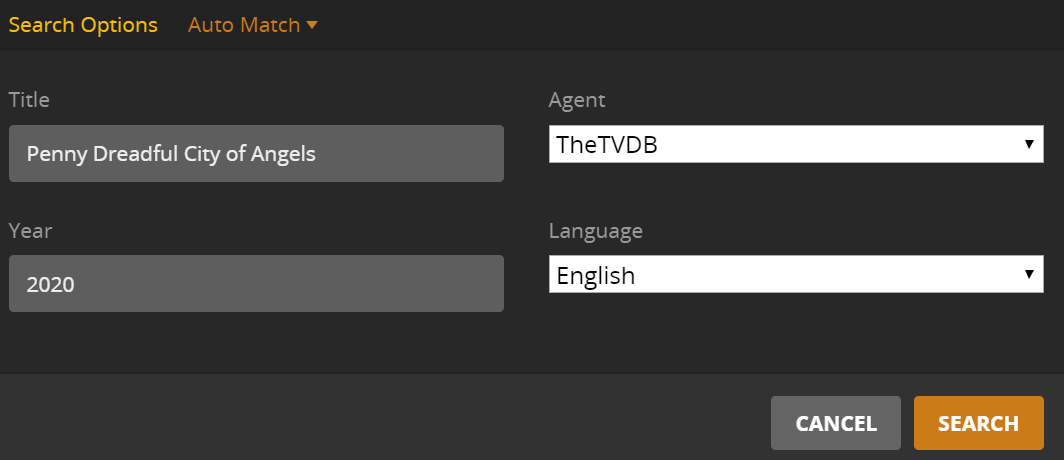
Here’s an example of a show Plex borks with matching despite it having a very specific show name. If it had any sort of logic or allowance for more than character to be incorrect (ie colon or year) it would match fine:
Penny Dreadful: City of Angels
So your saying Plex won’t match the above with:
Penny Dreadful: City of Angels
Penny Dreadful: City of Angels (2020)
Not sure what you have to do, but Filebot named mine without the colon and I got an instant, natural match.
I never saw the Fix Match interface.
That’s, pretty much the way it’s been going here in Juicetown. <— exactly the way I like it.
I did have to employ the TVDB ID# recently, very, for a show I can’t recall now when it simply refused to be recognized as anything.
I just added Super 8 (2011). Everyone, but me, thought it was Kick-Ass (2010).
I saw the Fix Match area for that one, but pulled it off without much drama.
If I include the colon, Plex won’t “auto match”, but as soon as I go into “Fix Match” (don’t touch a thing), press search, it finds a 100 match immediately.
Same thing happens when you have (2020) in the TV Show name. Plex won’t “Auto Match” but will immediately find a match when selecting “Fix Match”.
So I guess the question then becomes, why does “Auto Match” work different to “Fix Match”?
I’ve changed Sonarr to naming convention to “Clean Title” which removes colons. Hopefully this will fix Auto Match issues with shows with symbols.
But we don’t have an answer as to why “Fix Match” will find titles with release dates and colons, and “Auto Match” wont.