This is an odd one... Series disappearing from library, not filesystem. But with a twist!

Server Version#: Latest
Player Version#: Web

So… since last update i noticed that some series were not getting added and somewhere. But the series where new episodes were added, most of the existing episodes disappeared.

After some investigating, i found out it only shows the episodes where the files are in lower caps. The rest disappears. Note: They used to work fine.

Does anyone know what is going on here?

That doesn’t make any sense at all.

File names, folder structure, and agent selection of the library please.

I know it does not make any sense. It happened since the last update.
All series are fine, until i add a new episode, then everything disappears but only the episodes where the filenames are lowercase will remain.

Please note that besides updating, nothing has changed.

Structure is:

Series\Serie Name\Season 1\NCIS.S01E20.somethingsomething.mkv

That episode would not be visible, but when it is renamed to “ncis.s01e20.somethingsomething.mkv” it DOES show up in Plex.

Very odd behavior.

Agent selection: All of them.

1 Like

I know it sounds insane, but i have checked it and it behaves this way with every series.

1 Like

What are you actually using for “Series name”? Because the short “NCIS” may not be recognized as a valid series title. What happens if you use “Navy CIS” instead?

You can only select one agent at once in the properties of the library.


Do also look for signs of database file corruption:

  1. activate debug logging (not ‘verbose’!)
  2. quit Plex Server
  3. wait 1 minute
  4. start Plex Server
  5. wait 5 minutes
  6. fetch log files and attach them here

Or inspect them yourself. Take a look at the Plex Media Server.log file and seek for messages about database corrupt or malformed.
If you find these, you may have to repair your database.
https://support.plex.tv/articles/repair-a-corrupted-database/

It goes for all series where new episodes are added today. And it worked fine for years, until the last update.
I will go and activate debug logging and check for the logs.

Thank you for taking the time for this btw.

1 Like

Can we get a screenshot of the file path, screen shot of the affected files, a picture of the add folder section of the library, and a copy of the server logs post Plex Dance for an affected series?

Edit 3 - Removing screenshots and logfiles for now. Any devs wants them i can resend them.

I know i wasnt the person that started this thread. But i am having a very similar problem. For shows that i add it only detects filenames that end in a number.

i did the plexdance for this show. When i rescanned it didnt detect anything but the episode ending in 2160. I did make a try and renamed epsiode 10 to end with 99 … Then the scan detected it again

It is very bisarre and i dont understand anything. i couldnt see anything that i thought was strange in the logs but maybe you can see something.

Edit: Im using the Plex TV Series scanner and Agent
Edit2: Replaced screenshot with one from the actual server where the plex server runs.

1 Like

I noticed the same thing about series disappearing i didnt do that much investigation uet but i gues i got the same issue since last patch

1 Like

I am seeing something Ive not seen before:
May 10, 2023 18:26:49.850 [12424] WARN - Versions: generator Ted Lasso - Season 3 has an empty version set query, assuming generator is no longer valid

quite a few references to empty version set query errors

I am also seeing a folder structure issue you did not have in your screenshot:

May 10, 2023 18:36:21.457 [10048] DEBUG - Checking descendants of Ted Lasso
May 10, 2023 18:36:21.458 [10048] DEBUG -  -> Searching down into Ted Lasso/Season 03
May 10, 2023 18:36:21.458 [10048] DEBUG - Checking descendants of Ted Lasso/Season 03
May 10, 2023 18:36:21.459 [10048] DEBUG -  -> Searching down into Ted Lasso/Season 03/Plex Versions
May 10, 2023 18:36:21.459 [10048] DEBUG - Checking descendants of Ted Lasso/Season 03/Plex Versions
May 10, 2023 18:36:21.459 [10048] DEBUG -  -> Searching down into Ted Lasso/Season 03/Plex Versions/Optimized for TV
May 10, 2023 18:36:21.459 [10048] DEBUG - Checking descendants of Ted Lasso/Season 03/Plex Versions/Optimized for TV
May 10, 2023 18:36:21.460 [10048] DEBUG -  -> Searching down into Ted Lasso/Season 03/Plex Versions/Optimized for TV/Ted Lasso
May 10, 2023 18:36:21.460 [10048] DEBUG - Checking descendants of Ted Lasso/Season 03/Plex Versions/Optimized for TV/Ted Lasso
May 10, 2023 18:36:21.460 [10048] DEBUG -  -> Searching down into Ted Lasso/Season 02
May 10, 2023 18:36:21.460 [10048] DEBUG - Checking descendants of Ted Lasso/Season 02

Those subfolders of season 3 may be causing issues.

My suggestion would be to fix the subfolder issue and then Plex Dance the entire show.

And please remember to follow the dance instructions EXACTLY

1 Like

I think other users have said it, check your scanner and agent.

I have been using the Plex TV, series scanner, and the Plex TV series agent.

One day I went in because a show was not showing up properly, and I switched my scanner to Plex series scanner, and that locked me into… I think it was the movie database as far as agent.

It basically locked me into that new setting, too, I could not switch back to Plex TV series.

I ended up doing a troubleshooting dance. Eventually I was able to set my scanner and agent back to the default setting. And after that, I was finally able to get that show to show up properly, but all during the time I had Plex series scanner, it went into my complete TV library and it re-ordered every single show.

I have a couple of shows that have viewing orders that are not the same as when they originally Broadcast the show, for example, space above and beyond, and of course firefly.

Also, Farscape.

The first seasons of those shows actually the only seasons for a couple of them, were completely broadcast totally out of the intended order.

I have finally found ways of setting that properly within the shows that are affected, you have to choose absolute, ordering under the advanced settings under edit. In fact, I just checked my fire, fly sorting, and it was totally bogus, so I got into the advance tab after I selected absolute ordering everything fell right into place.

The thing that bugs me is, I even have the episodes numbered correctly in their folders, and still, if I use the default scanner, it will try to show the broadcast order
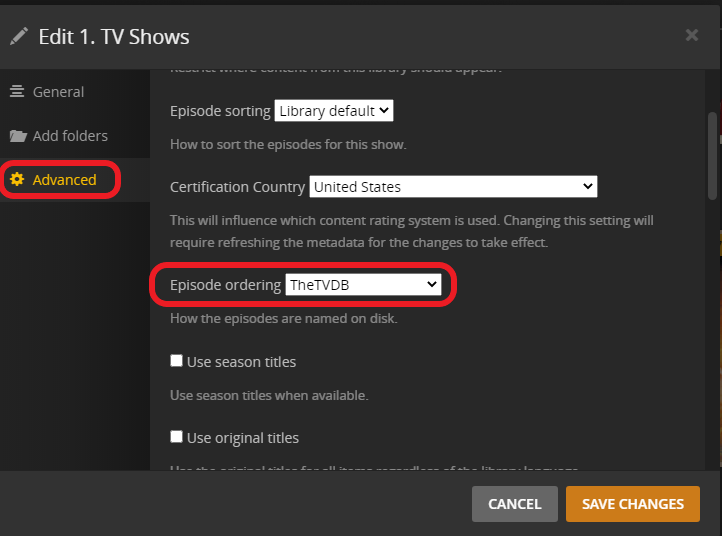
When you upgrade it defaults to the TMDB show order

You can change that to the TVDB for the whole library if that’s the source you used to name most of your shows by
3 dots next to the library → Manage Library → Edit → Advanced

You can break the library by switching scanner/agent back and forth.

If you still can’t get Ted Lasso to show up correctly, I would consider creating a test library within Plex

Add, just that show and see if everything works

1 Like

Ya, yep. Just by even changing it for a short while, I had a hell of a time setting it back to default.

How about if I were to set ordering to absolute ordering in the main settings? would that affect other shows that don’t have broadcast versus DVD episode ordering?

I tried changing to the “Plex series Scanner” and then it discovered all the episodes just as normal. But it was a big hassle to the turn it back to “Plex TV Series” again.

Yeah those do seem a bit strange but they are created by Plex itself when i have created optimised versions for TV. Until the latest version havent caused any problems. I would think that if they could cause problems plex wouldnt suggest to keep the optimised versions in the same substructure as the original files.
But i will try and move those if i do run into problems again

For me it is fixed by renaming al my episodes (via sonarr)
From seriesname - SxxExx episodename - quality to
Seriename - x/xx episodename - quality
Something like that the only major change is the season and episode number the way it is displayed in the name

Hope this helps

That is not a solution, but a workaround. And a bad one at that. This will cause you issues in the future.

If you have to rename at all, do it to the recommended schema:
seriesname - SxxExx - episodename [quality]

As a matter of curiosity, what are the “Country or Region”, “Regional format” and “Language” settings of your Windows?

this is how i had it and it only detected 56 of my series al other 220 orso didnt detect after i renamed them it worked.

I agree it is a work around atleast till the issue is fixed :slight_smile:

This topic was automatically closed 90 days after the last reply. New replies are no longer allowed.
