Tidal add-on?

Hello
i plan to migrate my Tidal account through plex.
I compare Hifi & Hifi Plus plans and the only difference is for Hifi+
“Plexamp:
Rediscover the beauty of sound and listen offline anywhere with this app made especially for music lovers.”

It means that if i only use Plexamp, Tidal Hifi add-on is useless? Or it deals with only offline feature?

My understanding is as follows …

Tidal HiFi content is playable using Plex/Plexamp
Content exclusive to Tidal HiFi Plus (Hi-Res > 44/16 ?, MQA, Dolby Atomos, etc.) is NOT playable using Plex/Plexamp
Regardless of subscription tier, NO Tidal content can be downloaded for offline listening using Plex/Plexamp

Also note, some weirdness to be aware of …

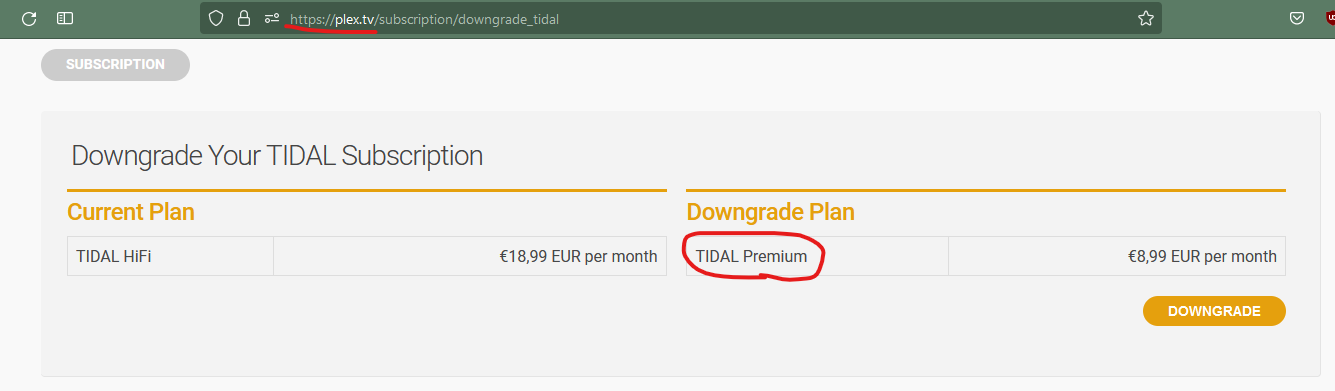
There are some places within Plex Media Server where out-of-date terminology is used to describe the Tidal subscription tiers (if you have a Tidal HiFi subscription, it will be listed as Tidal Premium in Plex Media Server … if you have a Tidal HiFi Plus subscription, it will be listed as Tidal HiFi within Plex Media Server … you can see how this might cause confusion, especially when you’re already paying for HiFi, and Plex Media Server presents you with an option to upgrade to Tidal HiFi for twice the cost … Plex reps, please fix this, hopefully it’s as simple as changing a couple words)

There is also a known (and long-standing) issue with how Plexamp displays the codec and bitrate of Tidal HiFi content … for example, FLAC 44/16 Tidal content that has been “added” to your Plex Library will be labeled by Plexamp as AAC 320 (or sometimes as just FLAC with no numbers after it) … as far as I can tell, I’m still getting FLAC 44/16 playback as expected, so perhaps just an odd labeling issue … and if I’m understanding correctly from prior forum threads, this behavior might depend on how exactly your Tidal account is linked with Plex (external vs directly purchased thru Plex, linked vs transferred to vs initiated thru Plex, other?) … Nothing really broken here, but like the subscription tier item described above, it can make the Plex/Tidal experience confusing, and I hope the Plex team can at some point prioritize some fixes

All that being said, I enjoy using Tidal HiFi from within Plexamp (and of course I like getting a discount on my Tidal subscription) … hope the above info helps to avoid some confusion

2 Likes

Thanks for your comment, it helps.
So if i sum up there is no reason to subscribe Tidal Hifi Plus if i only use inside Plexamp?

What a pity the confusion with wrong labels after Tidal offer changing :frowning:

Yes I think that’s correct … if you’ll only use Tidal within Plexamp, no reason to get HiFi Plus

Hey there

Just want to make sure I got this.

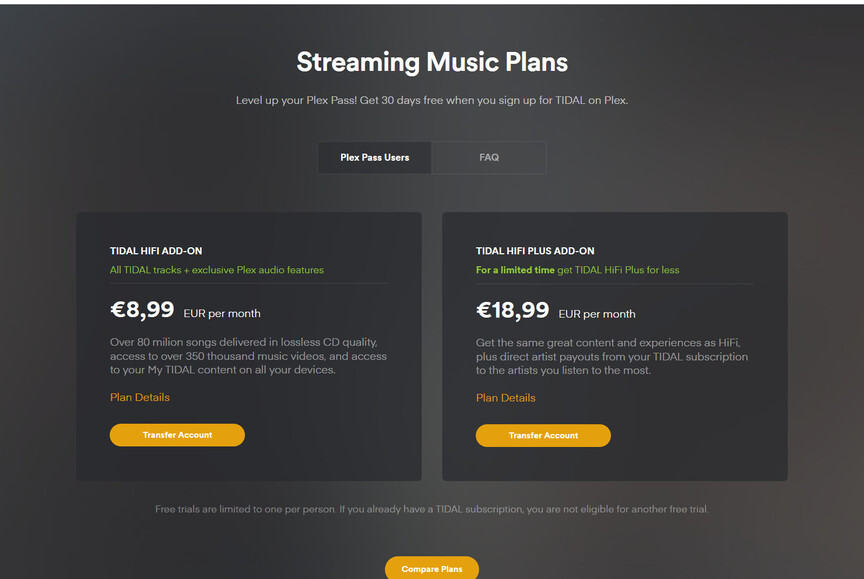
Plex advertises with:
TIDAL HiFi €18,99 EUR per month
or
TIDAL Premium €8,99 EUR per month

And on the Tidal support page on tiers you see

  • HiFi - $9.99 USD a month with standard sound quality (1411 Kbps)
  • HiFi Plus - $19.99 USD a month with lossless High Fidelity sound quality (1411 Kbps), Master Quality audio (up to 9216 Kbps), and immersive audio -360 Reality Audio, Dolby Atmos Music

So
Plex-Tidal Premium = Tidal Hifi
and
Plex-Tidal Hifi = Tidal Hifi Plus
?

Not anymore. The Plex Tidal add-ons have now the same names as their native Tidal counterparts.
https://www.plex.tv/music/

Well im sorry, but I don’t think “Tidal Premium” still exists anymore.
I do remember it from years ago (was MP3-320kbit), but it’s not listed on their site anymore… I only see, on the link you provided; Hifi and Hifi Plus.

So what do you actually get when you use Plex-Tidal-Premium?

“Tidal Premium” is not mentioned on that page.

Picture taken now from my settings, no Tidal Hifi mentionned

I mean this one:

Thanks for these screenshots! Now I know where they appear.
I will report this to the appropriate team.

And yes: the old “Tidal Premium” is the current “Tidal Hifi”,
while the old “Tidal Hifi” is the current “Tidal Hifi Plus”.

2 Likes

hello, i already have a tidal-account. i also have amazon prime video.
where can i login to this accounts in plex to use this services? i find no prefs for that :-/

thx

Go here to link your Tidal account to Plex: Sign In | Plex

There is no way to watch any actual content of video streaming services directly in Plex.
The only use case would be the Discovery section. You can select the streaming services you use on this page: https://app.plex.tv/desktop/#!/settings/streaming-services
But they will only be used if you don’t have the Discovery disabled here: https://app.plex.tv/desktop/#!/settings/online-media-sources

1 Like

This topic was automatically closed 90 days after the last reply. New replies are no longer allowed.