Synology FAQ - Questions, Answers, and How-To's

FAQ 17: Recover from a corrupt database

On Synology NAS machines, we have direct GUI access to the database area.
We can use File Station to recover if PMS was previously able to make database backups

  1. Open Control Panel - Shared Folders - EDIT the Plex share
    a. Permissions tab
    b. Give your username R/W permission to the Plex share

  2. Open File Station

  3. Navigate to the databases folder

  • DSM 6: Plex / Library / Application Support / Plex Media Server / Plug-in Support / Databases
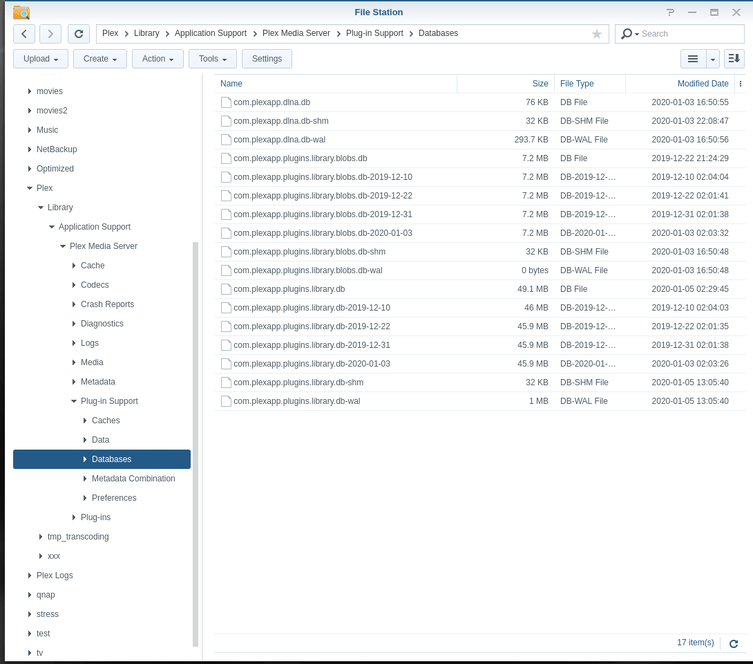
  • DSM 7: PlexMediaServer / AppData / Plex Media Server / Plug-in Support / Databases


4. If you have corresponding .wal or .shm for the main Database file, delete them

  1. Rename com.plexapp.plugins.library.db to com.plexapp.plugins.library.db-damaged

  2. Due to how Synology handles making copies of files (Skip or Overwrite only),
    a. Copy your most recent backup to another folder somewhere
    b. Rename it to add -copy to the name
    c. Move the renamed copy back here.

  3. Rename it to be the original, proper, name

  4. Right-click com.plexapp.plugins.library.db → Properties

  5. Set the owner to be plex . (It will have changed when you made a copy)

  6. Start Plex

  7. Scan Files to bring the database back into sync with your current media status

  8. When you are satisfied the -damaged file is no longer needed, you can delete it.

Go to Index

2 Likes
PMS Suddenly stop adding new media in library. Synology NAS
Plex Slow, inconsistent "There was an unexpected error when loading this library" error
How to repair database on Plex Server on my Synology
Unable to delete libraries
New Server Build & Migrate (Windows to Linux)
DS920+ not in authorized devices, DS415 play working fine
Plex Has Over-ridden My Previous Movies Folder Metadata - How do I recover it?
Moved Video Files to a new location now "collections" shows up blank
PMS refuses to run on Synology
Plex searching for server after restart/reinstall
Plex Server Library Scan will no longer recognize new files!
Can´t start Plex Media Server. Pop up: Package service cant be run
Unexpected error only under certain views
Plex Slow, inconsistent "There was an unexpected error when loading this library" error
Playback error Error code s1001 (Network)
Checksum mismatch errors - New media not adding
Plex on Synology Nas getting errors
Failed to run the package service on synology DS 718+
Synology DS1019+ - Failed to Run Package Service after transfer of PMS DB from Mac
Server won't start
Failed to run the package service error / DS216+II
Libraries won't load (says it's empty). Restarting PMS fixes things for a few hours
iOS player reporting corrupt database
Synology DS218+: PMS stopped and cannot be startet anymore
New Movies won't appear
Problems after an update
Plex Media Server not starting on Synology DS1019+ "Failed to run the package service"
Database Corrupted
Help needed: Ghost in the machine (DS218+)
PlexAmp iOS hangs when clicking on track search results
Later versions of Plex losing Movie Library

