Server Version#:n/a
Player Version#: n/a
Upgraded my TNAS to TOS 5.1, then reinstalled plex media server. That was all hot garbage, so I did a factory reset back to TOS 4.2.40. Life is grand again, but Plex media server won’t install properly now.
I used the reset to factory default → custom → selected the tos 4.2.40 installer package from the terramaster website. I did not go through the “first time initialization”
I’ve uninstalled/reinstalled it. Tried the steps listed on https://forum.terra-master.com/en/viewtopic.php?f=75&t=364
It seems TOS 5 migrated the plex media server to a new location as there is a migration.log file stating it moved the folder, so when I reinstall on the old OS, it seems confused.
No shortcut is created, it shows it is installed. If you click start, it stops immediately. I assume because the files don’t exist in the correct location.
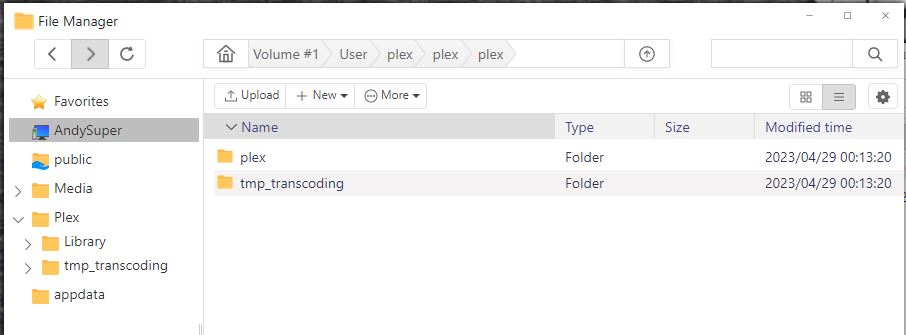
In the User directory, it creates a plex and tmp_transcoding folder, but if you open the plex folder, you just see another plex and tmp_transcoding folder like its just a referential link back to itself. It goes on and on if you keep opening the plex folder.
All the plex files are now in a shared folder called plex, but I know this version looks to the user directory.
I tried copying the files to the user folder, but TOS won’t copy directories that big. I don’t know how to do it with SSH.
I tried deleting the plex user with the deluser command but that had no effect on reinstalling.
I guess I’d be looking for a way to just do a clean removal of plex media server…
This is the plexmigration.log:
INFO: PMS AppData migration – START
INFO: PMS AppData migration – Found TOS 4 PMS Appdata directory (‘/home/plex/Library’)
INFO: PMS AppData migration – moving ‘/home/plex/Library’ → ‘/Volume1/Plex/Library’
INFO: PMS AppData migration – removing TOS 4 tmp_transcoding direcory (‘/home/plex/tmp_transcoding’)’
INFO: PMS AppData migration – END
