Intel i4590 cpu
16GB memory
Nvidia GTX960 video card
Windows 10
I’m trying to figure out a couple of issues I’m seeing in regards to trans-coding on the server. The first issue is I have hardware acceleration enabled which appears to be working but for some reason is only offloading to my cpu and not my gpu.
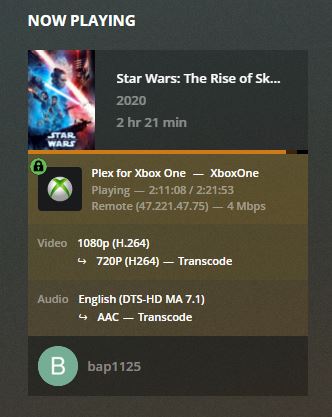
The second issue is I think I am trans-coding when it should be direct playing the media. I have a h264 file playing to an xbox one which is being trans-coded down from 1080p to 720p.
I’ve attached my logs as well. Please let me know if you need anything else from my end.
Hello, what did you notice recently? how many streams per user do you have? you could try putting at least 2 streams per user and try again to see if it transcodes. Thank you
Note there’s limitations when it comes to combinations of older Nvidia cards / CPUs. Make sure to have the newest NVIDIA drivers installed to make sure Plex can use your dedicated graphics card.
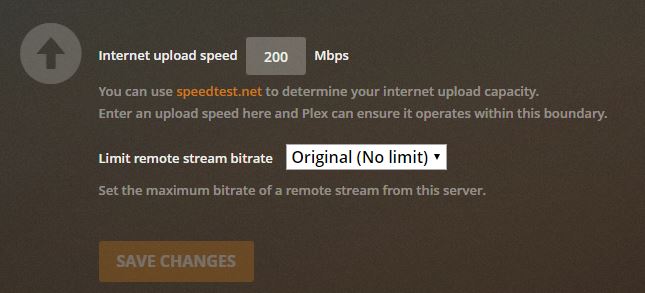
As for your 2nd question: check the video quality settings for remote playback in your clients… while the client should be able to direct-play the video (h264), DTS-HD MA likely requires transcoding. However… as the playback is happening outside your home network, it’s more likely the transcoding is caused by a restriction of remote quality.
Mar 21, 2020 10:49:39.006 [16008] DEBUG - MDE: Star Wars: The Rise of Skywalker (2020): Direct Play is disabled
Mar 21, 2020 10:49:39.006 [16008] DEBUG - MDE: Star Wars: The Rise of Skywalker (2020): media must be transcoded in order to use the dash protocol
Mar 21, 2020 10:49:39.006 [16008] DEBUG - MDE: Star Wars: The Rise of Skywalker (2020): no direct play video profile exists for http/mkv/h264/dca
Mar 21, 2020 10:49:39.006 [16008] DEBUG - Star Wars: The Rise of Skywalker - video.bitrate limitation applies: 14526 > 4000
Mar 21, 2020 10:49:39.006 [16008] DEBUG - Star Wars: The Rise of Skywalker - audio.channels limitation applies: 8 > 6
Mar 21, 2020 10:49:39.006 [16008] DEBUG - Star Wars: The Rise of Skywalker - video.bitrate limitation applies: 14526 > 4000
Mar 21, 2020 10:49:39.006 [16008] DEBUG - MDE: Star Wars: The Rise of Skywalker (2020): no remuxable profile found, so video stream will be transcoded
Mar 21, 2020 10:49:39.007 [16008] DEBUG - Star Wars: The Rise of Skywalker - video.bitrate limitation applies: 14526 > 4000
Mar 21, 2020 10:49:39.007 [16008] DEBUG - MDE: Cannot direct stream video stream due to profile or setting limitations
It appears the remote playback is restricted to 4 Mbps which is causing the transcoding.
No, I’ve had this issue for some time but haven’t really had the time/need to mess around with it. I have more people using my server now that everyone is sitting around at home which is causing this to become a problem.
I have the Maximum simultaneous video trans-code set to unlimited.
Thanks for the link and I’ve check to make sure my cpu is support (it is) and I updated to the newest NVIDIA drivers prior to posting and capturing the logs. I’m using TechPowerUp GPU-Z to monitor my gpu load which is sitting idle while the cpu is running at 80-90%.
tom80H
I believe that bap1125 and I have the same problem I opened a post that I link to you, I made several tests and there is no limitation on the server side bitrate and not even on the client side, read my post I think it is a situation common to all.
Looks like 2 very different scenarios.
bap1125’s stream has a client restriction (max. bitrate is set to 4 Mbit/s; client does not support DTS HD-MA); both result in his media being transcoded.