Linux newbie.
I made my drive to small that I installed Plex on. It’s hosted in esxi. I extended the drive. I then extended the volume in ubuntu. The transcode directory isn’t playing nice from what it looks like to me.
Help please!
Linux newbie.
I made my drive to small that I installed Plex on. It’s hosted in esxi. I extended the drive. I then extended the volume in ubuntu. The transcode directory isn’t playing nice from what it looks like to me.
Help please!
Need to know more.
What do you have ? (what does df show ? )
The transcode directory defaults to where PMS is stored (/var/lib/plexmediaserver)
Plex Media Server Logs_2021-06-10_20-20-11.zip (5.9 MB)
R710 no GPU
esxi 6.0
Ubuntu 18.04
What else can I provide that would help?
How about your disk partition map (my previous request) so I can help you pick out a possible solution?
Plex logs tell me nothing about the host.
Chris,
Would you mind using text copy/paste?
</> (code) button.It will look like this after you hit “POST”
[chuck@lizum ~.513]$ df -m
Filesystem               1M-blocks     Used Available Use% Mounted on
devtmpfs                     15987        0     15987   0% /dev
tmpfs                        16013      502     15511   4% /dev/shm
tmpfs                         6405        3      6403   1% /run
/dev/nvme0n1p2              124939    24623    100317  20% /
/dev/nvme0n1p4              788400   377849    410552  48% /home
/dev/nvme1n1p1              976285   816521    159764  84% /backup
/dev/nvme0n1p1                 476       21       456   5% /boot/efi
/dev/loop1                      33       33         0 100% /var/lib/snapd/snap/snapd/11841
/dev/loop2                     167      167         0 100% /var/lib/snapd/snap/signal-desktop/358
/dev/loop4                      56       56         0 100% /var/lib/snapd/snap/core18/2066
/dev/loop3                      65       65         0 100% /var/lib/snapd/snap/gtk-common-themes/1514
tmpfs                        16013       79     15934   1% /tmp
/dev/loop5                      32       32         0 100% /var/lib/snapd/snap/tautulli/766
/dev/loop6                      56       56         0 100% /var/lib/snapd/snap/core18/1997
/dev/loop7                      66       66         0 100% /var/lib/snapd/snap/gtk-common-themes/1515
/dev/loop8                      32       32         0 100% /var/lib/snapd/snap/tautulli/816
/dev/loop9                     160      160         0 100% /var/lib/snapd/snap/signal-desktop/354
/dev/loop10                    163      163         0 100% /var/lib/snapd/snap/gnome-3-28-1804/145
192.168.0.21:/nuc         79263990 35137813  44125649  45% /vie/nuc
This is a lot easier for me to read, thanks.
chris@plex:~$ /dev/sda2                              999320      206372     724136  23% /boot
-bash: /dev/sda2: Permission denied
chris@plex:~$ /dev/loop0                              56832       56832          0 100% /snap/                                                                                                             core18/1997
-bash: /dev/loop0: Permission denied
chris@plex:~$ /dev/loop2                              32896       32896          0 100% /snap/                                                                                                             snapd/11841
-bash: /dev/loop2: Permission denied
chris@plex:~$ /dev/loop1                              56832       56832          0 100% /snap/                                                                                                             core18/2066
-bash: /dev/loop1: Permission denied
chris@plex:~$ /dev/loop4                              69248       69248          0 100% /snap/                                                                                                             lxd/20326
-bash: /dev/loop4: Permission denied
chris@plex:~$ /dev/loop3                              32896       32896          0 100% /snap/                                                                                                             snapd/12057
-bash: /dev/loop3: Permission denied
chris@plex:~$ //192.168.0.4/movies              28113371136 23546102676 4567268460  84% /home/                                                                                                             chris/server/movies
-bash: //192.168.0.4/movies: No such file or directory
chris@plex:~$ //192.168.0.4/tv                  28113371136 23546102676 4567268460  84% /home/                                                                                                             chris/server/tv
-bash: //192.168.0.4/tv: No such file or directory
chris@plex:~$ //192.168.0.4/music               28113371136 23546102676 4567268460  84% /home/                                                                                                             chris/server/music
-bash: //192.168.0.4/music: No such file or directory
chris@plex:~$ tmpfs                                 2463004           0    2463004   0% /run/u                                                                                                             ser/1000

Command 'tmpfs' not found, did you mean:

  command 'tmfs' from deb tmfs (3-2build10)

Try: sudo apt install <deb name>

chris@plex:~$ df
Filesystem                          1K-blocks        Used  Available Use% Mounted on
udev                                 12270404           0   12270404   0% /dev
tmpfs                                 2463008        1248    2461760   1% /run
/dev/mapper/ubuntu--vg-ubuntu--lv   256862724    22079996  224066028   9% /
tmpfs                                12315036           4   12315032   1% /dev/shm
tmpfs                                    5120           0       5120   0% /run/lock
tmpfs                                12315036           0   12315036   0% /sys/fs/cgroup
/dev/sda2                              999320      206372     724136  23% /boot
/dev/loop0                              56832       56832          0 100% /snap/core18/1997
/dev/loop2                              32896       32896          0 100% /snap/snapd/11841
/dev/loop1                              56832       56832          0 100% /snap/core18/2066
/dev/loop4                              69248       69248          0 100% /snap/lxd/20326
/dev/loop3                              32896       32896          0 100% /snap/snapd/12057
//192.168.0.4/movies              28113371136 23546105848 4567265288  84% /home/chris/server/movies
//192.168.0.4/tv                  28113371136 23546105848 4567265288  84% /home/chris/server/tv
//192.168.0.4/music               28113371136 23546105848 4567265288  84% /home/chris/server/music
tmpfs                                 2463004           0    2463004   0% /run/user/1000
chris@plex:~$ ^C
chris@plex:~$
That looks VERY good.
If you downloaded from Ubuntu, you will get the SNAP package – which works completely differently.
If you download from Plex,
/var , which is part of / (plenty of spaceI’m VERY new to linux. I followed a guide that had me add a repository to install from. I wish I was better with this. I came from Windows and wanted to try linux.
So the / root was out of space. I increased the disk size in esxi and extended the partition in linux. When I launch a large mkv it hangs at 33% and from what I understand it has something to do with the transcoding directory. I’m not fluent enough with linux to know what to do next.
chris@plex:~$ cd /
chris@plex:/$ ls
bin   cdrom  etc   initrd.img      lib    lost+found  mnt     music  nfs  photos  recordedtv  run   snap  swap.img  sys  tv   var      vmlinuz.old
boot  dev    home  initrd.img.old  lib64  media       movies  nas    opt  proc    root        sbin  srv   synology  tmp  usr  vmlinuz
chris@plex:/$ cd /var
chris@plex:/var$ ls
backups  cache  crash  lib  local  lock  log  mail  opt  run  snap  spool  tmp
chris@plex:/var$
The first thing I must share (which is obvious , and I’m sorry ) you will need to learn basic Linux admin skills as fast as you possibly can . We can help with Plex on Linux and even teach some of the more advanced things but not equipped or staffed to teach linux itse.f
As for learning: a small VM is great for “educational sandbox” for you to safely play in without hurting anything else is perfect. You can try things, break them, snapshot restore the VM, and try again 
I don’t know which guide you might have used (there are many self-proclaimed experts out there) but it’s not difficult to do.
We have the How-To documented on our support site
You’ll find a lot of stuff here.
Additionally, I have curated a small collection of tailed How-To’s for common problems.
Back to your problem.
What you’re showing me here:
/dev/mapper/ubuntu--vg-ubuntu--lv 256862724 22079996 224066028 9% /
That sound right?
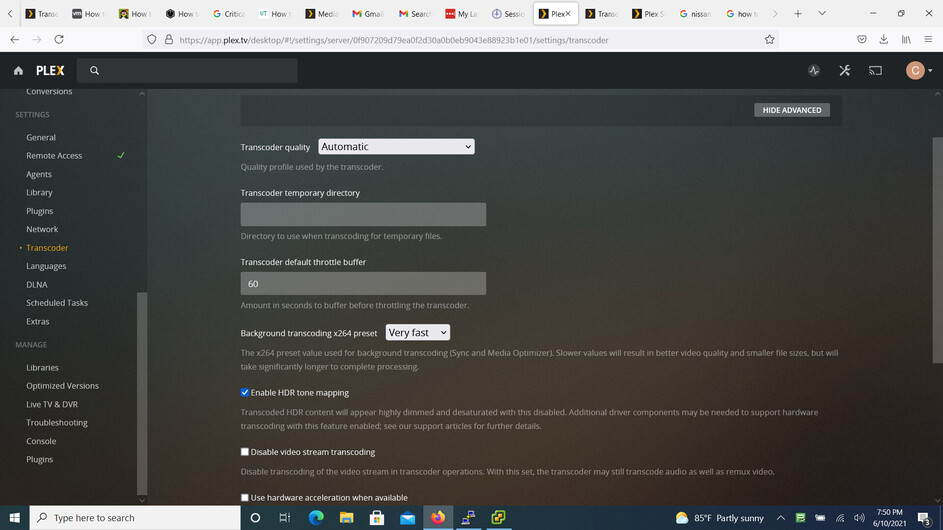
As part of your Plex settings, in Settings - Server - Transcoder - Show Advanced
did you type in a location for the transcoder temp directory?
If you didn’t, then it’s going to use space in the root (/) partition – which is plenty.
If you configured a value of /dev/shm (shared memory for tempory space) then I can see where you’ll run out quick.
It looks like you allocated 24 GB of RAM?
If true, 12 GB can be used for the /dev/shm ‘ramdisk’.
Am I getting closer ?
Lastly, would you please type:
dpkg -l | grep plexmedia
It will tell us what you have installed for PMS.
I’m definitely doing the crash course on linux here. I sincerely appreciate your time helping me out.
I haven’t defined a directory for transcoding. It is still blank at this time.
24 GB of ram is correct
chris@plex:/var$ dpkg -l | grep plexmedia
ii  plexmediaserver                        1.23.0.4497-a1b1f3c10              amd64        Plex organizes all of your personal media so you can easily access and enjoy it.
chris@plex:/var$
Where did you get 1.23.0.4497 ?
Neither our Public or PlexPass are that version.
Have you had this a while?
I’ve had this running for 2 months or so. I wish I bookmarked the guide I followed but I no longer have it.
Is there any chance you can recreate the error you saw and then immediately download the log files and attach them?
After looking at your system, and your logs, I am not finding where you’re out of disk space.
Certainly. The error first occurred when I saw that I was out of space. I thought that increasing the disk size would fix it but it didn’t. Certainly I could just blow this machine up and start over but I’d rather turn this into a learning experience see what the actual problem is.
Plex Media Server Logs_2021-06-11_00-57-29.zip (6.1 MB)
Thank you!
Jun 11, 2021 00:52:40.536 [0x7fdfd21cdd30] ERROR - IsFileWritable: failed to create file '"/4986f66f-7fb9-49be-929b-b9839d55a75b"'
Jun 11, 2021 00:52:40.536 [0x7fdfd21cdd30] WARN - IsDirWritable: directory '"/"' is not writable
Not out of space. No Permission to write to the root / file system (which is correct behavior on linux --or-- <space>/filename is not writeable (which is illegal).
Check to make sure there isn’t a space character in the Transcoder Temp Directory value. I’ll bet there is. I think it’s trying to write to /xxxx
Under settings…transcoder it is blank. Is there another place to define it?
Let’s try this.
I’m sorry I don’t have a standard linux machine in front of me but we can make whatever we want
Please do the following:
# sudo bash
# mkdir /var/lib/plexmediaserver/transcoding
# chown plex:plex /var/lib/plexmediaserver/transcoding
In the Transcoder Temp directory setting, making certain there are no leading or trailing spaces, type /var/lib/plexmediaserver/transcoding
SAVE the change
Now test it