Transcoder segfault on Qnap 453Be - Partition Table root cause

Server Version#: 1.19.3.2764
Player Version#: N/A
QNAP TS-453Be Firmware 4.4.2.1270 (4/10/2020).
This issue has been happening over the previous several stable releases.

My Plex server has been crashing every 4-5 days at night. I have no other known running jobs/processes during that time that would cause conflicting issues.

However, my Qnap logs show the following things that happen (screen):
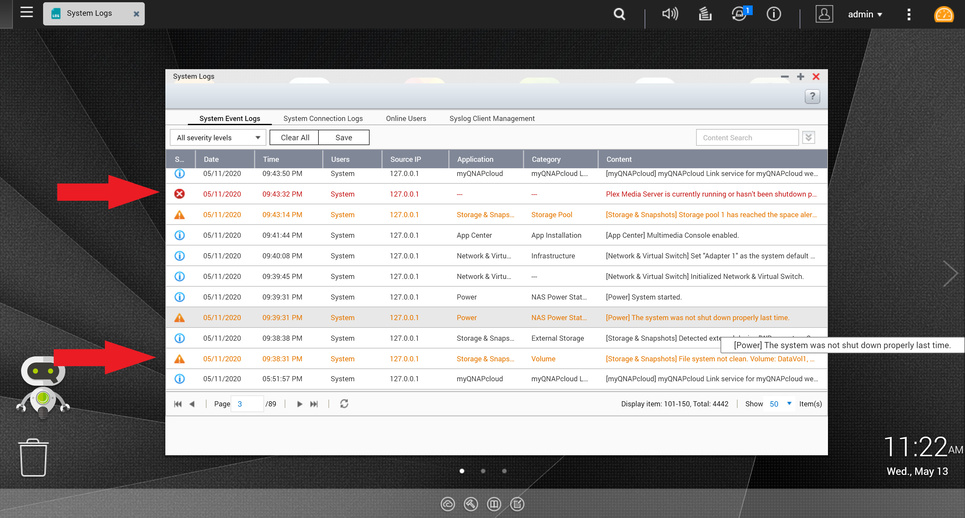
As you can see, somehow, the File System becomes corrupted, then a Power warning, then Plex eventually crashes. I have verified that the power did not go out during this time. The “Storage Pool has reached…” alert is known and has been that way for a bit. It wasn’t only triggered during this event.

Contacting Qnap support, they said app crashing can cause the file system to become corrupted (not clean – the fix is to run a File System Test which has resulted in always a Success. So I do not understand why it’s being “corrupted” in the first place.) They also mention that the Power warning could also be caused by apps crashing and causing the Qnap to trigger that message.

However, when I try to dig into my Plex Server logs (obtained from Downloading the logs in the Plex Web app) there are no logs for this timeframe, only up to about 1-2 hours before the crash.

Qnap support was able to find the following errors in the filesystem (screen):

It seems like an issue w/ the Plex Transcoder failing. I have verified that a Plex remote player was streaming during that time. However, I do not know how to prevent this error from happening or why it causes the whole Plex server to crash.

Here is my current setup for my Qnap 453Be:
4x 6TB WD Red NAS Drives - RAID-6
8GB Ram
I have one Storage Pool - 1 Thick Volume setup on the RAID

Since running Plex on a RAID volume is slow, I tried to enable RAMDisk caching using /dev/shm to increase performance, but that just resulted in more frequent crashing. It may have been with me not dedicating a standalone RAMDisk share for Plex, but I was just testing this functionality.

I have verified w/ Qnap support that even if I installed an SSD into my Qnap and switched QTS to run on that, separate from the RAID volume, that would not solve the File System error that happens.

Any insight would be greatly appreciated!

Attaching my logs:
Plex Media Server Logs_2020-05-13_11-13-44.zip (2.3 MB)

That fault is directly related to the qnap firmware

Version 4.4.2.1270 has known bugs, I wrote to qnap and they told me to downgrade to 4.4.1.1216. I went to the last version of 4.3.6 and have had a 20 day reboot filesystem error free run. Will soon go to 4.4.1.1216 and hope for the same. All other versions of 4.4.1 and 4.4.2 are ant city, get off them fast!

To repeat QNAP themselves told me to downgrade to 4.4.1.1216 from the version you are running.

See my attached snippit

@skwor01

Thanks for your reply. Funny, we have the same Qnap support rep. However, in my case, I was having the same problem on the firmware that you downgraded to. I was told to upgrade to the latest one, which still doesn’t solve the problem.

Which is why I went to 4.3.6

I am not convinced 4.4.1.1216 is stable. So you say you were running 4.4.1.1216 and it was causing the same error?

There are several 4.4.1 versions, are you sure it was 1216 that was causing the problem?

Here is my history:

  1. 8/27/2019 - Installed QTS 4.3.6.0993 Build 20190704
  2. 11/3/2019 - Installed QTS 4.4.1.1101 Build 20191025
  3. 11/19/2019 - Installed QTS 4.4.1.1117 Build 20191109
  4. 3/16/2020 - Installed QTS 4.4.1.1216 Build 20200214
    – Noticed multiple problems after this install
    – 1. RAID Scrubbing job failed when Plex is running
    – 2. Plex Crashing (This issue)
  5. 5/2/2020 - Installed QTS 4.4.2.1270 Build 20200410

Downgrade Questions

  1. Is downgrading to 4.4.1.1117 easy to do?
  2. Do I need physical access to my Qnap?
  3. Do my system storage pools/volumes stay intact?
  4. I’ve heard there could be stability issues w/ downgrading. (Go figure…) Could that lead to further problems down the road? (outside of Plex)

Per Qnap’s own website downgrading is the same as upgrading just install the firmware package. Some on the Qnap forums say it is best to back up data, re-initialize your NAS to factory then install the firmware. To date I have had no issues upgrading and downgrading per Qnap’s web instructions

Ok, thanks for your input! I’ll double-check w/ Qnap Support to see if they recommend the same solution for my case and give it a go!

If I may add to the above;

I have also updated firmware then backrev’d several times.

4.3.6 is very stable.
4.4.x has its issues.

I just had time to read the full thread.

The partition table is damaged.

This is dangerous territory

Is there any way you can backup the entire media volume / drive?
I suggest this because whenever working with the partition table, it’s possible to lose all previously defined partitions.

QNAP drive initialization will wipe it – another risk.

I URGE stabilizing the machine first.
Drive diagnostics and/or a UPS (if power outage caused the problem)
Deal with Plex after the machine is stable.

@ChuckPa - I’ve turned off Plex Server and testing to see if it crashes within the same timeframe. Qnap support recommended this testing first to verify that it is indeed Plex causing the issue. It seems to be stable, but I am going to give it a full week to verify.

I already have a backup job running to an external HDD that has backed up all my data, so I’m good there. Realistically, I am ok with having to wipe the NAS and start from scratch if needed. However, I only have remote access currently, being stuck on the opposite side of the country because of quarintine. I do have someone who can access it physically to reboot/login locally if needed, but I only have them reboot it. They wouldn’t be able to set it up from a clean install, it would have to wait until I’m physically there.

Some questions from your analysis:

  1. Is fixing the partition table easily done on an existing instance? Or does the system need to be wiped/resetup?
  2. Would partition table damage cause other app errors? The Qnap tech mentioned my Qnap Antivirus was corrupted and he fixed that.
  3. Would a hard shutdown/power outage cause partition table damage? Or is that caused by the firmware upgrade?
  1. While fixing the partition table with parted is easy, unless you know exactly how QTS wants it partitioned or is partitioned on other drives (to serve as your guide), you’re running a risk. If you’ve done this type work before then you’re going to fair much better.

  2. Partition table errors cause the file systems to point to wrong areas of the disk. Files ‘disappear’ or ‘blocks of some files appear corrupted’.
    This happens because the disk is structured as: Partition Table -> Partition -> File System formatting -> inode table -> Directory blocks & file blocks… If it gets skewed then major loss will be visible because the key items (Superblock) is not where expected .
    All addressing within the file system is relative from the start of the partition.

  3. If there was a power event (failure), anything and everything can be damaged. “Power Event” can be a power failure (significant blip or full outage) or hard “power off”. The damage occurs because, as the power is failing, data can get written to the wrong place.

The case of the partition table being damaged often occurs during physical power failure / abrupt drive spin down (while the heads are starting to retract). It’s a very ugly time for the drive doing emergency retract and the OS trying to be graceful but even memory could be corrupted at this point

I do not see Firmware Upgrade causing this UNLESS the upgrade was aborted mid-upgrade, essentially ‘bricking’ it.

Did the QNAP tech address your partition table errors?

Lastly, do you have a UPS protecting the NAS with USB connected from the UPS -> QNAP ?

Just wanted to say that I’m experiencing similar behavior on my end. I’m seeing reboots usually at 8pm, every two days or so, linked to users streaming a transcoded file.

Plex should not be crashing my NAS like this. Ideally, Plex would crash and leave the actual NAS functional.

Qnap support has been less than helpful so far.

@codingpanic

Please make a separate thread.

This thread is now dedicated to the OP due to the compromised state of his NAS.
(GPT partition table problems)

I will inform the Qnap rep of your analysis. At this point, you’ve shown that you know more than them.

I do not have a UPS, so a power event could affect it.

Another question, would the “damage” be only in software, or could the HDDs have issues? I’ve ran multiple drive tests as well and they have come back ok.

If there is potential hardware damage, then should I power it off until I can get a proper UPS installed?

The California, USA team knows me.
Please let them know they can reach out to me directly if they wish.

Hardware damage is highly unlikely.

Hard drives have an “Emergency Retract” feature built in for just these occasions.

Is your A/C line power normally unstable or is this a bad weather season for you?

My server is in San Diego, where there’s normally no issues. They’ve gotten a lot of rain storms over the last several months. The person that’s there hasn’t mentioned any power outages, but if it’s a blip in the night, might not have been noticed.

Thanks for the reference, I’ll let Qnap know

Update: The Qnap rep has suggested wiping and reinitializing the Qnap in order to fix the partition table issue.

I would like to note that I’ve had my Qnap up for 7 days w/ Plex Server stopped and have had no errors. If the problem is partition table damage, would that only cause problems when trying to access data on volumes? Aka, what Plex tries to do and then a segfault happens

If the NAS is otherwise quiet then yes, it can easily sit there without incident.

This isn’t the first time Plex has exposed a problem with the underlying system.

One common problem is CPU overheating (dust bunnies) when transcoding engages.

This topic was automatically closed 90 days after the last reply. New replies are no longer allowed.
