Server Version#: HP Proliant running Unraid
Player Version#: PS5
As anyone will know who owns a rack server, when under load the fans all spin up.
This only happens on my server when someone is streaming with a PS5.
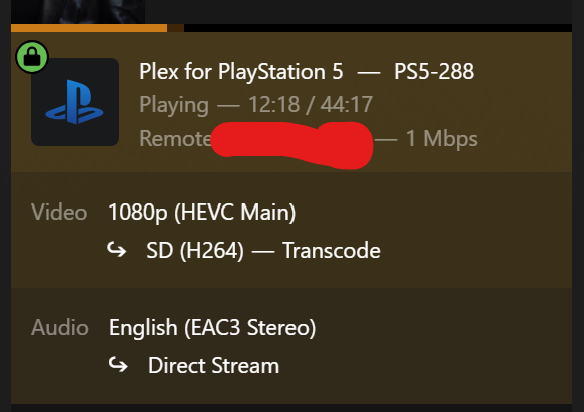
When i check the Plex dashboard i can see
Video: 1080p HEVC Main
SD (H264) - Transcode
Being computers i would have thought a PS5 could play all formats, why does everything need transcoding?
Is there a setting i can change to help with this, or are PS5s just crap for streaming?
The SD quality is a hint that your server probably isn’t accessible directly.
Ensure that the container with Plex server is using “host network”. Otherwise you are inserting another layer of NAT between clients and server.
Then the next step is to inspect the Server Dashboard in the web app, while the user in question is streaming a video.
Of particular interest are the bitrate and the connection type (local/remote/indirect)
And it doesn’t say “indirect”. Which means that the restriction to 1 mbps is not caused by the Plex relay connection.
But either by the Plex client’s quality settings, or by a restriction set in the server for remote connections.
The thing is i could have 4 or 5 family members on at the same time watching on firesticks and smart TVs, but as soon as a PS5 connects i hear all the fans kick in like its taking off.
it’s very strange.
However, i’ve just done a search what the maximum CPU it can take
The HP ProLiant DL165 G7 server has a maximum CPU capacity of two AMD Opteron 6100 or 6200 series processors, with up to 16 cores per CPU. This results in a total of up to 32 logical cores (16 physical cores per CPU) in a dual-processor configuration.
The Opteron 6212 CPU has only 8 real cores.
If you can upgrade the CPUs to a 16-core model, it may provide more oomph.
Though I suspect that it won’t solve the noise issue. Server cases are not optimized for low noise, but only for sufficient cooling while mounted within a rack.
Last year’s Pro Week server build would provide far more transcoding power, while keeping the noise level down. (Since it doesn’t suck much energy that has to be removed from the case in the first place). https://www.plex.tv/blog/plex-pro-week-24-does-your-server-suck-energy/
The noise isn’t the real issue to be honest. as the server is in another room away from my TV etc.
The only time the server fans spin up usually, is when it does its monthly back up, which takes around 24hrs
However when i heard it spin up outside of this monthly cycle i decided to investigate the cause, which is when i realised it only does this when any of the 3 PS5 users are streaming.
As for sucking energy, it’s a 500watt system, so not the most energy efficient servers to use.
I may have to look for new server options, either another rack server or try something new.