Server Version#: Version 1.40.4.8679
Player Version#: Version 4.134.2
I seem to be having an issues configuring my server properly to transcode, most notably for remote streams, but it is inconsistent for local as well. I tried just about everything that I can think of including the troubleshooting steps taken down below. Attached are my logs from starting up the server, letting it finish initializing, and then streaming a movie for ~60 seconds before attempting to transcode. Once I transcode the stream ends up dying all together and I believe I am seeing 404 errors in the logs at that time trying to access the /Transcode/Sessions directory. Then I try loading the same media locally and it appears to actually transcode one chunk and the the stream dies. Occasionally upon transcoding locally I am getting an “Error code: S1001(network)” or sometimes it will just stop trying to load the video all together.
From what I can tell, when I have the server set to convert automatically it will convert the file when initially requested from a host that has lower bandwidth (verified by checking /dev/shm/Transcode/Sessions), but if you try to change the quality at all the stream dies and I see nothing in /dev/shm/Transcode/Sessions
Here are my docker container settings
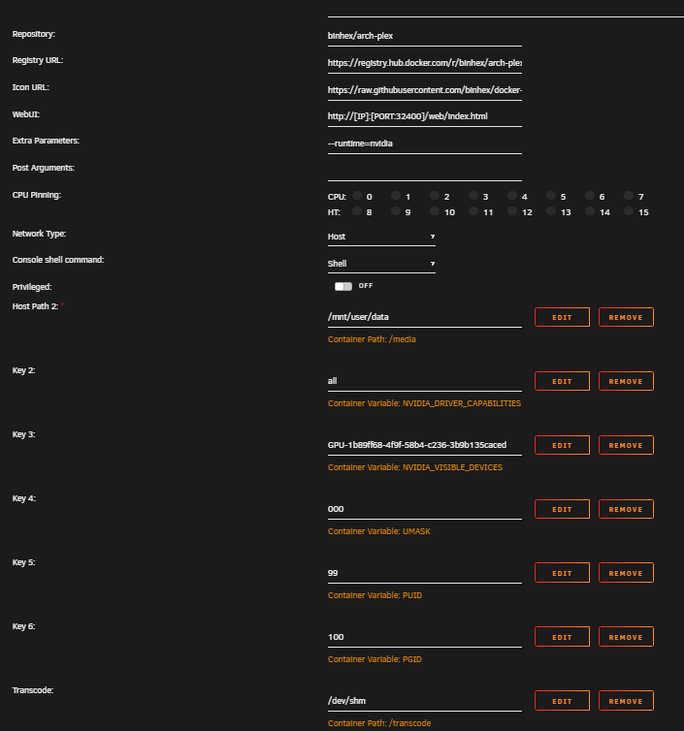
Plex Media Server Logs_2024-07-27_09-43-26.zip (2.4 MB)
troubleshooting steps:
change the transcode dir back to default (/config/Transcode) - resulted in remote streaming being capped at 2Mbps and everything looked blurry. Still couldn’t change the quality without the stream dying
Followed the IBRACORP video for making a /tmp as a 32GB tmpfs - when running df -h I never saw the tmpfs being mounted and the problem persisted
I have enabled GPU encoding and disabled it within the extra parameters and the problem persisted
Testing method:
Remote: I am using PIA and setting my location and trying to stream through OperaGX to test remote streams
Local: running both Plex in chrome web app and Plex for Windows app
Hardware:
CPU: 11th Gen Intel® Core™ i9-11900K @ 3.50GHz
Memory: 64 GiB DDR4 Non ECC Corsair Ram
GPU: NVIDIA GeForce RTX 3070 Ti
Storage: 5x - Seagate Exos x20 20TB SATA HDD, 1 - Samsung 970 Evo TB nvme (cache drive)
Motherboard: ASUSTeK COMPUTER INC. TUF GAMING Z590-PLUS
<If providing server logs please do NOT turn on verbose logging, only debug logging should be enabled>
