Server Version#: 1.41.7.9799
Player Version#: 2025.16.0
I used to see hw transcoding working on PMS on my QNAP TS-873A with installed GPU GTX-1050 Ti, QTS 5.1.9, with GPU assigned to QTS. The hardware transcode settings have not changed in Plex settings, I’ve not upgraded any software on the NAS except PMS versions. I noticed lately that transcoding is no longer showing as running hw. Tried on several clients and media, it will not do hardware.
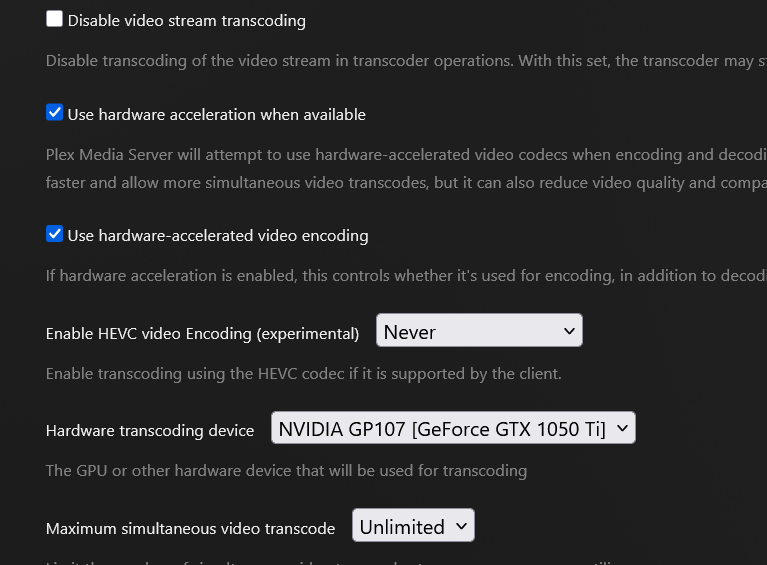
Verified the transcoding settings, and auto set as GPU. The nVidia drivers are still installed.
I’ve rebooted the NAS and restarted PMS, does not help. Is there something I can do to troubleshoot what has happened?
PS: I found this in the PMS logs, but I can’t see why the NAS is reporting the GPU available, but Plex can’t see it:
May 23, 2025 09:36:32.213 [140666134911800] DEBUG - [Req#5d83d7/Transcode/89a2de9ef24d4377-com-plexapp-android] TPU: hardware transcoding: enabled, but no hardware decode accelerator found
The only selection in the settings for transcoder device is “Auto”.
A further note. I completed an upgrade on the NAS to 5.2.4 and updated kernel/QTS drivers for the NVidia card. Card shows up and assigned to QTS (as before), but HW transcode still doesn’t start.
Is there a new bug related to this? I think t started in the previous-to-current release.
-Alan
PS: I double checked and found that now I can add the NVidia card explicitly to the transcode settings:
But, doesn’t help, tried transcoding again to 480p and no h/w use:
I happened to notice the same TPU: hardware transcoding: enabled, but no hardware decode accelerator found message in my server’s debug logs while trying to figure out an issue with some movies not playing on certain clients after updating PMS to 1.41.7.9799. The clients will direct play the video but do require audio transcoding.
The issue is the loading spinner will spin for a bit and then depending on the client it will either keep spinning endlessly and never play the movie (web client) or display a playback error (Roku TV). However, these same movies will play on Plex for Android, assuming because the audio can be direct played.
I didn’t find anything else of interest in the logs other than that message. It’s not clear to me if the issues are related. I tried deleting the Codecs folder and restarting PMS based on some other posts I found, but that didn’t fix the issue. I restored the original Codecs folder and ended up rolling back to PMS 1.41.6.9685 and the issue was resolved, and I am no longer seeing that message in the logs.
Nothing has changed on my end other than updating PMS to version 1.41.7.9799.
I am running PMS in Docker on a Synology DS1520+ with the latest DSM.
If you pull 1.41.6.9685-d301f511a for the image, will that restore functionality ?
Yes, as I mentioned I rolled back to 1.41.6.9685 and that seems to have fixed the issue. I also no longer see that message in the logs.
I’m not running Docker myself, and I feel like the problem may have started the release before the current. Running 1.41.7.9799 as of yesterday, upgraded to that to try to solve the issue.
Can you download older versions of the qpkg releases where I could try a downgrade a couple of versions?
@webminster
Which QPKG would you like (there are several – based on NAS type) ?
Plex.tv shows a TS-873 on your account. Is this correct?
It’s a TS-873A, Ryzen AMD so the amd64 version…
Link sent via PM.
If you need to shrink the DB, DBRepair (via SSH) will do that for you.
OK, am of the impression that it was probably the version two back that was working, and the last two releases might be broken for me. Are you saying that the downgrade isn’t likely just applying the package, I’ll have to goof with the database (never tried a downgrade).
1.41.7 is where the database problem began.
1.41.6 didn’t have the DB issues and was fairly stable from what I’ve seen
1.41.5 was stable as well
Only the new 1.41.8 (BETA from Chris) addresses the EAC-3 audio and all Dolby transcodes --BUT-- still has the database bloat problen that will be fixed in an upcoming 1.41.8 updated
I’ll PM you 1.41.5 so you can decide which you want to use until 1.41.8 is released.
@webminster
I am looking at my last reply. I might have missed part of your questions.
-
When you downgrade, given the 1.41.7 problem, if your database is bloated and you want to fix that too, then that’s a separate step we do in the ssh shell.
-
The transcoder not working (failing on Dolby Audio transcodes) is unique to 1.41.7 (where a fix for choppy EAC-3 was released) but that fix introduced a separate problem for ALL Dolby audio transcoded to Dolby (e.g. TrueHD → EAC-3 . e.g Roku devices)
If you’re using a Roku or other device that accepts EAC-3 output then 1.41.6 or 1.41.5 will resolve that crashing for you.
Almost forgot to report… the 1.41.5 release works great. Thanks for the help!
-Alan