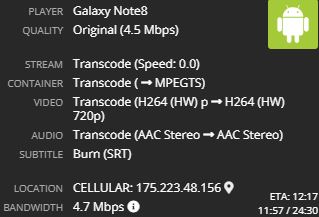
Server Version#: 1.15.3.858-fbfb913f7
Player Version#: 7.13.0
I tested my self for each case.
case 1
Direct with SRT = working
Direct with SMI = not working (Does not try to burn) NO Subtitle
case 2
Transcoding with SRT = working
Transcoding with SMI = working (Subtitle breakdown as “ㅁㅁㅁ” and delay response with message “not powerful enough to transcode” from player)
Form log
“[Transcoder] [Parsed_inlineass_2 @ 0x2049940] fontselect: Using default font: (Arial, 400, 0) -> /volume1/@appstore/Plex Media Server/Resources/Fonts/DejaVuSans-Regular.ttf”
Case3
After Case 2, I try to change case 1, I cannot change to direct play. It stuck on the transcoding option.
Common problem
I cannot play with Subtilte. If I want to play with subtitle, I have to turn off subtitle option and play and than turn on the subtitle options.
If I didn’t follow this instruction, I get message "Please try restarting both the Plex Media Server and this app”.
Upper tested three cases are followed this rule.
Tried to solve
I put Arial fonts at “/volume1/@appstore/Plex Media Server/Resources/Fonts”. It worked. “ㅁㅁㅁ” Subtitle has gone.
But, still I have to disable to subtitle to play movie. And still shows error on logs follows as
- [Transcoder] Error while decoding stream #1:0: Operation not permitted
- [Transcoder] [Parsed_inlineass_2 @ 0x266a800] fontselect: Using default font family: (Arial, 400, 0) -> /volume1/@appstore/Plex Media Server/Resources/Fonts/DejaVuSans-Regular.ttf, 0, DejaVuSans[Parsed_inlineass_2 @ 0x266a800]
I know that “smi” subtitle have to be burn to show on video.
What is this problems? Could you help me out?
- Direct with SMI // 2. Direct with SRT
- Transoding SMI // 4. Transcoding SRT