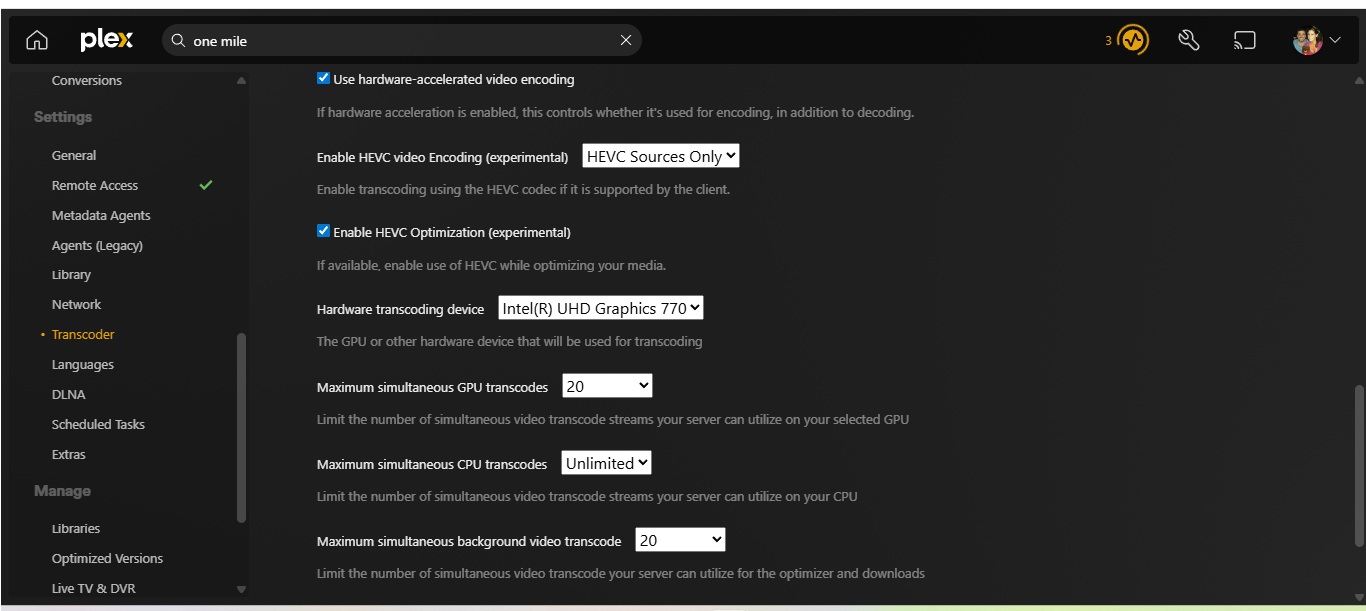
Server Version#:Windows 11 Pro, Latest Plex server beta
Player Version#: All devices local and transcoding over the Internet
Motherboard ASUS TUF Gaming Z790-Plus WiFi LGA 1700(Intel 14th,12th &13th Gen) with 12th Gen Intel(R) Core™ i7-12700K (3.60 GHz) CPU also have Nvidia Quadro P4000 card. Both are active under Cmos settings. Have Intel UHD Graphics 770 set to be used for Display using HDMI. Also, under Windows 11 Pro, the system has 770 checked to be used as a transcoder for Plex PlexTranscoder.exe (found in the Plex installation folder, usually C:\Program Files\Plex\Plex Media Server\). This has also been done. HDR is turned off so not sure why UHD 770 is not being used Log is here,
P.S. Yes I have Hardware enabled in Plex with UHD 770 ticked
also screen shot while streaming to my Galaxy S20
Plex Media Server Logs_2026-03-01_12-13-43.zip (6.8 MB)
So I guess I didn’t post the question correctly about forcing the UHD 770?
What is it that you’re seeing? Does playback start? Does playback fallback to SW encoding? Does this happen on every file or only specific files?
Every video played locally or streaming over the internet uses my P4000 card. Wasn’t sure if I was missing a setting? I have everything I could search for on the WEB telling me how to force it to use UHD 770, and as you can see from the photo I posted its not.
Can you take a screenshot of your Server Settings > Transcoder and open the dropdown for the Hardware transcoding device like this?
I already have all those set. I even went into CMOS and made the UHD as my main HDMI for my Windows 11 Monitor. So for the experiment, I just clicked off the Use Hardware and HEVC settings to off and the experimental setting to off
This has nothing to do with PMS.
You’re claiming that you have the Intel device selected but your Nvidia GPU is still being utilized, correct? Can you please show me this setting?
The issue is happening on all playback session on any client?
Can you please do the following;
- Confirm server DEBUG logging is enabled, VERBOSE logging is disabled.
SAVE if changes.
- Restart PMS
- Give it two minutes to start and stabilize
- Attempt to start playback
- Try again on another title
- Download the server logs
- Share them here
This will get some clean logs of just the issue.
The log I posted Verbose is disabled
Don’t forget I am a beta user using the latest
Tonight when no one is streaming I will do a clean reboot and Stream to my phone using cell tower only get you cleaner log
Again thank you for looking! Don’t forget I am using beta! Also added new equipment 2 weeks ago Google 4K Streamer with Network hardwire so no Wifi buffering the Google box crashed alot with Plex beta
1.43.0 is no longer in beta.
Can you tell me the display driver version? Device Manager > Display adapters > UHD 770
I’ve filed your issue for an engineer to review. Thank you for reporting.
Sorry about the Beta mix up. I had my Server setup to update automatically when new Beta Versions come out. I posted the version in the photo I am on. Thank you for stepping in.