Server Version#:1.32.3.7192-7aa441827
Player Version#:
The search function returns the Show with the two seasons.
Issue: The [Recently Added TV] doesnot show it. On examination of the the episode (Get Info) it shows the wrong attributes (File location on the server). This is a major bug because I will not be able to retrieve the episode using Search
URGENT FIX PLEASE
Would you mind sharing some more details on what you experience and how the files are named / linked to your library?
For each TV series I have a folder on the external HD.
I Group the folders (1)(2)
I add the group folder to plex library (3)

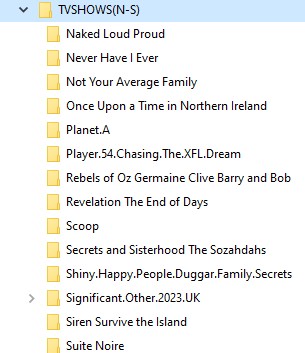
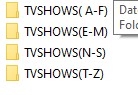
Once a new episode is added to individual folder, It gathers the meta data and displays it on the HOME as a season with the correct details.
Since I have many HDs and over time occasionally I need to locate the path for the season or the episode. I use search and Get INFO for the episode, IT has worked so far without any issue.
The New problem that I have described is : The path displayed is WRONG, and points to the wrong HD. (4)
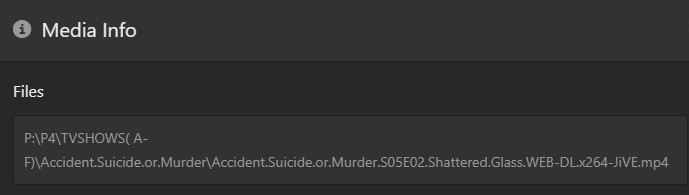
Please help. A fix is needed urgently The info in the DB is Useless and cannot be trusted.
Does your library name start with a dot ( . )?
Nope it doesnot
It happened again in today’s scan the clue that the path is incorrect is that it doesn’t show up in recently added, (?)
Your first screen shot above says it does.
I checked again, YES I am using ( . ) prefix to sort the names.
So what do you suggest to do.
I have been using this since I started and have NEVER had this problem.
I also noticed that the SOME Episodes on my K3 drive show up as being on M drive, All the other episodes are correctly Pathed.
Forgot to mention that I have the same schema on multiple servers without any Issue its just this Primary server that I have been using since 2018 that this problem has emerged
I recommend using a space character. It will be filtered out on most clients as well, so the library’s name will still look clean.
I am actually not sure if that is the cause of your issue, so I recommend checking for database damage as well.
- activate debug logging (not ‘verbose’!)
- quit Plex Server
- wait 1 minute
- start Plex Server
- wait 5 minutes
- fetch log files and attach them here
Or inspect them yourself. Take a look at the Plex Media Server.log file and seek for messages about database corrupt or malformed.
If you find these, you may have to repair your database.
https://support.plex.tv/articles/repair-a-corrupted-database/
will do when time permits Thanks
Greetings OttoKerner
I have yet to complete the Corrupt DB tasks.
I wanted to share some of what I have been doing to trouble shoot this problem
I checked the "media_parts " table from the Plex DB.
Interestingly the path is correctly captured.
This is the info in the table:
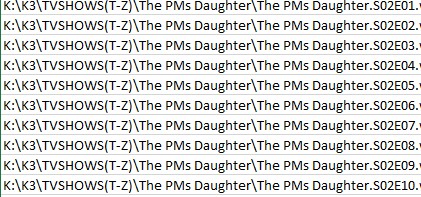
This is the info on the client:
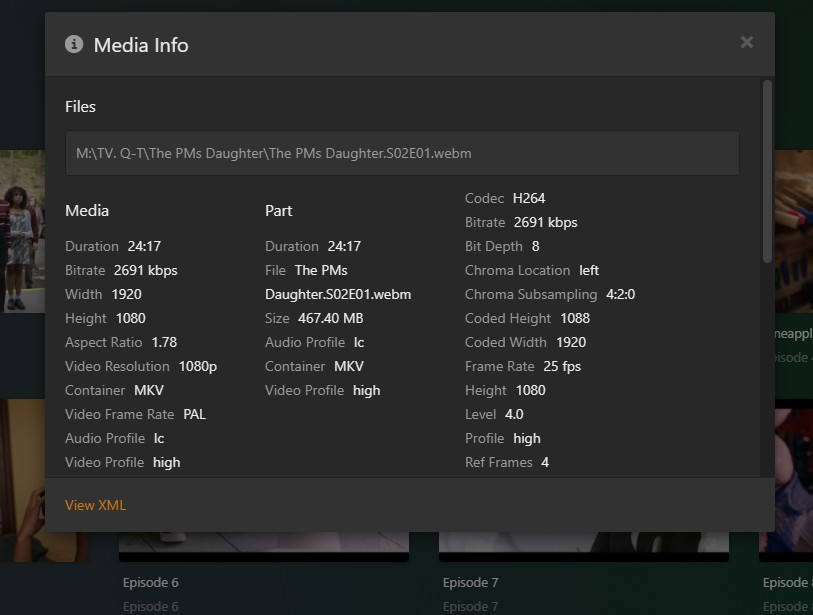
Any suggestions?
You may actually be looking at different servers.
You have 3 different server instances connected to your plex account. Each of which has been reporting to plex.tv that it is still active as of today.
So you might be looking at the library configuration and database files of one server, but are looking at the media info of the same video file added to a different server instance.
(which makes it plausible that there are different drive letters assigned to network file shares, and different Plex library titles)
I actually have 5 active servers.
I have noticed the switch and have retrieved the correct server using the >MORE at the bottom of the menu and it loads the correct HOME page which I then verify using the RECENTLY. ADDED BLOCK.
I have deselected REMOTE , But this occurs , It happened today.
I am not sure what you are pointing to is applicable to this. ((which makes it plausible that there are different drive letters assigned to network file shares, and different Plex library titles))- Same drive letter for all the instances, and the same HD for the scan.
For my needs Recently Added TV is an important feature and it has worked splendidly, The current issue of absence is a headache. If I open the library the season has been added and it has the correct path.
I have checked the Config:

Any other insight???
The other issue of PLEX Grouping wrong unrelated Seasons keeps happening.
Plex Media Server Logs_2023-06-15_09-41-52.zip (389.4 KB)
I am not a Programmer, This is the log file.
Let me know what you find
If that is so, only 3 of them are connected to the plex account you are using here.
If you are juggling with several plex accounts in your web browser and Plex clients, it could be one of the reasons why you are seeing confusing results.
I don’t know what you mean by this.
It has nothing to do with the issue at hand.
This is actually a wholly different area to what has been described above.
I’d start by ticking the checkboxes for “Recently Added TV” in the columns “Library Recommended” and “Friend’s Home” as well.
This yet another area and might not be directly connected to all of the above issues.
But my first guess would be that you are not adhering to the recommend folder organization for tv shows. You are completely missing subfolders per season. https://support.plex.tv/articles/naming-and-organizing-your-tv-show-files/
“I’d start by ticking the checkboxes for “Recently Added TV” in the columns “Library Recommended” and “Friend’s Home” as well.”: The reason I have not done so is because it generates a lot of unnecessary Clutter on the home page. The lib recommended - I am not a great fan of and don’t need it.
" You are completely missing subfolders per season" I am not sure what you have in mind. To explain the issue one more time The Home page “Recently added TV” is missing some episodes / Seasons, How- ever the workaround that works is to open my Library ( TVShows( X-X) the return screen Under Date Added displays the Season and List the episodes.
Thanks for the followup.
Did you find any corruption in the Log file that I uploaded today. I would really like to learn about reading the log file.
Repair DB: I had attempted this some time back - A complete disaster.
I don’t know what this means.
There is now a batch script which can do it for you.
Only thing you need to do is to edit it and put the location of the Plex data folder into it – but only if you have changed it away from the default location.
And make sure that plenty of free space is available on the volume which holds the Plex data folder.
Any feed back on the Log files?
Greetings OttoKerner:
Starting yesterday I have added the season suffix to the folder. I have yet to review all the new but the few that checked have the CORRECT path under Get Info.
You think this is the necessary Fix?
Your feedback is appreciated
