Server Version#: 4.99.2, windows 10
Player Version#: version 7.0, build 23, Roku
Tuner Make/Model: HDHR3-US (legacy hdhomerun)
Guide/Lineup name: Houston local broadcast listing
Using XMLTV?: No
Channel number/Name: all
Trying to figure out why I’m having live TV playback issues with plex. I’m thinking it is either a tuner or Plex software issue.
With the antenna plugged directly into my TV, I have max tv strength on many channels. These channels are what I’m using to test.
I then plug the antenna into the hdhomerunrum dual tuner, set it up in Plex, scan for channels, setup the guide etc… All works fine. Except when I start playing TV it keeps freezing and buffering every minute or so. Then errors out saying it may have a signal issue. I have no signal issue when the antenna is connected to the TV, it plays without issue.
Plex service is running on a windows 10 PC, with a Ryzen 7 2700x, 16gb ram. Latest version of server and player. I checked through the Plex settings and set the transcoding quality to automatic and transcoding to ultra fast. On the player I checked the video stream info and it says the transcoding speed is 1.6. So everything seems good to me. Why won’t it play without issue?
Is this a software issue or a device/tuner issue? I should note that I have two of these hdhomerun devices and both do the same thing. Help?
The older HDHomerun tuners are not as capable as the tuners in even cheap tv’s I wish Sony would release their tuner in a box like HDHR but then it would probably cost $500.
First there shouldn’t be any transcoding going on, the Roku’s have a checkbox to allow mpeg2 so that all video direct plays.
Using the browser app you can watch the console and filter for signal or quality then tune a channel and see what the tuner is reporting to Plex. Anything less that 80 can be unreliable.
It might also be worth loading the HDHR software to do a channel scan and save only the strong channels to the device.
HDHR support told me that the legacy device isn’t compatible with the Roku HDHR app, therefore I am using Plex on Roku to stream the TV. Are you saying it should still not be transcoding? It is, so idk how to make it direct play. All of my downloaded content to my Plex server direct plays through Plex to my Roku tv, but not the TV stream.
I should also note that this issue only appears in the Plex app on Roku. When using the hdhomerun app on my Android device, it plays just fine with no issues. It also plays just fine when plugging the antenna into the TV so it’s not a signal issue. This is looking like a Plex on roku software issue as it plays fine using the hdhomerun app on Android.
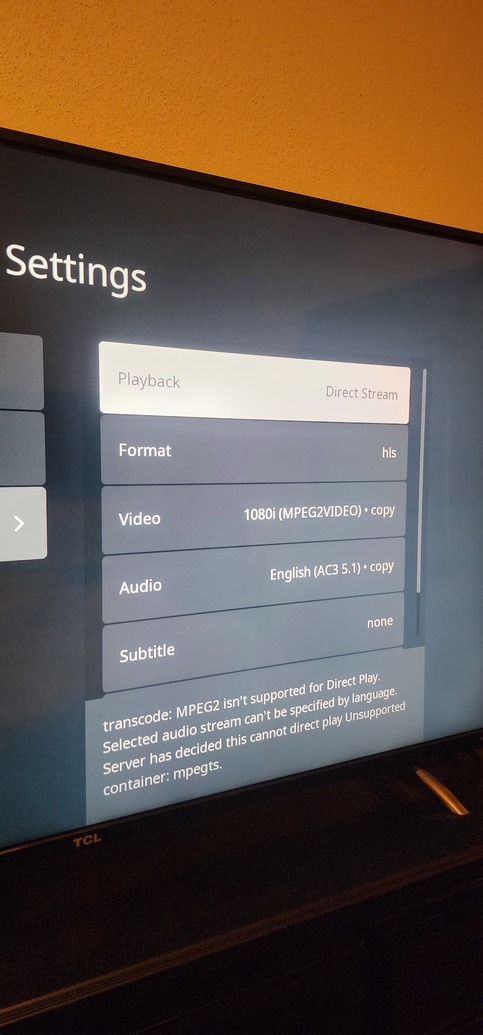
I went into the sstream settings in Plex on Roku and it shows the attached. It’s set to direct stream force (I tried auto also, same thing), allow mpeg2 is set, and it says mpeg2 isn’t supported for direct play, audio stream can’t be specified, server has decided direct play is unsupported container mpegts.
If I unselect allow mpeg, it says partial transcode.
I notice that if I unselect allow mpeg and set direct play to auto, the video format changes to h.264. the transcode speed on any of these settings is less than 1.0. Currently with the last setting it is at .08 transcode speed.
It would seem that the Roku TV isn’t as capable as their streaming devices. If you can’t turn on Mpeg2 then it falls to the server to transcode which sounds like it can’t keep up which is hard to believe. https://support.plex.tv/articles/204275243-settings-plex-for-roku/
The HDHR boxes need a stronger signal than a TV, that’s just the way it is.
Upload your debug logs Server Settings > Troubleshooting > download logs, drag them into a reply here and they will upload.
You have are having some signal drop out and Plex is not always recovering. You also seem to be experiencing the AC3 audio problem where Plex is struggling to transcode. For that you can drop back to 1.29.2 version till they fix it.
I’m not sure how many Roku devices you have but for those that allow Mpeg2 it should be enabled. Make your settings as close to the support page as you can to minimize problems.
I’ve uninstalled the server and reinstalled the older version 1.29.2. I’ve uploaded the new logs. Can you check if that audio issue is still a problem? I also checked my signal in the hdhomerun app and it looks like a steady 100% strength, Quality consistently stays between 80-100%, an occasion drop to below 10% for a second then right back up, and symbol quality is between 90-100% with an occasional drop to 0 when the quality drops for a second then it’s right back up.
I have been reading that my signal strength may be too strong because I’m using 2 powered antenna and I’m right next to a 5g tower. I’ve ordered a 5g filter and an attenuator to see if that helps the signal. It doesn’t appear that any of my roku devices are able to play mpeg2. I checked all the devices, a tcl roku tv, several roku premiere’s, and a streambar pro. All say incompatible container.
The other thing I noticed is that the audio stream is set to espanol, but it plays english. I went into the player settings and changed language from “default” to english, and then I get no audio in any streams. Setting it back to default puts it back, listed as espanol, but playing english. On one show yesterday it was actually playing the show in spanish, I had to change it to english in the stream, but most others do not have the option. Any clue on this? It doesn’t really matter I suppose it’s just weird that it says the only audio stream is spanish but it’s playing english.
I compared my logs to yours and do not have the issues with the audio that you do. Something worth checking would be on Remote Access, do you have a value specified for Upload Speed. Since you don’t have a Plex Pass it isn’t easy for you to determine when a client is being detected remote causing the bandwidth to be limited.
There is another thread where a Plex employee is working with the user who also uses Windows and a tuner that uses the “Plex Tuner Service” receiving Spanish or no audio. Hopefully they make progress.