I have the complete Combat! 60’s TV Series ripped from DVD, in DVD disc/episode order, with the folder structure and naming convention as required by Plex for proper identification.
The Problem: TVDB has the episodes listed and numbered in Aired Date order (?) not the actual Studio created order (as the DVD disc set has them).
TVDB shows Season 1 Episode 1 as “Forgotten Front” but the disc sets have Season 1 Episode 1 as “A Day in June” (which was the first episode filmed/taped in the studio for the series).
As a result - the episode titles and metadata downloaded for TVDB are all incorrect and don’t match the actual titles as indicated in the DVD set (and as named).
I want the titles in actual studio episode order as the Discs have them (they make more sense in the created order, not the aired order). Is there some alternate TV database other than TVDB which has this info correct based on the DVD Series discs?
If you ripped them from the DVD as MP4s you may have meta data that provides what you want. I’d check a few of the file properties to see if this is true. If it is move your local agent up on your TV show list settings>>server>>agents>>show. It might correct the show name vs metadata problem, but you might have to adjust sort order in the files edit page for the final clean up
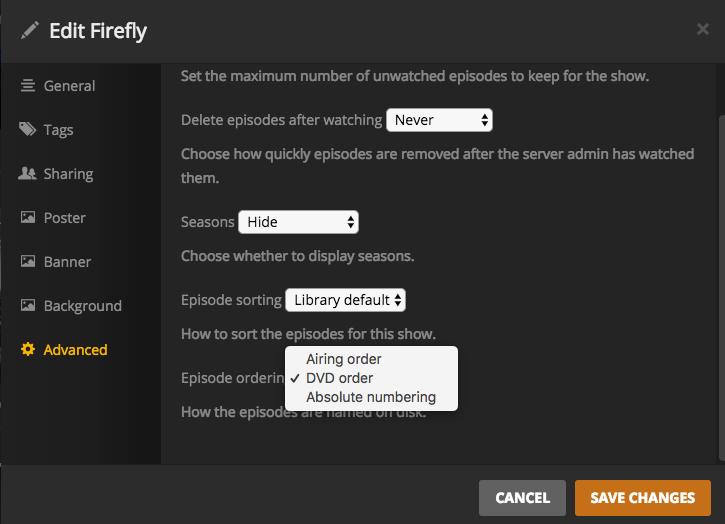
Have you edited the show and selected the order? ( it will grab metadata after you save) I have not used the TVDB site in a while and can’t see where to change the view to dvd order on their new site layout but for many shows they actually do have the DVD order.