Server Version#:1.15.3.876
Streaming TV Shows from my iMac to a Panasonic TV. The directory structure is correct (I think):
TV Shows/Red Dwarf/Season1/s01e04
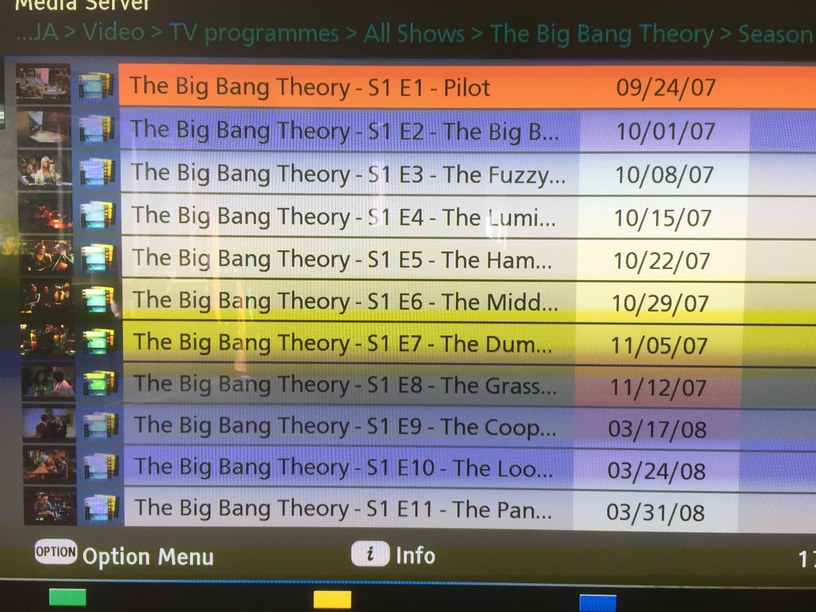
Plex correctly identifies the programme and title of the episode but on the TV it displays the full file path:
Red Dwarf - S1 E4 - Confidence and Para…
Is there a way to remove the series title in order to display completely the episode title?
S1 E4 - Confidence and Paranoia
Thanks
Go to
- Settings - Server - Agents - Shows - TheTVDB
In there, grab the line ‘Local Media Assets’ with your mouse and drag it downwards, so it ends up being at the bottom of the stack of active agents.
Repeat the same under
- Settings - Server - Agents - Shows - TheMovieDatabase
- Settings - Server - Agents - Movies - Plex Movie
- Settings - Server - Agents - Movies - TheMovieDatabase
Afterwards, Refresh Metadata for the whole series.
Nothing changed.
Under TheTVDB, after I drag it to last position the system puts ‘Local Media Assets’ back into third position after ‘TheTVDB’ and ‘Fanart.tv’. The same thing happens with Movies - Plex Movie where it returns to sit after ‘Plex Movie’ and ‘Fanart.tv’.
That’s OK, it just needs to be underneath of those.
Please post a screenshot of your TV with the issue shown.
This is no Plex client. You are simply using your TV’s generic DLNA client.
You might as well not use Plex at all.
Ouch! Back to school I go, Plex for beginners next :-/
Thanks for taking the time.