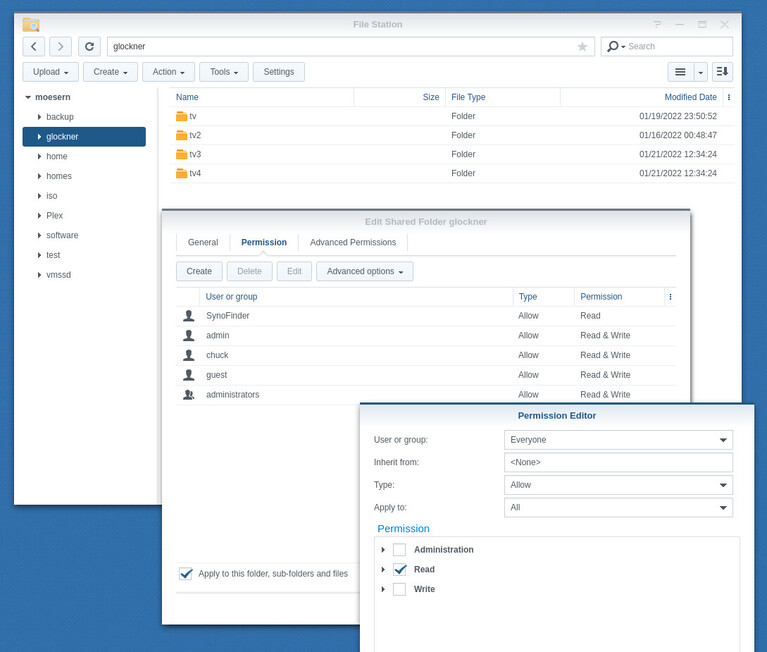
So today I added a hard drive to my Synology 920+ My first NAS is the Synology 218play which is were Plex is installed. I have two hard drives on my 218play with movies and series. Now I want to add files from my new hard drive installed in my 920+ but I can’t get it to work.
In internal system users permission under the shared folder on the new hard drive located on the 920+ the PlexMediaServer won’t show. So I can’t set the proper permission so it show in Plex when I want to add a media folder.
In order to make it work, you must ‘mount’ the shared folder from the 920+ on the 218play.
The easiest way to do this is:
– DS218play
Create a shared folder and give PlexMediaServer access to it.
Create a folder in there to mount the 920+'s shared folder. (one for each)
Go to Control Panel - File Services - Enable NFS service
– DS920+
Go to the shared folder you want to mount over the network
Change the permissions to allow “Everyone” “Read-only”
Go to Control Panel - File Services - enable NFS
Go to Control Panel - Shared Folder - EDIT the folder you’ll be sharing
a. NFS Permissions tab
b. Create a rule to allow * hosts (all) – looks like this:
c. SAVE & SAVE again
Now to make the actual mount on the 218play:
Open FileStation
Navigate to the folder where you will mount the DS920+
Highlight the folder
Click ‘Tools’ → Mount Remote Folder → NFS
a. enter the IP address and file path (e.g. 192.168.0.20:/volume1/music)
b. check the box to “mount at startup”
I created a shared folder (called it 920plus) on the 218play. Gave that permission to Plexmediaserver. But do I need to create a folder in the actual shared folder (920plus)? Or just a regular folder? I can’t create a shared folder inside (920plus) It just create a new single shared folder outside the 920plus folder…
The shared folder on the 920+ then. I can’t change or find "change permissions to everyone - read only. That box is greyed out for admin and mine user.
On the DS920+ is where you grant permission for “Everyone”. This allows “PlexMediaServer” from the DS218play to connect and access.
If you want to share a folder which is inside an existing shared folder, you will need to move it to its own shared folder. This is how Synology does things. Only shared folders can be shared over the network.
On the DS218, you create a regular folder.
This regular folder is where you mount the NFS shared folder from the DS920.
( the concept is: Remote-shared-folder → mounted on → local regular folder )
But when I open the actual mounted folder on 218play it takes me to the folder on 920+
Example: The music folder is shown in the screenshoot above. It’s empty. But if I open it in file station on 218play it takes me to the actual music folder on the 920+ which I mounted.
Client NAS (your DS218play with PMS)
(I will mount at folder named ‘glockner-nfs’ for this demonstration)
Make certain PlexMediaServer can read from the Shared folder and sub-folder folder you are going to mount
(I use “LAN” shared folder here… LAN/glockner-nfs )