Server Version#: 4.29.2
Player Version#:
<If providing server logs please do NOT turn on verbose logging, only debug logging should be enabled>
Here is the full back-story, then my question(s). I had a PC dedicated to be a Plex server (Thor) for years but recently came into a much beefier box for this job (Dell). I took the plunge and created a whole new server instead of migrating as I wanted/needed to do some media cleanup. The new box (Dell) is running Plex without ANY issues on my home network and remotely for family. It is also publishing music for PlexAmp, etc. NO issues with this new server.
The issue(s) came up when I decided to make the old box (Thor) a Plex server again. This time it would be for local media only, no outside access needed or wanted. I have completely abandoned the original Plex server name from this PC and created a new one and “claimed” the server name to my Plex account. I only have testing media on this new server until I get this issue sorted out.
The issue I speak of is when I power up the resurrected Plex PC (Thor, with it’s new name) I then lose access to my main server (Dell) EVERYWHERE. I cannot see it on my Android, my Rokus, or my SmartTVs (Samsungs). If I power down this additional server (Thor) my main one (Dell) will still not be found until I get onto the box and stop/restart Plex. Sometimes I will even have to go so far as to have to re-log into my Plex account on the Dell Server. Both boxes have separate manual DHCP home network IP addresses, What can I do to get this to work? I thought it was supposed to be simple, but I am missing something somewhere. Help.
Did you originally migrate your server to the new machine (Dell)?
The migration includes transferring the server’s machine identifier – so even after renaming it, Plex will consider them to be the same.
If you want to start from scratch with the Thor server, you’ll need to shut that PMS down, go into the Registry Editor and delete the records related to the machine identifiers.
HKEY_CURRENT_USER\Software\Plex, Inc.\Plex Media Server\
Tom, I did NOT migrate the original Thor to the new Dell. I recreated my PMS “from scratch” and moved all video files, music, etc, creating a new library, etc.
I will fire up Thor and navigate to the key you provided and kill it. Once that key is gone I assume I will have to reclaim the server again, right?
@dbirch, can you expand on that? WAN ports in my router/firewall or within the Plex server settings somewhere? I do NOT intend on Thor being accessible to the outside world so WAN seems unnecessary, unless I am missing something (most likey).
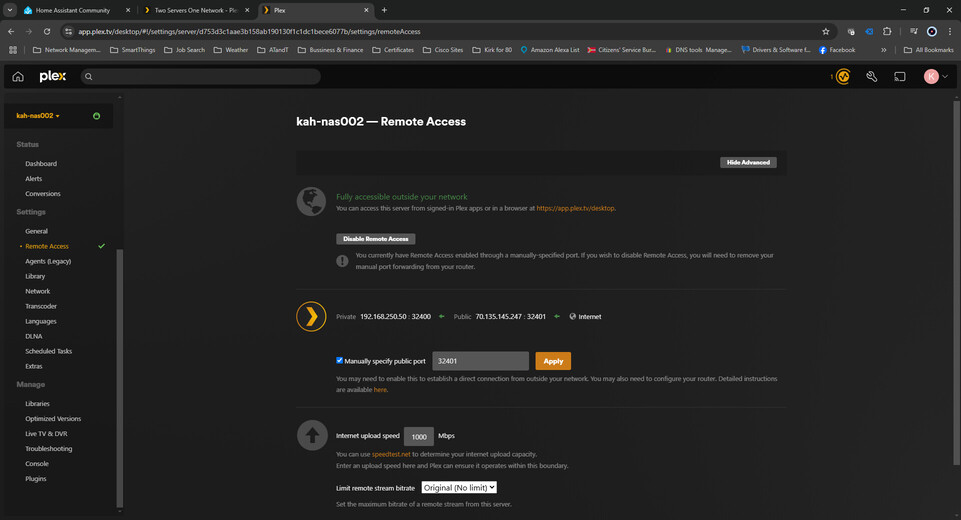
If both servers have the same external port there is a chance that the plex servers can see them as the same server, by giving it a different port it helps segregate the servers and avoid having to re-claim servers repeatedly
I have two servers that I rSynch the content between the two of them so I always have an online backup. So, it is almost like a cluster. But, yes, you have to pick a different port for your second server.
Here is what I do:
tcp/32400 (the default port) on the WAN interfaces (I have two) is port-forwarded to tcp/32400 on my internal IP Address of my primary server. Normal stuff.
On the secondary server, I changed its port for remote access to tcp/32401 and on that WAN interface, I have a port-forward set up to send that tcp/32401 traffic to the secondary server’s inside IP Address.