Just migrated my system from a LXC headless ubuntu 18.04 container over to a dedicated headless 20.04 ubuntu i3 machine. This was done to take advantage of QuickSync HW transcoding, and even finally dropped the $$ to get lifetime Plex Pass as a result.
I followed this guide, and if we’re being honest, I had my doubts as it seemed a bit too high level, and contradicting at times. Regardless, the migration should be straight forward. All my media is on a NAS and I created the exact same mount directory and path on the new machine. So in reality, it should just be the following steps:
- apt-get update/upgrade on old server
- current version 1.20.2.3402-0fec14d92
- Install plex (apt-get plexmediaserver) on new device
- current version 1.20.2.3402-0fec14d92
- Stop service on new device
- Stop service on old device
- Make a backup of /var/lib/plexmediaserver/Library/Application\ Support/Plex\ Media\ Server/ from old server
- Created .tar.gz of this
- Remove that same directory on new device and replace it with directory from old device
- Reboot new device
- Sign in and out of server on new device to tidy up any security issues
At this point everything is good go it seems, however I get the dreaded “unable to connect to server securely”. From my understanding this has to do with the SSL cert tied to the box. I assumed the sign in/out of server is what was supposed to correct this, but I’ve done it a few times with no change.
It seems all the topics against this issue revolved around port forwarding in the router, which I know isn’t the case given the configuration is now the same on router/new server. I initially had the new server on a new IP and changed port forwarding to reflect that. Since then I have changed the IP to match the old server, both in router and ubuntu. I’ve given both the system and a router a few hopeful reboots as well afterward. However I still get this error.
Edit:
So with concerns against the SSL cert, I decided to test a lets encrypt cert I already have on a 443 service I run on the same WAN IP. I threw it into the server an applied the it via the network settings in Plex. I notice that as soon as I apply that, connections outside of my network function fine, and the error is gone.
However connections within my home network are still served with “unsecured connection” message. Further more, Plex dashboard is reporting that my server is not accessible remotely, however at this point it’s functioning fine from a remote network point of view.
Very confused by this. Adding sanitized PCAP flow, taken from client trying to connect locally.
Client: 192.168.1.105
Plex: 192.168.1.50

Looks like Plex is just FIN/ACKing after client hello. Is it possible that it’s the SNI being provided?
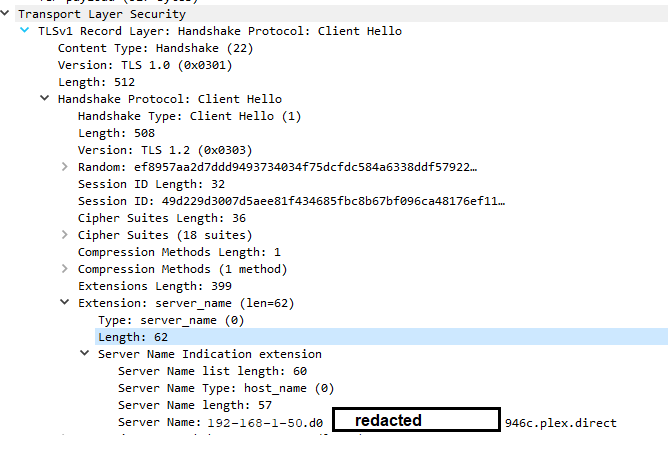
Can I check this on the Plex server or are these domains created on the fly?
Final edit:
Hours of tshooting later, I just decided to wipe the box and try again. Was up instantly with no problem… Glad it’s fixed I guess.
